

Anonymous Delivery Instructions Sticker: A Private Way to Reach Home
What if a delivery worker could alert you to a problem without seeing your phone number? An anonymous delivery instructions sticker gives someone at your home a QR code to scan and a private way to send a message when written directions don’t cover what’s happening at the door.
It’s understandable to want clear delivery instructions while keeping personal contact details out of public view. Curb Samaritan’s Resident Sticker provides a QR-based route to send an anonymous text alert through a messaging platform, without requiring a mobile app or sharing your personal information with the person who scans it.
The sticker doesn’t replace delivery preferences set with a carrier, and it can’t direct or control a delivery. It offers another way to open a conversation if a question comes up. This guide explains how the Resident Sticker can complement clear delivery directions, where to place it thoughtfully, and what to consider when using it around your home.
Key Takeaways
- An anonymous delivery instructions sticker offers a visible way to start a private conversation when a delivery question comes up.
- A scanner can use the QR code to send an anonymous text alert without a mobile app or access to your personal contact information.
- Use carrier instructions for delivery preferences, a written note for a simple direction, and a QR sticker as an optional way to receive a message.
- Place the sticker where intended visitors can see it, and keep personal, access, and security details off its visible surface.
- Curb Samaritan’s Resident Sticker supports communication around the home, but it doesn’t manage a delivery or guarantee a message or response.
What Is an Anonymous Delivery Instructions Sticker, and What Problem Does It Solve?
A delivery can go off course for a small, everyday reason: an entrance is temporarily blocked, a drop-off point is hard to spot, or someone has a question about where to leave a package. You may want to help without posting your phone number where passersby can see it. An anonymous delivery instructions sticker provides a visible QR-based way for someone at your home to send you a message without seeing your personal number.
An anonymous delivery sticker opens a way to message a resident; it supports communication, not delivery management. With Curb Samaritan, someone who scans the code can send an anonymous text alert through a messaging platform, without downloading a mobile app or receiving your personal information. A QR code is a type of code that a smartphone can scan to access digital information. Here, it connects a physical sticker to an online messaging route.
This is different from entering directions in a carrier’s delivery tools. Carrier preferences tell the carrier how you would like a delivery handled, such as where to leave a package. A QR sticker provides a way to communicate if a question comes up at the home. A written note can share a fixed direction, but it doesn’t provide the same messaging route. Each option has a distinct role: use the sticker as an added contact path, not as a substitute for clear delivery instructions.
When might a resident want a private delivery contact option?
Imagine the usual entrance is blocked, or a drop-off point is difficult to find from the street. Someone who notices the sticker could scan it and send an alert, giving you a chance to respond without displaying your phone number. Scanning is optional, so the sticker works best as an additional contact route, not as the only place to find essential directions.
What does the sticker not do?
The sticker doesn’t replace delivery preferences entered through a carrier, control a carrier’s route or decisions, or guarantee that someone will send or answer a message. It doesn’t ensure a package reaches its destination or remains secure, and it isn’t a tracking, monitoring, or dispatch service. Think of it as a communication bridge: carrier tools explain what you prefer, while the sticker gives someone another way to raise a question if they choose to use it.
How Does an Anonymous QR Delivery Sticker Connect a Resident and a Scanner?
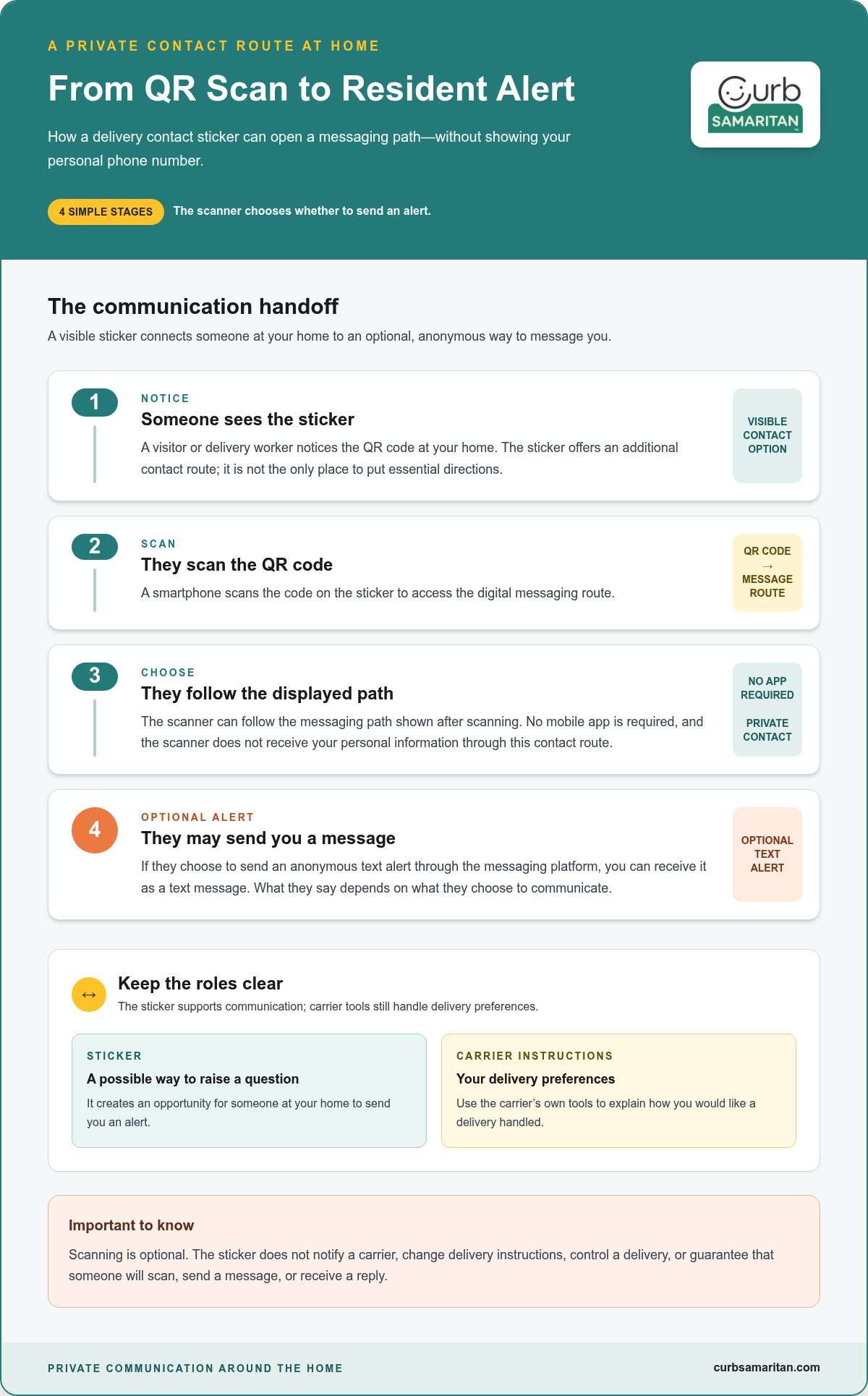
The process is straightforward: someone notices the sticker, scans its code, follows the messaging path displayed, and decides whether to send an alert. Curb Samaritan’s messaging platform lets someone send an anonymous text alert without downloading an app or sharing personal information. The resident can receive the alert as a text message.
The scanner chooses whether to act. A scan provides a way to send an alert, not a promise of a reply or a particular delivery outcome.
- A visitor or delivery worker notices the sticker.
- They scan its QR code with a smartphone.
- They follow the messaging path displayed after scanning.
- If they choose, they send an alert to the resident.
That’s the handoff. The sticker makes a communication route available, but the person at the door decides whether to use it. Your response also depends on receiving and seeing the alert. The process doesn’t notify a carrier or change the delivery instructions the carrier has received.
What happens after someone scans the QR code?
After scanning, the person can follow the displayed route to send an anonymous text alert. The message depends on what that person chooses to communicate. The important point is the handoff from a visible code to a way to contact you: it creates an opportunity to share an alert, not a guaranteed conversation.
For example, someone might use the channel to flag a delivery question. You may receive that alert, but the sticker can’t ensure that anyone scans it, sends a message, or gets a reply. It also doesn’t send a notification to a carrier. Keep the distinction clear: this route supports communication between a person at your home and you, while delivery preferences belong in the carrier’s own tools.
How does anonymous messaging differ from posting a phone number?
A visible phone number gives passersby direct contact information. An anonymous messaging route lets someone send an alert without receiving your personal information through that contact route. This offers a more private way to open a conversation than posting your number publicly.
If you’d like to understand the broader idea behind app-free QR contact, the guide No-App QR Code Contact Stickers: How They Work and Protect Privacy explores how that kind of communication works. For a home-focused option, Curb Samaritan’s Resident Sticker for private home communication provides a QR-based route for anonymous text alerts. It can sit alongside clear carrier instructions as another way for someone to reach out with a question.
Anonymous Sticker, Written Note, or Carrier Instructions: Which Fits the Situation?
These options serve different purposes. Carrier instructions record your preferences through the carrier’s own tools. A written note gives a quick, visible direction. An anonymous sticker offers a possible contact route if someone has a question. Choose based on whether you need to explain what to do, share a simple detail, or invite a private message.
Match the channel to the need: use carrier tools for delivery preferences, a note for a simple direction, and an anonymous sticker for a possible private conversation. None controls a carrier’s behavior or guarantees a particular outcome. Used thoughtfully, the options can complement one another.
- Privacy: Carrier tools and a simple note can share directions without displaying a phone number. A QR messaging sticker provides a way to communicate without posting your personal number.
- Visibility: Carrier instructions are entered within the carrier’s tools. A note or sticker needs to be noticed at the home.
- Communication: A note shares a fixed message. A sticker offers a route for someone to send an alert if they choose to scan and use it.
- Delivery preferences: Use carrier-provided tools for instructions about handling a delivery. A sticker is a communication option, not a delivery-management system.
When are carrier instructions or a written note more suitable?
Use a carrier’s own tools for formal delivery preferences when available. That’s where to record directions intended to guide a delivery. A brief note may suit a straightforward, non-sensitive detail, such as pointing out a clearly marked drop-off spot. Keep it short and appropriate for anyone passing by to read. Don’t put personal contact details, access information, or security-sensitive directions on a public-facing note.
When might anonymous messaging add a useful option?
An anonymous delivery instructions sticker may help when you want someone to be able to ask a question or send an alert without seeing your phone number. For instance, someone who can’t locate a drop-off point might choose to scan and send a message. That depends on the person noticing the sticker, scanning it, and deciding to write. Don’t use it as the only way to communicate essential delivery directions.
For broader ideas about private communication around the home, the Guide to Secure Messaging Stickers for Home Privacy offers a related topic to explore. A practical approach is to put instructions in the carrier’s tools, use notes only for non-sensitive details, and treat the sticker as an added way to open a conversation. Each channel then has a clear purpose without expecting one method to manage the whole delivery.
How to Place and Use a Delivery Contact Sticker Thoughtfully
A sticker is most helpful when intended visitors can notice it without making your home’s private details public. Consider who should see it, what they need to do, and what information belongs elsewhere. Keep its role simple: it offers a possible way to message you, while delivery directions explain what you’d like a carrier to do.
Before placing an anonymous delivery instructions sticker, use this checklist:
- Choose a spot relevant to visitors approaching your home, while considering household privacy.
- Make sure it doesn’t cover required notices, access controls, or safety information.
- Keep your phone number, entry codes, information about valuables, and household routines off anything visible to passersby.
- Put ordinary delivery preferences in the carrier’s own instruction tools when available, rather than relying on the sticker to communicate them.
There’s no single location that suits every home. Consider the layout and who you want to notice the sticker. In a building with shared spaces, take other residents’ privacy and building rules into account before displaying it. Avoid a spot where the sticker could be mistaken for an official building notice or obscure information people need to see.
Where should a resident consider displaying the sticker?
Look for a place visitors are likely to notice as they approach, without exposing the sticker more widely than you intend. Think about the path someone would naturally take to reach the entrance, then check that the sticker won’t block signage or interfere with access controls. If you share an entrance or live in a managed building, consider household privacy and building rules before choosing a location.
What should delivery directions say?
Keep directions brief, practical, and limited to information that’s appropriate to share publicly. A simple note might point out a clearly marked drop-off location. For formal preferences, use the carrier’s instruction fields when available. Never put entry codes, details about valuables, or information that reveals when your household is away on a visible sticker or note. The messaging channel is for contact, not for publishing private instructions.
Keep the two messages distinct. A delivery preference should tell the carrier what you’d like done. The sticker can give someone a way to send an alert if they have a question, but only if they notice it and choose to use it. Neither message needs to include sensitive access or security details.
For a private contact option at home, Curb Samaritan’s Resident Sticker for home communication offers a QR-based route for anonymous text alerts. Consider a location where intended visitors can see it without displaying unnecessary personal information.
How Curb Samaritan’s Resident Sticker Supports Private Home Communication
Curb Samaritan’s Resident Sticker is a QR-coded option for opening a communication route around the home. Someone who notices it can scan the code and send an anonymous text alert through the messaging platform. The scanner doesn’t need a mobile app, and your personal information isn’t shared with them through this contact route.
The Resident Sticker complements, rather than replaces, delivery directions. Carrier tools remain the place to record delivery preferences. The sticker offers another way for a person at your home to reach out with a question or something they think you should know. It can also support communication about the home beyond deliveries, without posting your phone number.
Each purchase includes lifetime access to the messaging platform, with no recurring subscription fees. That access doesn’t mean someone will scan the code, send a message, or receive a reply. The sticker also doesn’t manage deliveries or provide professional monitoring.
Who may find an anonymous Resident Sticker useful?
It may suit residents who want a private way to receive a text alert from someone who notices a concern around their home. A delivery worker might have a question, or a passerby might want to point out something that needs your attention. The Resident Sticker creates an optional route for that contact. It isn’t a monitored service, and it doesn’t direct delivery workers or control what happens to a package.
What should readers consider before choosing one?
Start with the communication gap you want to address. If your main need is to give a carrier a clear preference, use the carrier’s instruction tools when available. If you want someone at your home to have a way to send an alert without seeing your phone number, an anonymous delivery instructions sticker can be a useful addition. Keep in mind that visibility alone can’t ensure a scan, a message, a response, or a particular delivery outcome.
Consider whether you’re comfortable making the sticker visible to the people you intend to reach, while keeping personal, access, and security details private. Its value is the opportunity to connect, not a guarantee that help or information will arrive. The Resident Sticker may suit residents who want to make that private communication option available at home.
If that approach fits your needs, Curb Samaritan’s Resident Sticker offers a way to open communication around your home alongside clear delivery preferences and directions.
Make Your Home Easier to Reach on Your Terms
Think about when a visitor might need to ask a question, then decide what kind of contact feels right for your home. A thoughtful anonymous delivery instructions sticker can be part of that plan, alongside clear directions and sensible limits on what you share publicly. Consider whether you want to open a private line of communication and where intended visitors could see it.
Curb Samaritan’s Resident Sticker provides a QR-based way for someone to send an anonymous text alert without an app or access to your personal information. Explore Curb Samaritan’s Resident Sticker and decide whether it fits the way you want to communicate with people at your door.
A small, considered step can make it easier to connect while keeping personal details private. Choose an approach that feels comfortable for your household, and let clear communication begin there.
Frequently Asked Questions
What is an anonymous delivery instructions sticker?
An anonymous delivery instructions sticker gives a visitor or delivery worker a QR-based way to contact a resident without the resident displaying a personal phone number. Curb Samaritan’s messaging platform supports anonymous text alerts without an app or sharing personal information with the scanner. Someone who can’t identify a drop-off point, for example, may use it to send a question. The sticker doesn’t manage delivery instructions, track a package, or guarantee a delivery.
Can a QR sticker tell a delivery driver where to leave a package?
No. A QR sticker doesn’t control where a carrier leaves a package. For a formal preference, use the carrier’s own delivery instruction fields when available. A sticker offers an additional way to contact you if a question arises, such as uncertainty about which entrance to use. Someone must notice the code, scan it, and choose to send a message, so keep essential directions in the carrier’s tools.
Do delivery workers need an app to use an anonymous contact sticker?
No special mobile app is required to use Curb Samaritan’s messaging platform. Someone can scan the QR code and follow the messaging path to send an alert. That doesn’t mean every delivery worker will see or scan the sticker, or that a scan will lead to a complete exchange. If a detail is essential, such as a preferred drop-off location, include it in the carrier’s own instruction tools when available.
Is an anonymous delivery sticker safer than putting a phone number on the door?
It offers a way to receive an alert without displaying your personal phone number to someone scanning the code. That can be a more private option for opening contact, but it doesn’t make nearby notices or other visible details private. Keep entry codes, information about valuables, and household routines off the sticker and surrounding area. Consider what a passerby can see before displaying any contact information at home.
Where should I put a delivery instructions QR sticker?
Choose a location intended visitors can notice without unnecessarily exposing information or obstructing building notices, safety details, or access controls. The right spot depends on your home and the people you want to reach. A shared entrance, for example, calls for consideration of other residents and building rules. Don’t assume a particular surface or outdoor condition is suitable unless the sticker’s product information says so.
Will an anonymous sticker guarantee that my package is delivered correctly?
No. An anonymous sticker can’t guarantee a correct delivery or a particular action by a carrier. It offers a possible way for someone to send an alert, but they must notice the sticker and choose to use it. Use carrier-provided preferences for formal directions, such as where you’d like a package left. Treat the sticker as an optional communication channel, not a substitute for delivery instructions or a promised response.
Does Curb Samaritan charge a monthly fee for its messaging platform?
No recurring subscription fee is charged for access to the messaging platform. Each product purchase includes lifetime access. This may suit residents who want an ongoing way to receive anonymous alerts without a recurring platform fee. The sticker still doesn’t guarantee that someone will scan it or send an alert, so consider whether this optional contact route fits your needs.