

Community Alert QR Code Stickers: A Practical Guide to Better Neighbor Communication
What if a neighbor could send a timely note without needing your phone number or knowing which app you use? Community alert QR code stickers can offer a simple bridge between a physical place and a private way to message a resident. But the experience depends on what the code opens and how the service handles communication.
It’s understandable to want a reliable way to reach one another while keeping personal contact details private. A QR code can make that first step easier, but it shouldn’t create confusion or promise more than it can deliver. The right setup should be clear to scan, easy to use, and a good fit for the kinds of updates your community wants to share.
This guide explains where QR alert stickers may help, what to ask about privacy and usability, and how to choose a practical approach without adding unnecessary complexity. You’ll also see how a no-app messaging option, such as the one connected to Curb Samaritan’s Neighborhood Connect Sticker Bundle and QR Code Posters, can support neighbor-to-neighbor communication without sharing personal information.
Key Takeaways
- Match the alert method to the need, whether neighbors are sharing updates or contacting a resident about a concern.
- Compare community alert qr code stickers with group chats, email lists, and printed instructions to see which mix is easiest for people to use and maintain.
- Before choosing a tool, check what happens after a scan, what information is collected, and how messages reach the intended person.
- Place and explain stickers where the responsible property owner or organization permits them, and remember that a scan doesn’t guarantee a response.
What Are Community Alert QR Code Stickers, and What Problem Do They Solve?
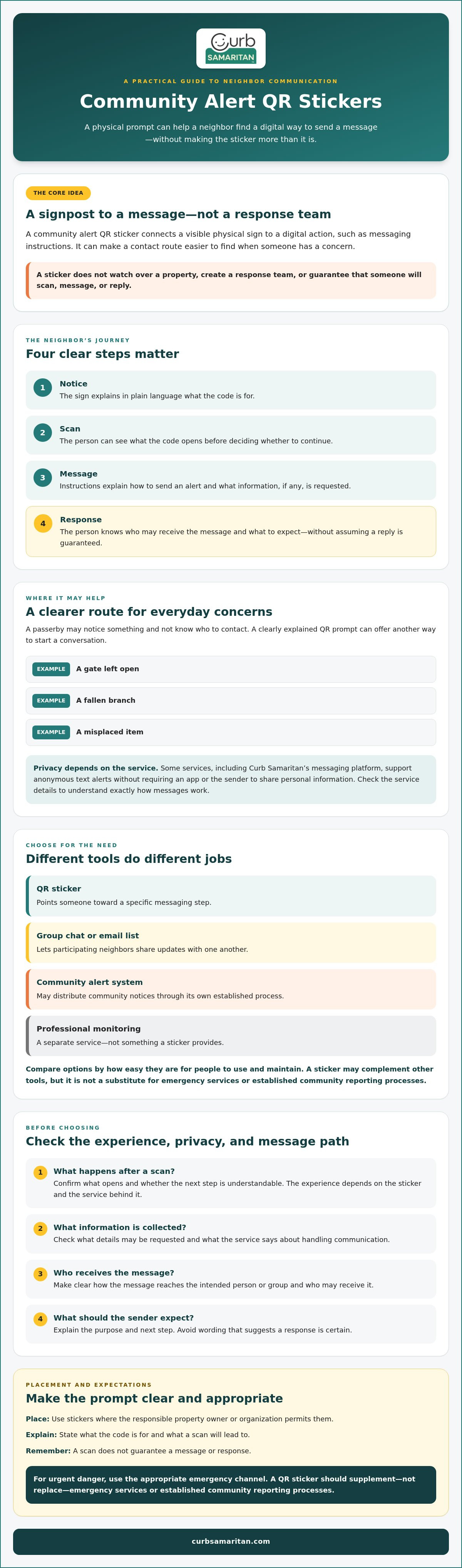
A community alert QR sticker is a visible sign that gives someone a route to send or receive a community-related message. The code connects the physical sticker to a digital action, such as opening messaging instructions. The sticker doesn’t create a response team or watch over a property. It can simply make a communication channel easier to find when a neighbor needs to pass along a concern or contact a resident.
A QR code is a type of machine-readable code that can hold information or direct a device to digital content. For community alert QR code stickers, the practical idea is straightforward: place a clear prompt where it may be useful, then guide the person who scans it to the next step. The exact scanning and messaging experience depends on the sticker and the service behind it, so check those details rather than assuming every code works the same way.
How does a community alert QR sticker work?
The basic flow is simple: someone notices the sticker, scans its code with a compatible device, and follows the instructions shown. Those instructions should make clear what the message is for and how to proceed. A physical sign can help people discover a contact route they might not otherwise know about. It doesn’t guarantee they’ll scan, send a message, or receive a reply.
Which community communication gaps can a sticker address?
Think of an everyday situation: a passerby sees a gate left open, spots a fallen branch, or needs to reach a resident about a misplaced item. They may not know who to contact, and sharing a personal phone number can feel uncomfortable. A clearly explained QR prompt can offer another way to start that conversation. Some services, including Curb Samaritan’s messaging platform, support anonymous text alerts without requiring an app or the sender to share personal information. Review the service’s own details to understand exactly how messages work.
A sticker is not the same as a group chat, a neighborhood alert system, or professional monitoring. Each serves a different purpose:
- A QR sticker points someone toward a specific messaging step.
- A group chat or email list lets participating neighbors share updates with one another.
- An alert system may distribute community notices through its own established process.
- Professional monitoring is a separate service, not something a sticker provides.
These tools may complement one another, but a sticker is only useful when its instructions are understandable, its placement is accessible to the people who need it, and someone can act on the message. It should supplement, not replace, emergency services or established community reporting processes. For urgent danger, use the appropriate emergency channel.
How QR Code Stickers Fit into a Secure Community Communication Tool
A sticker is only the visible starting point. A useful communication tool connects that prompt to a clear scan experience, a message channel, and a person or group prepared to respond. If any step is unclear, a neighbor may hesitate or send a message that never reaches the right person.
A secure community communication tool gives people a clear way to send a message while making it understandable what information they may need to share and who may receive it. “Secure” should describe a considered approach, not a promise that every detail is private or every message will get a response.
The user journey should feel easy to follow:
- Notice: The sign explains in plain language what the code is for.
- Scan: The person can see what the code opens before deciding whether to continue.
- Message: The next screen explains how to send an alert and what details, if any, are requested.
- Response: The person knows who may receive the message and what to expect next, without being led to assume a reply is guaranteed.
Digital.gov’s guidance on QR codes explains how codes can connect a physical sign with online information. For an alert sticker, that connection should be transparent: tell scanners what they’ll be asked to do and avoid vague prompts that leave them guessing.
What should happen after someone scans the code?
The intended next step might be a message screen or other instructions, but a QR code alone doesn’t determine what appears. The result depends on the service linked to it. Clear wording beside the code can explain its purpose and what to expect, helping first-time users make an informed choice. Curb Samaritan’s messaging platform supports anonymous text alerts and doesn’t require a mobile app. Check current product information to understand the specific message flow before choosing a tool.
What does privacy-conscious communication mean in practice?
Look at each point where information could be shown, requested, or shared. Is a phone number displayed on the sticker, requested from the person sending a message, or shared with the recipient? What does the service’s current privacy information say about data handling? These are questions to answer before placing a code in a shared space, where people may scan it without knowing who manages the channel.
For communities considering a no-app option, Curb Samaritan’s Neighborhood Connect Sticker Bundle is one example to review alongside those privacy and message-flow questions.
Community Alert QR Stickers Compared with Group Chats and Other Options
A group chat may already be the best place for neighbors to share ongoing updates. That doesn’t automatically make a sticker redundant. Community alert QR code stickers can provide a visible route to a specific contact or message pathway, while a group chat supports conversation among people already connected to it. Visitors, delivery workers, or passersby may not belong to a private chat, and residents may prefer not to post personal contact details where anyone can see them.
Each channel has different access, privacy, and upkeep considerations. The details depend on the platform and how the community manages it, so treat this comparison as a starting point for questions, not a guarantee about every tool.
| Channel | Strengths | Limitations and upkeep | May suit |
|---|---|---|---|
| QR sticker | A visible prompt can direct someone to a specific contact pathway without printing a phone number on the sign. | People need to notice the sticker, understand its instructions, and be comfortable with the scan flow. The community should check the linked service and keep the prompt accurate. | Reaching people who aren’t in a private group, or providing a clear way to contact a resident. |
| Group chat | Supports ongoing discussion and shared updates among participating neighbors. | Access may depend on an account, app, invitation, or group rules. Someone needs to manage membership and keep messages useful. | Conversation and updates among residents who have joined. |
| Email list | Can distribute written notices to people who have subscribed or been added. | Addresses and list settings need care; someone must maintain membership and send messages. Messages may not be noticed promptly. | Planned announcements or updates for a known group. |
| Printed contact instructions | Easy to read without scanning or joining a digital group. | Contact details may be visible to anyone nearby, and printed information can become outdated. | Simple directions or a contact route for people who prefer not to scan. |
When is a QR sticker useful alongside a neighborhood group chat?
Use both if they serve different people or moments. A chat can help residents talk through routine matters; a sticker can guide someone outside that group toward a designated contact option. It won’t reach every resident, and neither channel ensures a message will be seen or answered in time.
What are the trade-offs of different community alert channels?
Before choosing, ask who needs access, what information they must share, and who will maintain the channel. Check whether a tool requires an account, app, contact exchange, or ongoing administration rather than assuming. The best fit is the option people can understand and maintain for the intended purpose, not simply the newest one. These approaches can work together, with urgent situations directed to established emergency channels.
How to Evaluate, Place, and Explain Community Alert QR Stickers
Before choosing community alert qr code stickers, decide what communication gap you’re trying to address. A simple sequence keeps the choice grounded in how people will actually use it:
- Define the alert need: Is the goal to contact a resident, report a concern, or share a community update?
- Identify the users: Consider who may scan the sign, including residents, visitors, or passersby, and whether they can access the proposed channel.
- Assess privacy: Review what information the service asks for, what may be visible to others, and who receives a message.
- Choose the channel: Select a sticker, poster, or another method that fits the purpose and can be maintained.
Keep the sign practical. A short explanation of the code’s purpose and next step is more useful than decorative wording. Include a non-QR contact option where appropriate, especially for people who can’t or don’t wish to scan. Don’t imply that scanning guarantees a response.
Where should a community place an alert QR sticker?
Think about whether the intended audience can notice and approach the sign. Check visibility, lighting, weather exposure, and whether the location makes sense for the message. A sign that’s hard to read, obscured, or placed where people can’t comfortably access it may not serve its purpose. There’s no single best spot for every community. Get permission from the responsible property owner or organization before attaching anything to shared or privately controlled property.
How can organizers make the scan experience clear and accessible?
Use plain instructions such as what the code is for and what the scanner should expect next. Avoid implying that every code opens the same kind of page or messaging flow. Test the actual sign and linked experience, then make sure any alternative contact route is clear and current.
Assign someone to review the sign and its instructions periodically. A simple checklist can keep responsibilities visible:
- Access: Can the intended users see and read the prompt?
- Upkeep: Is the sticker legible, clean, and still linked to the intended destination?
- Message ownership: Who receives incoming messages, and who is responsible for following up?
- Expectations: Do the instructions explain the next step without promising a particular response time?
For a community considering a ready-made option, review Curb Samaritan’s QR Code Posters and Neighborhood Connect Sticker Bundle alongside these placement and communication questions.
Choosing a Community Alert QR Code Sticker and Taking the Next Step
A good choice starts with the communication need, not the sticker itself. Decide who is expected to use it, what message they should be able to send, and who will receive that message. Then review the privacy information, ongoing upkeep, and purchase terms. These checks help reveal whether a code fits your community’s routines or adds a new channel that no one is ready to manage.
Convenient access can make it easier to find a contact route, but it can’t ensure that someone will notice the sign, scan it, or get a response. Treat community alert QR code stickers as one part of a communication plan, not a replacement for established processes or emergency services.
What should organizers confirm before choosing a sticker?
Review the full message experience before committing. Find out what a person sees after scanning, whether they need an app or account, what personal information they must provide, and who receives the message. Check current privacy information, terms, support details, and any conditions for continued access. Don’t assume that two QR services handle messages or data in the same way.
Curb Samaritan is one option to evaluate. Its messaging platform supports anonymous text alerts without requiring a mobile app, and purchases include lifetime platform access without recurring subscription fees. Review the current product details to confirm the fit for your intended use.
How can a community start with a small, practical rollout?
Begin with one clearly defined purpose, such as giving a passerby a way to contact a resident. Explain the sticker’s purpose and expected next step to the people who may use it. Choose someone to review the instructions and gather feedback after the rollout. If people are unsure what happens after a scan, make the wording clearer before adding more signs.
Use this final checklist to compare options:
- Users: Can the intended audience access and understand the message route?
- Flow: Is the next step clear, and is there a suitable non-QR alternative?
- Privacy: Have you checked what information is requested or shared?
- Upkeep: Is someone responsible for reviewing the sign and message pathway?
- Terms: Do you understand what the purchase includes and any conditions for continued access?
For more context, pair these checks with your community’s neighbor-messaging and neighborhood-alert guidance. If a QR-based approach seems like a fit, you can also explore Curb Samaritan’s confirmed community options, including the Neighborhood Connect Sticker Bundle and QR Code Posters.
Make Neighbor Communication Easier to Find
Better neighborhood communication starts with a clear purpose and a channel people can understand. Community alert qr code stickers may give residents and passersby a visible way to begin a message, while group chats and email lists can support ongoing updates. The right choice depends on who needs to use it, what happens after a scan, and how the community will keep instructions current.
Before adopting a sticker, check what information the messaging process asks people to share, who receives alerts, and what response users can reasonably expect. A convenient route can help neighbors connect, but it can’t guarantee that someone will scan or reply.
Curb Samaritan offers one privacy-conscious approach: its messaging platform supports anonymous text alerts without requiring a mobile app. Purchases include lifetime platform access without recurring subscription fees. If that fits your community’s needs, explore Curb Samaritan’s community QR sticker options.
Start with one practical communication need, explain the process clearly, and invite neighbors to help make the approach useful for everyone.
Frequently Asked Questions
What are community alert QR code stickers?
Community alert QR code stickers are physical signs that use a scannable code to connect someone with a digital communication step, such as sending an alert. The exact destination and message process depend on the service behind the code. A sticker can make a contact pathway easier to find, but it can’t ensure someone will scan it, send a message, or respond. Clear instructions help set expectations before anyone scans.
Can a QR code sticker let neighbors send an alert without seeing a phone number?
Yes, some services are designed to let people send messages without displaying or sharing a personal phone number. Check the specific service’s current message flow and privacy information before relying on that feature. Not every QR code works this way. It may lead to a website, form, or another destination, and that page may ask for information. Make sure the sticker explains what happens after scanning.
Do people need an app to scan a community alert QR code?
Not necessarily. Some phones can scan QR codes with a built-in camera, but the destination may have its own requirements. Confirm how the selected service works and state the expected next step beside the sticker. Curb Samaritan says its messaging platform doesn’t require a mobile app. Check its current product information before choosing it, since scanning and messaging details can differ between services.
Are community alert QR code stickers a replacement for a neighborhood group chat?
No, they usually serve different purposes. A group chat can support ongoing conversation among people who have joined, while a sticker can direct someone to a particular contact or alert process. A community may choose to use both, depending on who needs access and what messages are appropriate for each channel. Neither option guarantees that every resident will see a message or that someone will respond promptly.
Where should a community place QR code alert stickers?
Choose a visible, readable location that makes sense for the people expected to use the sign. Consider lighting, weather exposure, and whether people can comfortably access it. Get permission before placing a sticker on property you don’t control. Add a short explanation of the code’s purpose, and include another contact option where appropriate for people who can’t or prefer not to scan. Review the sign to keep its instructions current.
Are QR code alert stickers secure and private?
A QR code alone doesn’t establish that the linked service is secure or private. Before using one, check what information a scanner must provide, what the recipient can see, and what the provider’s current privacy information says about data handling. Avoid sharing sensitive details unless you understand the channel’s protections. Curb Samaritan’s messaging platform supports anonymous text alerts without requiring users to share personal information, but review current details for the specific product.