

How to Build an Anonymous Neighborhood Alert System
What if neighbors could share a useful alert without turning the block into a group chat or a watchful patrol? A thoughtfully planned anonymous neighborhood alert system gives residents a practical way to pass along concerns while keeping personal phone numbers out of view.
When you notice a problem, you need a clear next step that doesn’t expose your contact details or invite a flood of notifications. An alert channel also needs boundaries. Anonymity can protect privacy, while clear rules help reduce rumors and misuse.
This guide explains how to set up a low-maintenance, no-app option, decide what belongs in an alert, and set expectations for privacy and responsible use. You’ll also learn how to make the channel easy to find and why it should support neighborly communication rather than promise emergency monitoring. The goal is to help people share relevant information and decide what to do next, while keeping the system practical, respectful, and clear about its limits.
Key Takeaways
- Define what your alert channel is for, so neighbors know which messages belong there and which don’t.
- Build an anonymous neighborhood alert system around a clear path for sending and receiving messages. Confirm how replies work before sharing instructions.
- Compare QR messaging, group chats, and public posts by who can see alerts, how widely they spread, and what moderation they need.
- Start with one limited use case, then introduce simple privacy and appropriate-use guidelines before expanding.
- Consider QR stickers or posters when a visible, no-app option could help neighbors reach the right person. They facilitate messages, not tracking or monitoring.
Anonymous neighborhood alerts: what they are and are not
You notice a delivery left at the wrong door, a branch blocking a walkway, or a belonging someone may be trying to find. You’d like to tell the right person, but you don’t have their contact details, and posting publicly may reveal more than you want to share. A small, well-defined alert channel can help neighbors pass along useful information without asking everyone to watch one another.
An anonymous neighborhood alert system is a voluntary channel for sharing relevant observations while limiting the personal contact details exposed. It is not a guarantee that no information is processed, and it is not a substitute for emergency help. Its purpose is to make neighborly communication easier, not to investigate people, track activity, or promise that someone is monitoring alerts. It can complement community efforts such as a neighborhood watch, while staying focused on practical, everyday notices.
Which neighborhood situations are appropriate for an alert?
Keep alerts factual and useful. A note might say that a parcel was left by the wrong entrance, a walkway is obstructed, or a set of keys was found near a shared area. Describe what you observed and what help may be useful. Avoid naming or accusing someone based on a guess, or presenting an alert as proof of wrongdoing. This keeps the channel focused on solving small problems rather than creating suspicion.
Urgency matters. A community message may suit a non-urgent hazard or misplaced item, but it should not be the only response to immediate danger or a medical emergency. Contact the appropriate emergency services directly when urgent help is needed. The alert channel is for neighbor-to-neighbor information, not emergency dispatch.
What anonymity can and cannot mean
Not sharing phone numbers with a group is one privacy benefit, but it doesn’t automatically mean that nobody can identify a sender or that a platform processes no data. Channels handle messages and replies differently. Before inviting neighbors, review the channel’s privacy information and explain what is known, what isn’t, and how to use it responsibly. Don’t promise complete anonymity unless that claim is verified.
Set expectations in plain language: share only what helps, stick to what you observed, and don’t use alerts to follow, photograph, or accuse neighbors. Clear boundaries help keep a useful communication tool focused on offering help, rather than turning the community into watchers.
How an anonymous neighborhood alert system can work from scan to response
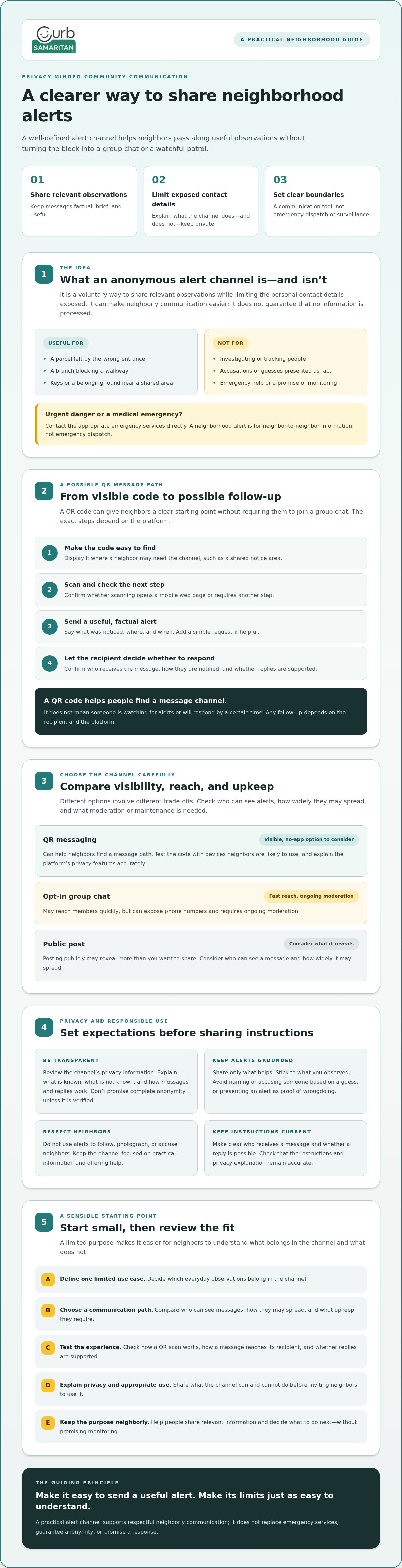
A QR code can give neighbors a clear starting point for sending a message without joining a group chat. In an anonymous neighborhood alert system, the intended path may be simple: display a visible code, scan it, write a relevant alert, and let the recipient decide whether to respond. The exact steps depend on the platform. Before explaining the process, confirm who receives the message, how they’re notified, and whether replies are supported.
A QR alert lets someone share an observation through a visible code. Any follow-up depends on the recipient and the platform, not on live monitoring. That distinction matters. A code can make communication easier to find, but it doesn’t mean someone is watching for alerts or will respond by a certain time. The U.S. Office of Justice Programs provides background on community crime prevention programs, a useful reminder that communication works best as part of a broader, people-led effort.
Choose a communication path neighbors can use easily
A QR code can be displayed where people are likely to need it, such as a shared notice area. An opt-in group chat may reach members quickly, but can expose phone numbers and require ongoing moderation. A printed contact notice is familiar and simple, though it may ask residents to contact someone directly and share their own details. Compare options by asking who needs to find the channel, what information each option reveals, and who will keep instructions current.
For a QR option, check whether scanning opens a mobile web page or requires another step. A no-app path can reduce installation friction, but test the code with the devices neighbors are likely to use. Don’t promise universal access without checking compatibility. Also confirm whether the service lets a sender and recipient communicate without sharing personal contact details, and explain its privacy features accurately.
Make the first alert useful and easy to answer
Keep a message brief and specific. Include what was noticed, where, and when, then add a simple request if one is helpful. For example: “The shared entry light appears to be out near the north door this evening. Could someone check it?” Stick to what you observed. Avoid names, sensitive personal details, speculation, or photos that reveal more than the recipient needs.
Before launch, test the full message path: scan the code, send a sample, and confirm what the recipient actually sees. Explain how to follow up only after verifying the platform’s reply features. Curb Samaritan’s QR-coded stickers and posters are one option for making a community message channel visible. Organizers should still explain the channel’s limits and direct emergencies to emergency services.
How to balance neighborhood alerts, privacy, and accountability
A useful alert channel should make it easier to help, not easier to monitor one another. Each communication method has different trade-offs: QR messaging can keep neighbors from exchanging phone numbers directly, a group chat can reach enrolled members, and a public post can spread information more widely. None guarantees privacy, accuracy, or a response. An anonymous neighborhood alert system needs clear boundaries as well as a convenient way to send messages.
Anonymous to the recipient doesn’t necessarily mean technically anonymous. A platform may process information as part of delivering a message. Check its privacy information before inviting neighbors, and avoid promising that a sender’s identity or data is completely hidden. The Electronic Frontier Foundation’s discussion of the dangers of crowd-sourced surveillance is a helpful reminder that unverified reports can fuel suspicion and harm people.
Compare what each channel can and cannot do
| Channel | Can help with | Doesn’t guarantee |
|---|---|---|
| QR messaging | Making a message route visible without requiring a shared group chat. | Complete technical anonymity, broad reach, or a timely reply. |
| Opt-in group chat | Sharing updates among participating neighbors. | Keeping phone numbers private, limiting notifications, or preventing misuse without moderation. |
| Public posts | Making information visible to a wider audience. | Restricting who sees or shares a post, protecting personal details, or ensuring a claim is accurate. |
Set simple rules before inviting participation
Decide what belongs in the channel, such as a found belonging or a non-urgent shared-area issue, and direct emergencies to emergency services. Ask people not to post names, accusations, private images, or identifying details that aren’t needed to solve the problem. Choose a community contact for questions or misuse reports, but explain that this person isn’t a professional monitor and may not see every message.
Keep alerts helpful, not intrusive
Encourage direct observations, not guesses about someone’s identity or motives. Participation should be voluntary. No neighbor should feel pressured to scan a code, share information, or respond. If using a poster, place it where people can choose to read it without feeling watched or singled out. For shared spaces, choose a location that is easy to notice and where you have permission to display it.
How to set up and introduce a neighborhood alert system
A useful alert channel doesn’t need a complicated rollout. Start with one clear purpose, such as sharing notices about found belongings or non-urgent issues in a shared space. A limited use case helps residents understand what belongs and gives organizers a chance to learn before expanding the system.
Define the purpose, choose a channel, set boundaries, explain how to use it, then review whether it’s working. This simple sequence gives an anonymous neighborhood alert system a clear shape without suggesting that someone is always watching or ready to respond.
- Define the purpose: Name the kinds of helpful, non-urgent alerts the channel is for.
- Choose a channel: Consider how residents will find it and what personal information the option may expose.
- Set boundaries: Explain what not to send and where urgent concerns should go.
- Introduce it: Share concise instructions and invite voluntary participation.
- Review usage: Ask whether the channel is clear and useful, then adjust its guidance if needed.
Prepare the message, placement, and participation guidance
Before displaying a QR code, write a plain-language explanation of what scanning it is intended to do. Confirm the actual message and reply flow with the platform, and avoid promising a particular notification, response, or privacy outcome unless verified. Tell residents not to send accusations or unnecessary personal details, and direct emergencies to emergency services rather than a community alert channel.
Make signs easy to notice and understand, and place them only where you have permission. Check that the code is readable from a comfortable distance and test it on more than one available device if possible. Scanning can vary by device, so don’t imply that every phone will work in exactly the same way. If a code is meant for use at home, consider how its placement makes the instructions visible to the people who need them without exposing more information than necessary.
Review whether the channel is working
Invite feedback: Are the instructions clear? Are alerts relevant to the original purpose? Look for recurring confusion, unnecessary details, or misuse. If people keep sending the wrong kinds of messages, revise the boundaries or make the channel’s purpose more visible. A community contact can receive questions or concerns, but be clear that this role isn’t professional monitoring.
For a visible QR-based option, Curb Samaritan offers a Neighborhood Connect Sticker Bundle and QR Code Posters. Review the product details and verified message flow before choosing materials for your community.
When a QR-based alert option fits and what to do next
A QR-based option may suit a community that wants a visible, low-friction way to send a message without asking residents to join an app or share contact details with a group. It’s most useful when people can easily find the code and the intended recipient is clear. If residents need a public stream of updates for everyone to read, another channel may fit better.
Keep the tool’s role clear: QR stickers and posters provide a way to send messages. They are not GPS trackers, emergency services, or professional monitoring. An anonymous neighborhood alert system should make it easier to reach the right person, not imply that a person or service is watching over a location.
Match the tool to the community’s communication needs
First decide whether residents need a shared information point, such as a poster in a common area, or a way to message a specific recipient. A poster can make instructions easy to find in a shared space, while a sticker may be more appropriate where a direct message route is needed. In either case, choose a visible location with permission, and make participation optional.
Before choosing materials, review what the QR code leads to, what information a sender is asked to provide, and how the recipient can respond. Don’t assume that all QR systems work the same way. Make sure the message path suits the community’s privacy expectations and practical needs.
Start small, explain the boundaries, and invite feedback
Introduce the code with a short explanation of its purpose and limits. Tell residents what kinds of messages are welcome, what details to leave out, and where to turn for urgent help. Start with one clear use, then ask whether the instructions are easy to follow and whether the channel is serving that purpose. Adjust the guidance before inviting broader use.
Curb Samaritan’s community options include the Neighborhood Connect Sticker Bundle and QR Code Posters. These are optional physical ways to make a message channel visible, not a requirement for building a neighbor-led system. If a QR-based approach fits your needs, review the product details and privacy information before deciding.
Make neighborly alerts simple, clear, and respectful
A useful anonymous neighborhood alert system starts with a clear purpose, a channel neighbors can understand, and boundaries that protect privacy and discourage speculation. Keep it focused on voluntary, practical messages, and direct urgent situations to emergency services. An alert channel can help neighbors connect, but it shouldn’t promise complete anonymity or ongoing monitoring.
If a visible QR option suits your community, QR-coded stickers and posters can make the message path easier to find. Curb Samaritan’s community communication products include access to the messaging platform with a purchase, without recurring subscription fees. Review the product details and privacy information to decide whether the approach fits your needs.
Explore Curb Samaritan’s community communication options and consider which tool feels right for your neighbors. Start small, listen to feedback, and build a thoughtful way to help one another.
Frequently Asked Questions
What is an anonymous neighborhood alert system?
An anonymous neighborhood alert system lets neighbors share useful observations or requests without necessarily exchanging personal phone numbers. It might use a QR code that opens a messaging page, an opt-in group, or posted contact information. The word “anonymous” can mean personal details aren’t shown to the recipient, but it doesn’t automatically mean no information is processed. Organizers should explain what’s shared and direct emergencies to appropriate emergency services.
How do you set up an anonymous neighborhood alert system?
Start with one clear purpose, such as helping return misplaced belongings or sharing practical, non-urgent observations. Choose a communication method, then write simple instructions about privacy, appropriate messages, and urgent concerns. Test the process before inviting neighbors, including what a sender sees and how the recipient can respond. Ask for feedback and revise anything confusing. Avoid promising anonymity or a particular response unless the chosen service confirms it.
Can neighbors send alerts without sharing phone numbers?
Yes, some messaging tools let a sender contact a recipient without displaying personal contact details to them. What each person can see depends on the service and its settings, so check the current privacy information and message flow before recommending a tool. Don’t assume that keeping phone numbers private means no other information is processed. Describe the privacy features accurately, and avoid calling a system completely anonymous unless that claim is verified.
Do people need an app to scan a neighborhood QR alert code?
Not always. Some QR codes open a webpage in a phone’s browser, while others may rely on a particular app or service. The experience depends on the code and platform. Test it on commonly used devices before putting up signs, and explain any steps people need to take. Include an alternate way to contact the right person for anyone who can’t scan the code or access the linked page.
What should a neighborhood alert message include?
A helpful alert is brief, factual, and clear about what someone might do next. Include what was observed, where it happened, and when, if those details are relevant. For example, report that a parcel appears to be at the wrong entrance rather than guessing who left it there. Avoid accusations, speculation, and unnecessary personal details. Residents should know that immediate emergencies need direct contact with emergency services, not a community message.
Are anonymous neighborhood alerts a replacement for emergency services?
No. A resident-led alert channel helps neighbors share information, but it doesn’t provide professional security monitoring or guarantee that anyone will see or answer a message. For an immediate emergency, contact the appropriate emergency services directly. Organizers should state the channel’s purpose and limits wherever they explain how to use it. This helps residents understand when a community alert may be useful and when they need a different response.
How can a neighborhood alert system reduce misuse?
Set clear rules before inviting participation. Keep messages focused on helpful observations, and discourage accusations, speculation, and unnecessary personal information. Explain how residents can raise concerns about misuse, and identify a community contact for questions or feedback. Make participation voluntary, with no pressure to scan, post, or respond. These steps create clearer expectations, but they can’t guarantee every message will be accurate or appropriate.