

How to choose a secure neighbor communication tool for privacy and trust
The safest neighborhood channel isn’t necessarily the most advanced. For a small block, a group text, email list, or messaging app may be enough. Choose a secure neighbor communication tool that protects personal details and makes it easy to share verified, observable information. Contact emergency services when someone needs immediate help.
It’s natural to want neighbors to stay informed without exposing private information or spreading rumors. The right channel can support both clear communication and the trust that grows when people look out for one another responsibly.
Here, you’ll learn how to protect personal information, choose a channel that fits your neighborhood, and set simple ground rules for sharing concerns. You’ll also see how shared vigilance can strengthen neighbor relationships rather than replace them.
Key Takeaways
- Set clear boundaries for what neighbors share, and keep personal details out of routine safety updates.
- Choose a communication channel that fits your neighborhood’s size and needs, then agree on simple rules for using it.
- Share observable behavior rather than assumptions, and use emergency services when immediate help is needed.
- Build trust offline as well as online through shared planning, friendly gatherings, and focused safety discussions.
- For direct, anonymous messages about a home, vehicle, person, or pet, QR-enabled stickers and tags offer another way for neighbors to connect.
Balancing technology with neighbor relationships
- Use neighborhood technology to support real relationships, not replace them. A group message can share a road closure, while a face-to-face conversation helps neighbors understand who needs assistance. Keep digital updates practical, and make room for everyday contact, such as greeting someone while walking through the neighborhood.
Give each channel a clear purpose. For example, use one neighborhood thread for timely safety updates and save personal disagreements for a direct, respectful conversation. This boundary helps prevent a shared communication space from replacing listening or in-person discussion of sensitive matters.
- Ask residents what would make communication useful before setting rules. A short survey can gather concerns, preferred ways to receive updates, and ideas for safety efforts. Ask what belongs in a group message and what should be discussed privately. Share the results so decisions reflect more than one household’s preferences.
Keep the survey focused on observable needs, such as better visibility near an alley or clearer notices about community meetings. Avoid inviting speculation about individual neighbors. When residents can explain their priorities, the group can choose practical steps without treating every concern as a reason for more monitoring.
- Start a neighborhood watch group with a small core of engaged residents. Invite people who can contribute constructively, then agree on a limited task, such as sharing verified updates or organizing a safety discussion. A committed group can make follow-through easier than a long membership list with little participation.
Keep meetings short and focused on action. An agenda might cover a recent safety concern, a community event, and one action item for the next month. Give residents room to speak and record decisions in plain language. A clear agenda keeps technology and watch activities focused on helping the community.
- Make connection part of the plan. Host a block party, community picnic, or simple gathering where neighbors can meet outside the context of a safety concern. Recognizing familiar faces can make residents more comfortable asking questions or offering help. These moments build familiarity that a notification alone cannot create.
Set respectful limits on shared vigilance. Ask neighbors to describe what they observed, not guess about someone’s identity or intentions. Research on neighborhood watch programs reports that people of color are disproportionately reported as suspicious, including when no criminal activity is taking place. A rule against assumptions helps keep communication fair and focused on specific behavior.
Research on neighborhood watch programs reports that neighborhood safety technology should support communication between neighbors rather than replace real relationships. Use digital channels to help residents stay in contact, while keeping conversation and mutual understanding at the center of safety planning.
Community surveys give residents a structured way to share opinions and take part in safety planning. Invite a range of residents to describe what communication would help, then use their views to guide decisions. Connecting these practices helps make technology and planning ways to strengthen neighbor relationships, not substitutes for them.
Building trust through shared vigilance
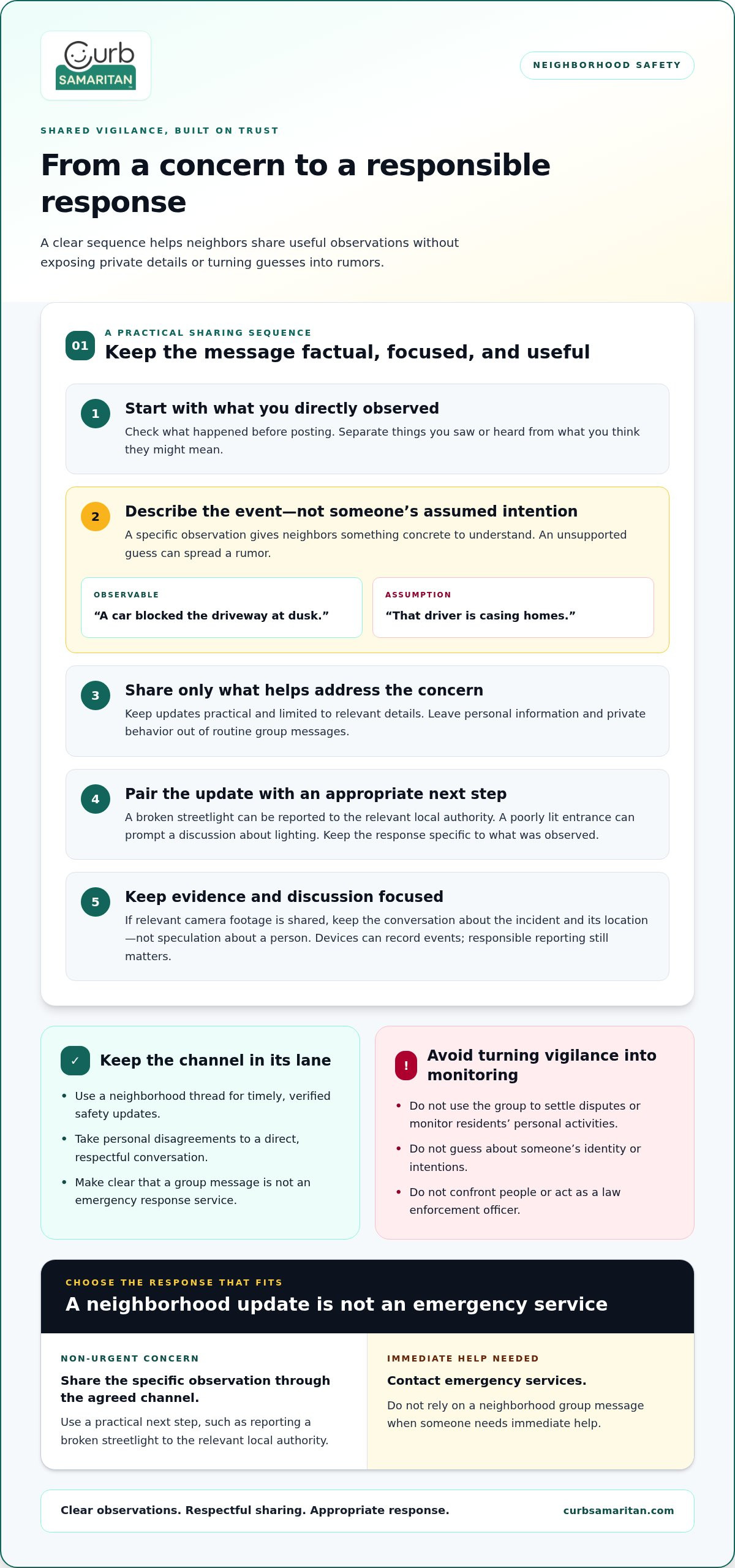
- Agree on what neighbors will do when they notice a concern. A simple plan can identify who shares updates, which channel to use, and when to involve emergency services. For example, residents might report a broken streetlight to the group, then send a repair request to the relevant local authority. Clear roles reduce confusion and prevent a group message from being mistaken for an emergency response service.
Keep the purpose narrow: community safety, not settling disputes, enforcing neighborhood rules, or monitoring residents’ personal activities. If a concern involves a neighbor’s private behavior, don’t turn it into a group discussion. Focus shared messages on specific observations and practical next steps.
- Set up a voluntary watch schedule that fits residents’ routines. Neighbors can take turns walking through shared areas and noting concerns such as a blocked walkway or damaged lighting. Describe the task plainly, without encouraging anyone to confront people or act as a law enforcement officer. A walk is an opportunity to notice conditions and share useful updates, not to investigate.
Pair each update with an appropriate response. If residents identify a poorly lit entrance, they can discuss motion-sensor lights near the walkway. If speeding is a concern, neighbors can identify the affected street and ask local authorities about traffic-safety measures. Specific observations make the group’s efforts easier to understand and act on.
- Share information carefully and usefully. Before posting a claim, check what was directly observed and separate it from guesses. “A car blocked the driveway at dusk” describes an event; “that driver is casing homes” assigns an intention without evidence. This distinction helps prevent rumors and gives neighbors something concrete to address.
If a homeowner has camera footage of a concerning incident, they can share relevant video with neighbors or a neighborhood watch group. Keep the conversation focused on the incident and its location, rather than inviting speculation about a person. A device can record an event, but neighbors still need to describe it responsibly and let appropriate authorities handle reports.
- Build contact with local police outside urgent situations. Residents can invite officers to a community meeting or event, giving neighbors a chance to ask questions and learn how to report concerns. Discuss practical issues, such as a dark alley or recurring speeding, and record agreed actions. Familiar, respectful contact can make future communication clearer.
Use Crime Prevention Through Environmental Design, or CPTED, to guide discussion of shared spaces. Its emphasis on natural surveillance and active community involvement can help neighbors create visible, welcoming areas. For example, residents might identify a walkway hidden by poor lighting and coordinate a practical improvement. Keep decisions focused on places and conditions, not on watching individual residents.
Choosing communication channels
- Match the channel to the neighborhood’s size and communication needs. For a small block, a group text, email list, or messaging app may be sufficient. Use text for brief, time-sensitive notices or email for messages residents may need to revisit. A messaging app may suit neighbors who prefer a shared space for conversations. Choose the channel residents can use comfortably and consistently, not the one with the most features.
Before choosing, name the main purpose. A channel for a road closure or lost pet has different needs from one used for event planning. A clear purpose helps residents decide where an update belongs and reduces unrelated posts.
- Compare privacy and access before inviting the whole block. Consider what information a channel displays, who can join, and whether members need to share personal contact details. Some residents may be comfortable sharing a phone number in a group text, while others may prefer a channel that doesn’t show it to every participant. Explain how membership works before sending invitations.
Consider the information itself, too. A routine notice about a community meeting may suit a broad group. Keep personal details about a resident or household concern out of a public thread. A secure neighbor communication tool should fit both the message and the audience, rather than treating every update as equally shareable.
- Set simple channel rules before the first safety update. Explain what belongs there, how to label urgent versus routine messages, and where to take personal conversations. For example, a group might reserve its shared thread for neighborhood notices and move a one-to-one question to a private conversation. Keep the rules easy to find so newcomers can follow the same expectations.
Keep the channel focused on communication, not enforcement. It shouldn’t become a place to police residents, settle disputes, or circulate personal details. A clear scope helps members distinguish useful community updates from messages that need another conversation or an appropriate authority.
- Make the channel usable across different routines and devices. A resident who rarely checks email may miss a notice there, while another may prefer email to app notifications. Ask how neighbors want to receive routine information, then choose a main channel and a simple backup for important announcements. Avoid sending every message across several platforms, which can make it harder to tell which update is current.
Test the process with a low-stakes example, such as announcing a block meeting. Confirm that residents can find the message, understand its purpose, and know where to reply. If the neighborhood grows or needs more organized communication, an app or community association tool may suit it better than a small-block group text.
How can neighbors report suspicious activity securely without exposing their identity?
- Describe what you observed, not what you assume. Include concrete details such as location, time of day, and action. “A person tried several car doors on Maple Street” reports observable behavior. “A stranger is planning a theft” guesses at intent and can fuel rumors. Leave out details that don’t help explain the event, and don’t label someone suspicious based on appearance, identity, or simply being unfamiliar.
This approach gives neighbors useful context while reducing the risk of unfairly targeting someone. If the report concerns a vehicle, note relevant details only when they help identify the incident. Keep the message focused on what happened, where it happened, and whether there’s an immediate safety concern.
- Choose a reporting channel with privacy in mind. A neighborhood group may suit a general safety update, but it can expose a sender’s name or contact details to other members. If protecting your identity matters, use a channel that supports anonymous communication and avoid details that could identify you indirectly. For example, a message can describe an event without mentioning your address, routine, or relationship to the person involved.
Before posting, consider who will see the message and whether the group needs every detail. Share only information that helps people respond responsibly. Don’t promise that a group post is anonymous unless the channel’s design and settings support that expectation.
- Separate urgent danger from non-urgent observations. If someone needs immediate help, contact emergency services rather than waiting for neighbors to respond in a group thread. For a non-urgent concern, share a concise account through the agreed neighborhood channel or use an appropriate local process. This distinction helps neighbors understand whether to stay informed or prioritize immediate assistance.
For example, report a damaged gate as a maintenance concern. A person attempting to enter a home calls for a different response. Keep either message factual, and don’t encourage neighbors to confront or pursue anyone.
- Protect the report after sending it. Don’t forward screenshots, names, or images beyond the people who need them to address the concern. If a neighbor shares camera footage, keep discussion tied to the specific incident and avoid guessing about the person shown. A responsible report gives the right people useful information without turning a private concern into public speculation.
Neighborhood watch members should verify information before posting. If a detail is uncertain, explain what remains unclear rather than filling gaps with a guess. This simple practice supports privacy, accuracy, and trust while keeping the focus on observable behavior.
When evaluating what belongs in a public discussion, neighborhood watch groups should encourage members to report observable behavior rather than assumptions about a person's identity or intentions. Keep any follow-up limited to clarifying what was seen and whether help is needed; do not turn uncertainty into a claim about motive. If the concern has already been passed to the appropriate people, avoid repeating it in wider channels. A measured, private follow-up can preserve useful details while limiting unnecessary exposure and speculation.
Communications tools
- Match each tool to the work neighbors need it to do. A small block may rely on a group text, email list, or messaging app for routine notices. A larger neighborhood may benefit from an app or community association communication tools. For example, residents can use a shared channel for event updates while keeping personal conversations private. Choose a secure neighbor communication tool that fits the community’s needs, rather than one with features no one will use.
For messages containing sensitive information, consider whether the platform supports encrypted voice, text, and data exchanges. Encryption helps protect exchanges from unauthorized access. It doesn’t replace careful choices about what residents share, so keep messages relevant to the intended recipients.
- Consider how a platform is hosted when a community has specific technology requirements. Secure communication platforms can be deployed in sovereign cloud, on-premises, or hybrid environments. A sovereign cloud is hosted within a defined jurisdiction; on-premises systems run on an organization’s own infrastructure; hybrid arrangements combine environments. These options matter more to organizations with formal infrastructure needs than to a small block seeking a simple place for updates.
Keep the decision practical. If neighbors mainly share meeting reminders and local notices, a simple channel may be enough. If a community association needs coordinated access across teams, clarify who manages the channel and what information belongs there.
- Separate everyday updates from urgent coordination. A neighborhood channel can circulate a road closure, while immediate danger requires emergency services. Secure collaboration platforms can support rapid incident response through unified channels for cross-agency, real-time, mission-critical situations. That’s different from routine neighbor messaging. Be clear about the intended audience and purpose before treating any channel as an incident-response system.
For example, residents can share a notice about a blocked entrance in their community channel. If the issue requires action from a homeowners’ association, send the report through its established communication route. A channel works best when people know who receives each message and what action it supports.
- Practice the communication plan before a stressful event. Run a simple exercise using a harmless example, such as reporting a damaged sign. Ask participants to use the agreed channel, keep the message factual, and follow the response steps. Then discuss whether the right people saw the update and whether anyone shared unnecessary personal details. A short practice can reveal confusing instructions before a real concern arises.
Write down the approved channel, its purpose, and the next step for urgent situations. Keep that guidance easy for residents to find, including those who rarely check a device or app.
- Review the setup as neighborhood needs change. If a block expands or a community association takes on shared-area repairs, residents may need clearer reporting paths. For example, an association channel can route a report about a damaged walkway to the people responsible for action. Keep safety discussions separate from repair requests when different people handle them.
For another privacy-minded way to help neighbors communicate about a home, vehicle, person, or pet, explore options for neighbor communication.
Curb Samaritan: Driver Sticker
Curb Samaritan’s Driver Sticker gives someone who notices a concern with a parked vehicle a way to contact its owner without seeing their personal contact details. A passerby scans the QR code and sends an anonymous text alert, without needing a mobile app or sharing personal information. It can complement a neighborhood communication plan when direct, vehicle-related contact is more useful than posting a notice to a group.
For other situations, a Resident Sticker supports contact about a home, while a Found Sticker and People & Pet tags help with lost-and-found communication. A scan connects the finder with the owner through a message, offering a practical way to make everyday neighborly help easier.
Visit Curb Samaritan to learn more about the Driver Sticker.
Take the next step toward a more connected neighborhood
A trusted neighborhood doesn’t happen through technology alone. It grows through small, thoughtful choices: sharing only what’s useful, respecting different privacy needs, and treating each neighbor with care. Choose a secure neighbor communication tool that supports those values, then help residents understand how to use it respectfully.
Start with one practical improvement. Clarify where residents can send a non-urgent concern, make a community message easier to find, or create a simple way to reach a household about an everyday issue. Invite neighbors to shape the approach so it works for the people who will rely on it.
If you’d like a way to support direct, privacy-minded communication about a home, vehicle, or found item, contact Curb Samaritan to connect. A considerate next step can help neighbors feel more comfortable reaching out and looking out for one another.
Frequently Asked Questions
What are the risks of sharing addresses, schedules, or emergency information in neighborhood apps?
Sharing these details can reveal where someone lives, when a home may be empty, or how to reach them during a crisis. A post intended for neighbors could also be saved, forwarded, or seen by people beyond its original audience. Share only what’s needed: send a general notice about a gathering without posting someone’s travel schedule, and share sensitive emergency details directly with the people who need them.