

How to Receive Alerts Privately: A Practical Guide
What if someone could alert you about a note on your car, a found pet, or a misplaced belonging without seeing your personal phone number? Learning how to receive alerts privately starts with choosing a way for people to reach you that keeps your direct contact details out of view. Wanting that distance is reasonable, especially when the person sending a message is a stranger.
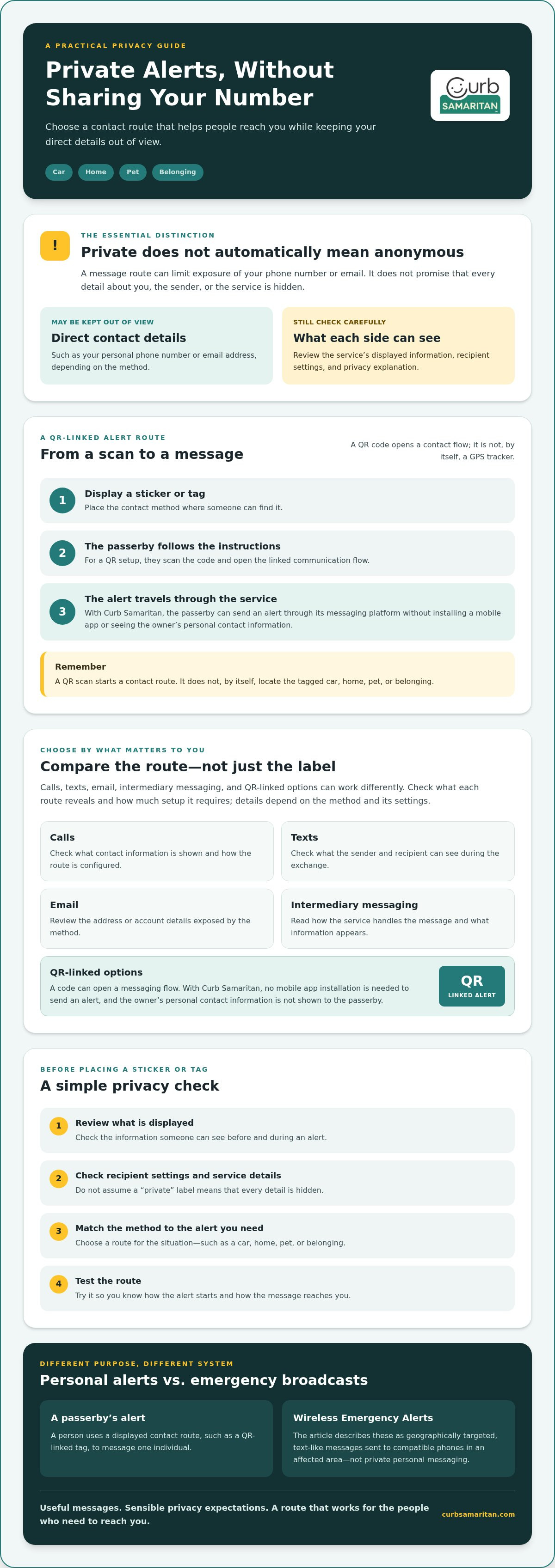
Private communication doesn’t always mean complete anonymity. A method may keep your number hidden while still using an account, a service, or other information. Understanding that difference helps you choose an option that suits your privacy preferences without assuming it hides everything.
This guide explains what private alerts can and can’t protect, then compares practical options for a car, home, pet, or belonging. You’ll also learn how QR-coded stickers and tags can let someone send an alert through a messaging platform without installing an app or seeing your personal contact information. The aim is straightforward: useful messages, sensible privacy expectations, and a setup that works for the people who need to reach you.
Key Takeaways
- Learn how to receive alerts privately by choosing a contact route that limits exposure of your direct details.
- Compare calls, texts, email, intermediary messaging, and QR-linked options by what they reveal and how much setup they require.
- Before placing a sticker or tag, review what information is displayed and check the recipient settings.
- Match the alert method to what you need to hear about, then test the route so you know how it works.
- Consider QR-linked messaging when you want people to send an alert without seeing your phone number.
What Does It Mean to Receive Alerts Privately?
You may want a useful alert without giving a stranger your personal phone number or email address. That’s the practical meaning of a private alert: someone can reach you through a chosen route while your direct contact details stay out of view.
A private alert is a message route designed to limit exposure of your direct contact information, not a promise that every detail about you or the sender is hidden. Privacy depends on the method and its settings. For example, a QR-coded sticker or tag can let a passerby scan a code and send an alert through a messaging platform without seeing the owner’s personal contact information or installing an app. Other methods may work differently.
This distinction reflects a broader public expectation of privacy: people want useful communication without unnecessary exposure of personal information. Still, don’t assume a private message route also hides all information collected or shared by the service.
What information can a private alert keep out of view?
Your phone number and email address are direct contact details. A message route is the path that connects a sender to you, such as a relay, platform, or QR-linked messaging service. Depending on the method, a sender may be able to reach you without being shown either detail.
Before relying on a service, check what both sides can see. Review its displayed information and recipient settings, and look for a clear explanation of what appears during an alert. Don’t assume that a label like “private” tells you what information is protected.
How are private alerts different from anonymous alerts?
Private communication can limit the contact information you share without guaranteeing that the sender is anonymous. A hidden number, intermediary channel, or QR scan describes how an alert starts or travels. None of these, on its own, proves that every participant or service involved is unidentifiable.
For example, someone might scan a QR code to report that a parked car is blocking access. The owner can receive the message without displaying a personal phone number, but that doesn’t automatically make the sender anonymous or conceal all information handled by the messaging service. When deciding how to receive alerts privately, focus on the specific details each method protects and what it may still reveal.
How Do Private Alerts Reach You Without Sharing Your Number?
A private alert needs a route between the person who spots something and the person who needs to know. That route might be a phone number, email address, messaging service, or code displayed on an item. The details vary, so check the service’s current instructions and privacy information rather than assuming every system works the same way.
In a QR-linked setup, the general flow is simple:
- Display a contact method: Place the sticker or tag where someone can find it.
- Start an alert: The person follows the displayed instructions, such as scanning a QR code.
- Receive the message: The alert travels through the service’s communication channel to you.
With Curb Samaritan, a passerby scans a QR-coded sticker or tag to send an alert through its messaging platform, without installing a mobile app or seeing the owner’s personal contact information.
What happens when someone scans a QR alert code?
The passerby scans the code with a phone camera, opening the linked communication flow. They can then use that flow to send an alert. With Curb Samaritan, the scanner doesn’t need to install an app. Screens and steps can differ between services, so review the product’s instructions before placing a code where people will use it.
A QR code is a way into a contact route, not a GPS tracker. Scanning it doesn’t, by itself, mean the code is locating the tagged car, home, pet, or belonging. For a closer look at the general idea, read this guide to no-app QR code contact stickers.
Can you receive an alert without giving out your phone number?
Yes. Some messaging routes let someone contact you without showing them your personal number. That doesn’t establish that a service collects no personal information or hides every detail. Before relying on one, check what the sender sees, what appears to you, and how the service describes its message flow.
Government Wireless Emergency Alerts offer a useful contrast, though they aren’t private personal messaging. The FCC describes them as geographically targeted, text-like messages delivered to compatible phones in an affected area. This broadcast approach is different from a passerby contacting one individual through a displayed tag. If QR-linked alerts suit your situation, you can explore Curb Samaritan’s QR-coded stickers and tags as one possible contact route.
Which Private Alert Method Fits Your Situation?
The right option depends on who needs to reach you and what they need to report. A direct call may feel familiar, while an intermediary or QR-linked route can reduce the need to display personal contact details. Each option involves a trade-off between convenience, privacy, and how easily someone can send a useful alert.
Use this comparison as a starting point. What a sender can see may depend on the service and its settings, so check those details before sharing a contact route.
| Use case | Contact details exposed | Setup needed |
|---|---|---|
| Direct call, such as a quick vehicle alert | Your phone number may appear, depending on your calling setup. | Share or display a number people can call. |
| Text or email for a message that can wait | A standard text may reveal your number; email shows the address used. | Display the number or email address you want people to use. |
| Intermediary messaging for more separation | Visibility varies by service and settings; check what each person can see. | Create or configure the route and explain how to use it. |
| QR-linked messaging for a vehicle, home, pet, or item | A QR-linked route can let someone send an alert without seeing your personal contact information. | Place a QR-coded sticker or tag where it can be found, then check the linked message flow. |
What works for vehicles, homes, pets, and belongings?
For a vehicle, choose a route that makes it easy to report something time-sensitive, such as lights left on, without displaying details you’d rather keep private. At home, a contact option can let a visitor send a message without seeing your number. A pet or lost-item tag can give a finder a way to contact the owner, but it isn’t a GPS tracking device. For a closer look at vehicle options, see this guide to secure driver notification systems.
How do you weigh privacy against convenience?
Think about who is likely to send an alert and how quickly they may need to do it. Someone noticing a car’s lights may need a quick, simple route; a person who finds a belonging may be able to follow a few extra steps. A public contact method can also attract unwanted messages, so display only information you’re comfortable sharing and review the settings. The EFF offers broader guidance on defending yourself from surveillance and protecting your privacy online.
There’s no single best answer to how to receive alerts privately. Compare what information each method shows, the effort required from a passerby, and how reliably the alert reaches you. If QR-linked contact suits your needs, explore QR-coded stickers and tags as one possible option.
How Can You Set Up Private Alerts More Safely?
A private alert route is useful only if people can follow it and you know what information it displays. Before putting a sticker or tag in place, check the full message flow, review recipient settings, and test the route yourself. A quick check can help prevent confusion later.
Use this checklist when setting up an alert method:
- Check the destination. Scan the QR code or follow the contact instructions yourself. Confirm that the code opens the expected communication route and note what the scanner is asked to do.
- Review what’s visible. Check what information appears to the sender and what your recipient settings reveal. Don’t add personal information unless it’s needed for the alert.
- Read the current privacy information. Look for the service’s explanation of message handling and account settings. Don’t rely on assumptions about what a “private” label means.
- Choose a sensible placement. Put a code where the intended person can find it, while considering whether it should be visible to everyone who passes by.
- Test delivery and access. Send a test alert if the service allows it. Confirm it reaches the expected destination, then make sure you can still access the account or channel that receives messages.
What should you check before displaying a QR code?
Confirm where the code leads and what a scanner sees before placing it on a vehicle, at a home, or on a tag. Check that the linked route gives a passerby a clear way to send an alert and that the recipient settings match your expectations. If you change the route or account settings, check these details again.
How can you reduce unwanted or confusing messages?
Use a short prompt that explains what the alert is for, such as reporting an issue with an item or contacting its owner. Direct notifications to an account you check and can still access. A private message route can still receive unwanted or unclear messages, so share only the details needed to make contact.
Set expectations, too. A sticker or tag provides a way to send an alert, not an emergency-response service or a promise of immediate help. Don’t rely on it for urgent situations that require emergency services.
If a QR-linked alert route fits your needs, explore QR-coded stickers and tags as one option. Knowing how to receive alerts privately also means checking the route before relying on it and revisiting your settings when your contact needs change.
How Can You Start Receiving Alerts Privately?
Keep the decision simple: identify the alert you need, choose a suitable contact route, then test it before relying on it. A message about a car or a found belonging may call for a different setup than a visitor contacting you at home. Start by deciding which contact details you’re comfortable making visible and how easy you want it to be for someone to reach you.
When might a QR-coded alert sticker or tag make sense?
A QR-coded sticker or tag may be useful when a passerby could notice something and need a way to contact the owner. That could be a vehicle issue, a visitor at a home, a pet, or a misplaced belonging. Instead of printing a personal phone number on the item, the code opens a messaging route. Check the current product details to understand what the scanner sees and how the alert reaches you.
Curb Samaritan sells QR-coded stickers and tags that connect a passerby with an owner through its messaging platform. The platform is accessed through these physical products, and the scanner doesn’t need to install a mobile app. Purchases include lifetime platform access without recurring subscription fees. These products provide a contact option, not GPS tracking or professional monitoring.
What should you do next?
Before choosing, ask yourself:
- What might someone need to tell me? Match the route to the likely alert and the person who may send it.
- What details am I comfortable showing? Review what the sender and recipient can see, and avoid exposing information you don’t need to share.
- Can I test the route? Follow the setup instructions, send a test message if available, and confirm you can receive and access alerts.
A test can catch simple problems, such as a notification going to an account you rarely check. Review the current product and privacy information before deciding, especially if your contact preferences or setup have changed. No single method fits every situation, and a private route doesn’t mean every part of a message or service is hidden.
If a QR-linked option seems practical for your vehicle, home, pet, or belongings, take a look at Curb Samaritan’s privacy-focused alert options. Compare the available stickers and tags with your needs, then choose a route that makes useful contact easier while keeping your personal number out of view.
Choose an Alert Route That Fits Your Needs
Knowing how to receive alerts privately starts with choosing a contact route that keeps your personal details out of view while remaining practical for the people who may need to reach you. Private communication isn’t the same as complete anonymity. Check what information each method shows, then test that alerts arrive as expected.
For cars, homes, pets, or belongings, QR-coded stickers and tags are one option. Curb Samaritan’s physical products connect passersby with owners through a messaging platform. The scanner doesn’t need a mobile app, and purchases include lifetime platform access without recurring subscription fees.
Choose the method that suits your situation, and review its current privacy details before relying on it. To explore this option, visit Curb Samaritan’s privacy-focused alert options. A little preparation can make it easier for people to help while giving you more say over how they contact you.
Frequently Asked Questions
How can I receive alerts privately without sharing my phone number?
Choose a contact route that lets someone send a message without displaying your number to them. Some QR-linked systems allow a passerby to scan a code and send an alert through a messaging platform. Before choosing, review the service’s current privacy information and check what the sender and recipient can see. “Private” describes a way to limit exposure, not a guarantee that no information is processed.
Can someone send me an alert by scanning a QR code without an app?
Yes. Some QR contact systems let scanners open a messaging flow without installing a dedicated app. The exact steps depend on the service and the scanner’s device. With Curb Samaritan, a passerby can scan a code to send an alert through its messaging platform without needing an app. Test the code yourself before displaying it, and check what appears on the screen.
Are private alerts the same as anonymous alerts?
No, not necessarily. A private alert may keep your direct contact details out of view while still using a service to route the message. “Anonymous” can mean that an identity isn’t revealed, but services may define or handle the term differently. Read the service’s privacy details and don’t assume either label guarantees complete anonymity. Check what information is visible to the sender, recipient, and service.
Is it safe to put a QR alert sticker on my car or home?
A QR sticker can provide a practical contact route, but check where the code leads and what information it displays before placing it. Review recipient settings, avoid adding unnecessary personal details, and choose a visible but appropriate location. Test the code first so you know what a passerby will see. An alert sticker can help someone send a message, but it isn’t emergency monitoring or a guarantee of immediate help.
What happens if someone sends an unwanted message through a private alert?
Your options depend on the service’s available message and privacy controls. Before choosing a method, check whether you can manage notifications, block or report unwanted contact, or change the route. Use a short prompt to explain which alerts are appropriate, and avoid displaying details you don’t want strangers to see. Testing the setup can also help you understand how messages reach you and what controls are available.
Do QR alert stickers track my location?
A QR code is a scannable code that can open a link or contact route. It isn’t, by itself, a GPS tracker, and scanning a code doesn’t mean the item is being tracked. What happens after scanning depends on how the code is set up. Review the provider’s current privacy information for details about data handling, and don’t assume location tracking is included.
Do private alert systems require a monthly subscription?
It depends on the provider and product, so check what access is included before choosing. Curb Samaritan says purchases of its QR-coded stickers and tags include lifetime access to its messaging platform without recurring subscription fees. Review current product details to confirm what the purchase covers. Other services may have different terms, so don’t assume one provider’s setup applies to another.
How do I choose a private alert method for my needs?
Start with the alert you expect and who might send it. Consider whether a caller, visitor, passerby, or person who finds an item needs to reach you, then compare the effort involved with the contact details each method reveals. Check whether a sender needs an app, read the privacy information, and test message delivery. The right choice balances reachability with the privacy you want.