

Lifetime Access QR Tags: What It Means and How to Choose
When comparing lifetime access QR tags, separate the scannable code from the service it opens. A free static code can keep pointing to a link, but it does not automatically include a physical tag or a messaging platform. With Curb Samaritan, one purchase includes a physical QR-coded sticker or tag and lifetime access to secure, anonymous messaging, with no recurring subscription fees. Someone scanning the code can send a text alert without downloading an app or seeing your personal information.
It makes sense to wonder what “lifetime” covers, whether fees continue after purchase, and whether a stranger needs your phone number to contact you. The key is to look at what access is included and what the scan lets someone do. This guide explains how messaging tags differ from free QR codes and subscription services, and what to consider when choosing an option for a person, pet, vehicle, home, or belonging.
To choose a useful tag, start with the situation you want to make easier: alerting a driver, reaching a resident, or helping a finder contact the owner of a pet or lost item. Then consider who may scan it, what they need to communicate, and what personal details you want to keep private.
Key Takeaways
- Compare the QR code, physical tag, and linked service separately so you know what a purchase includes.
- With lifetime access QR tags, check what “lifetime access” applies to rather than assuming it guarantees the code and every destination will work forever.
- Match the tag or sticker to what needs an alert or a way to be returned, such as a person, pet, vehicle, home, or belonging.
- Consider who may scan the tag and what they need to communicate when choosing an option.
- Compare physical messaging tags with free static codes and dynamic-code services by purpose, physical format, and type of access.
What Does Lifetime Access Mean for QR Tags?
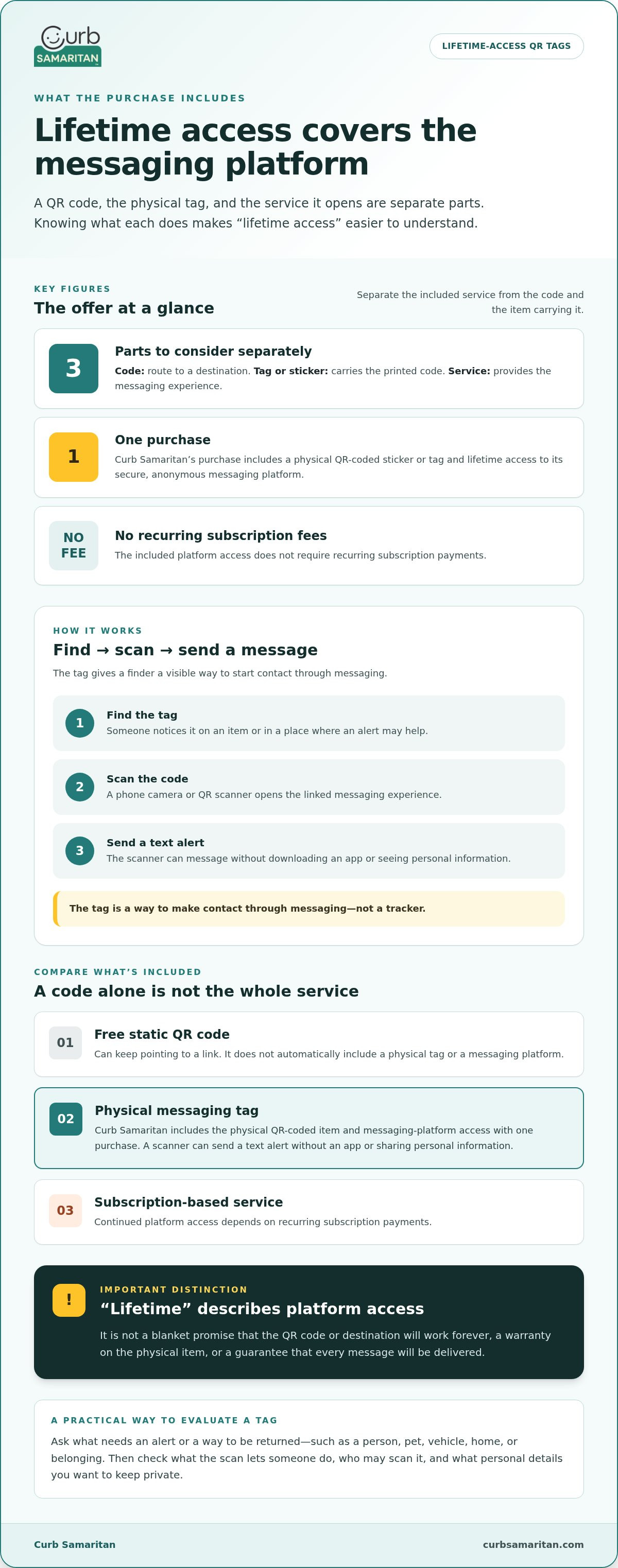
Lifetime access means continued access to the messaging platform included with a tag. It describes the service, not the physical tag itself or a promise that its QR code will work forever. Think of these as three separate parts: the printed code gives someone a route to a destination, the tag or sticker carries that code, and the linked service provides the messaging experience.
This distinction matters because a QR code alone doesn’t tell you what happens after a scan. It might open a web page, a contact card, or a messaging service. The destination and the access terms attached to that service determine what a scanner can do. For a general introduction to how codes work, see this overview of the QR code.
A QR code’s validity and a messaging platform’s lifetime access are separate: one describes whether a code can reach its destination, while the other describes access to the service that handles messages. Keeping the distinction clear helps you understand what a purchase includes without assuming that every code or destination remains available indefinitely.
Does the QR code itself have lifetime access?
Not quite. A QR code is a scannable route to information or a service; it doesn’t provide messaging on its own. The linked service determines what a scanner can do after opening the destination. The code also doesn’t tell you whether a physical tag includes ongoing access or whether access is subject to other terms.
Think of the code as a signpost and the service as the place it leads. The signpost can remain visible, but that alone doesn’t guarantee the destination will stay active. So, don’t treat “lifetime access” as a blanket promise about every part of a QR tag. Look at what the phrase refers to, especially whether it describes access to a messaging platform.
What does lifetime access cover on a messaging tag?
Curb Samaritan’s physical QR-coded stickers and tags include lifetime access to its secure, anonymous messaging platform with a one-time purchase. There are no recurring subscription fees for that access. “Lifetime access” refers to use of the messaging platform, not a warranty on the physical item or a guarantee that every message will be delivered.
This differs from an offer where continued platform access depends on recurring subscription payments. With Curb Samaritan, the purchase includes ongoing platform access without a recurring subscription. A scanner can use the tag to send a text alert without a mobile app or sharing personal information. The physical item carries the QR code, while the included service provides a way to message privately.
When comparing lifetime access QR tags, focus on the service included with the physical item. Consider what a scan is meant to help someone do, then read “lifetime” in that context. It describes the access included in the offer, not a guarantee about the code’s permanent validity or the outcome of a message.
How Lifetime-Access QR Tags Connect a Scanner to a Message
A QR tag is most useful when someone can quickly understand what to do with it. The path is straightforward: they find the tag, scan its code with a phone, and send a message through the experience it opens. Curb Samaritan’s tags don’t require a mobile app to scan and send a text alert.
What does the person scanning the tag do?
A phone’s camera or QR scanner reads the pattern and opens the linked messaging experience. From there, the person can send a text alert. The tag is a visible starting point, not a tracker: it gives a finder a way to make contact through messaging.
- Find the tag. Someone notices it on an item or in another place where a message may be helpful.
- Scan the code. They point a phone camera or QR scanner at the printed pattern and open the destination.
- Send a message. They use the messaging experience to send a text alert.
For example, someone who finds a tagged belonging can scan it and send a message instead of needing to know who owns it or search for contact details. The tag helps bridge the moment between finding something and reaching out.
Find the tag, scan the code, and send a message: that’s the scan-to-message journey. It describes the steps, not a promise that someone will respond or that a particular outcome will follow.
How does messaging protect personal details?
Curb Samaritan’s system lets scanners send secure, anonymous text alerts without sharing personal information. That gives a finder a way to send a message without requiring the person associated with the tag to put contact details directly on the item.
Privacy can matter in everyday situations. Someone who finds a tagged pet or belonging may want to alert its owner without asking for or exposing a phone number. An anonymous messaging route lets the first contact happen through the platform. It doesn’t specify a particular encryption method or data-handling practice, so focus on the stated benefit: the scanner can send an alert without sharing personal information.
For a closer look at the privacy value of this approach, see the guide to no-app QR code contact stickers. The same basic idea applies here: make it easy to send an alert while keeping personal details out of the initial exchange.
When considering lifetime access QR tags, picture the person who may scan one. A noticeable tag and a straightforward scan-to-message route give them a clear next step without an app or direct access to someone’s personal contact details. Explore Curb Samaritan’s QR-coded tags and stickers for everyday messaging needs.
Lifetime-Access QR Tags Compared with Free Codes and Subscriptions
These options may all involve a QR code, but they serve different purposes. A free code generator creates a pattern that points to chosen content. A dynamic-code service adds a platform between the code and its destination. A physical messaging tag combines a scannable item with a service designed to help someone send an alert. Compare purpose, format, and access to see which fits your need.
| Option | Purpose | Physical item included? | What access describes |
|---|---|---|---|
| Free static code | Points to information or a destination chosen when the code is created. | Usually no. The generator creates a digital code that can be printed separately. | Access to the generator or code creation. That alone doesn’t include a messaging platform. |
| Dynamic-code service | Uses a service to manage a code’s destination and, depending on the offer, related features. | Usually no. The code can be printed or added to an item separately. | Access to the service, which may be offered through a subscription or another plan. |
| Physical messaging tag | Gives someone a visible QR code intended to open a messaging experience. | Yes, the tag or sticker is part of the purchase. | For Curb Samaritan, lifetime access refers to the messaging platform included with the purchase. |
How is a QR generator different from a messaging tag?
A generator makes a QR code. It doesn’t automatically supply a physical item or the messaging service someone might expect from a tag. QRCode Monkey promotes free code generation, while QRGenerator.org distinguishes static and dynamic code options. Those tools address code creation; Curb Samaritan’s physical stickers and tags provide a code linked to messaging. The code’s destination and the tag’s service are separate considerations.
What is the difference between lifetime access and a subscription?
A recurring subscription means paying ongoing fees to keep using a service under its subscription terms. Curb Samaritan’s one-time purchase includes lifetime access to its messaging platform without recurring subscription fees. Here, “lifetime” describes the included platform access, not a promise that any QR code or destination will work forever.
Choose a free code when you only need to point people to information. A dynamic-code service may suit a use that depends on features offered through that platform. Choose a physical messaging tag when you want a ready-made item for everyday alerts or helping belongings find their way back. Lifetime access QR tags bring the physical tag and messaging access together, rather than offering code generation alone.
If a tag linked to messaging fits your need, explore Curb Samaritan’s QR-coded tags and stickers.
How to Choose a Lifetime-Access QR Tag for Your Situation
Start with the moment you want to make easier. Is someone trying to alert a driver, reach a resident, or contact the owner of a pet or lost item? Choose a tag that fits the person or thing it will be attached to and gives a scanner a clear next step. Consider the likely finder, too: what would they need to communicate, and what personal details would you prefer not to display?
Use this checklist to narrow your choice:
- Name what needs an alert or a way back. Consider a vehicle, home, person, pet, or belonging.
- Picture who may scan it. A passerby, visitor, or someone who finds an item should be able to recognize that the code offers a way to send a message.
- Decide what the message needs to do. For example, it might help someone notify a driver or contact an owner about a found item.
- Choose your privacy comfort level. If you don’t want a personal phone number visible, choose a messaging option that lets someone send an alert without sharing personal information.
- Think about placement. Choose a practical, noticeable spot suited to the item and the person likely to scan it.
Which everyday situation are you solving?
For a vehicle, a Driver Sticker gives someone a way to send an alert to the driver. For a home, a Resident Sticker supports private communication without putting contact details on display. For a pet or lost belonging, a tag gives a finder a way to reach the owner. Focus on the likely situation and the message a scanner needs to send, rather than choosing a tag based only on its appearance.
What should you consider before attaching a tag?
Choose a location where the tag is easy to notice and practical for the item. Consider whether someone can see it and understand that scanning offers a way to send a message. Then decide what a stranger should be able to access or communicate. If privacy matters, avoid displaying a personal phone number and use a messaging route that lets someone send an alert without sharing personal information.
Try to imagine finding the item yourself. Would you notice the tag? Would you understand what to do next? If so, the placement and purpose are clear. Keep the message relevant to the situation, whether that means alerting a driver, reaching a resident, or helping a lost belonging make its way back to its owner.
Choose among lifetime access QR tags by matching the item, likely scanner, and intended message. For an everyday communication need, choose a Curb Samaritan QR tag or sticker.
Explore Curb Samaritan Lifetime-Access QR Tags
Curb Samaritan offers physical QR-coded stickers and tags for everyday communication. They’re designed for situations where someone may need to send an alert or contact someone about a vehicle, residence, person, pet, or belonging. Instead of starting with code creation, choose the kind of item or situation you want the tag to support.
Each purchase includes lifetime access to Curb Samaritan’s secure, anonymous messaging platform, without recurring subscription fees. A scanner can send a text alert without downloading a mobile app or sharing personal information. That combination suits people who want a physical tag and a way for someone else to make contact.
Which Curb Samaritan tag or sticker fits your use case?
Match the format to the person or item involved. Consider who is likely to notice the tag and what kind of message would be useful in that situation. Available options include:
- Driver Sticker: a vehicle-focused option for someone who needs to send an alert to a driver.
- Resident Sticker: a home-related option for communication with a resident.
- People & Pet tags: tags for people or pets, where a scan provides a way to send a message.
- Found Sticker: a format for lost belongings, helping someone who finds an item contact its owner.
- QR Code Posters: a poster format for sharing a QR-based way to communicate.
- Neighborhood Connect Sticker Bundle: a sticker bundle for neighborhood communication.
For example, a vehicle owner may prefer a Driver Sticker, while someone thinking about a pet or personal item may find a People & Pet tag more relevant. A home communication need points toward a Resident Sticker. Start with the situation, then choose a format that makes sense for where it will be used.
What can you expect from the included access?
The purchase includes lifetime access to the messaging platform. Scanners don’t need a mobile app, and they can send a message without sharing personal information. If you’re choosing a tag for a pet, the smart pet ID tag lifetime access guide offers a closer look at that use case.
Keep the purpose in view as you decide: the tag or sticker provides a physical QR-coded route into the messaging experience, while its format helps you choose what to attach or display. Consider what needs an alert, who may scan it, and what kind of message they might want to send. That makes it easier to select a relevant option without putting personal contact details on display.
Explore Curb Samaritan tags and stickers to find a format for your everyday communication needs.
Make Your Next Step a Thoughtful One
Start with one practical question: where would a simple way to reach you make an ordinary day easier? It might be a vehicle, a home, a pet’s collar, or something you often carry. Thinking about the moment before it happens can help you choose a useful place and purpose for a tag.
That’s the practical value of considering lifetime access QR tags carefully. You’re not just choosing a code. You’re choosing how someone can begin a helpful conversation if they find a tagged item or need to send an alert. Let that everyday scenario guide your choice.
Ready to find an option for the people, pets, or belongings you care about? Explore Curb Samaritan QR tags and stickers and choose a format that fits your needs.
Frequently Asked Questions
Do lifetime-access QR tags require a monthly subscription?
No. Curb Samaritan’s one-time purchase includes lifetime access to its messaging platform, with no recurring subscription fees. You pay once for the physical item and included access, rather than paying monthly to keep using the messaging service. Other QR-code offers may have different platforms or access arrangements.
Does lifetime access mean a QR code can never stop working?
No. “Lifetime access” describes access to the messaging platform included with a purchase, not a promise that the printed code or every destination will always work. A code’s usefulness depends on whether it can still reach an active destination. For example, a code pointing to a page that has been removed may no longer lead to the information someone expects.
Can someone scan a QR tag without downloading an app?
Yes. A scanner doesn’t need to download a mobile app to send a text alert through Curb Samaritan’s messaging experience. Someone who finds a tagged item can scan it and follow the messaging steps without installing a separate app. They’ll still need a phone capable of scanning the code and a way to use the messaging experience.
Can a QR tag let someone send a message without seeing my phone number?
Yes. Curb Samaritan’s tags allow secure, anonymous text alerts without sharing personal information. You don’t need to print your phone number on a tag to give a finder a way to reach out. For instance, someone who spots a pet with a tag can use its messaging route instead of relying on a number displayed for anyone to see.
What is the difference between a static QR code and a messaging tag?
A static QR code points to information or a destination; it isn’t a physical tag or messaging service by itself. A messaging tag is a physical item carrying a code linked to a messaging experience. For example, a printed code might open a web page, while a messaging tag gives a scanner a route to send an alert.
Can QR tags be used for pets, cars, homes, and lost belongings?
Yes. Curb Samaritan offers formats for vehicles, residents, people and pets, and lost belongings. A Driver Sticker supports an alert to a driver, while a pet or lost-item tag gives a finder a way to contact someone. Choose according to what you want to label and the kind of message a scanner may need to send.
What happens if a QR code opens a destination that is no longer available?
If the destination is no longer active, scanning may not reach the intended information or messaging experience. Lifetime access to a messaging platform doesn’t make an unrelated or inactive destination available again. Consider what a QR code is meant to open and whether that destination is maintained. The code provides a route; it can’t replace the content or service at the other end.