

No-App QR Code Contact Stickers: How They Work and Protect Privacy
What if someone could reach you through a QR code without downloading an app or seeing your phone number? That’s the idea behind a no app qr code contact sticker: a passerby scans it with a smartphone camera, then uses a web page to send a message. It gives someone a simple way to share a useful alert while keeping your personal contact details private.
It’s reasonable to wonder what happens after the scan. Does the code open a browser page? What information can the scanner see, and what details might the service collect? With Curb Samaritan, the QR code opens a messaging page, and the platform relays an anonymous text alert without showing your phone number to the scanner. The person scanning doesn’t need to install an app.
This guide explains the scan-to-message process and the privacy questions to ask before choosing a sticker. You’ll also learn what to check for clear instructions, a straightforward way to send a message, and a setup suited to your needs, whether you’re considering a Driver, Resident, Found, or People & Pet tag. A thoughtful setup makes the purpose clear without exposing more information than you intend.
Key Takeaways
- A no app qr code contact sticker can give a passerby a way to send an alert through a web-based contact route, without installing an app.
- Understand what the scanner does and what the owner may need to set up or receive along the way.
- Compare phone numbers, app-based tools, basic QR codes, and QR-linked messaging by the steps they require and the information they expose.
- Use a practical checklist to assess placement, scan readability, instructions, and the provider’s privacy explanation.
- Choose a sticker category that fits your use, and check what Curb Samaritan includes with a one-time product purchase.
What Is a No-App QR Code Contact Sticker, and What Problem Does It Solve?
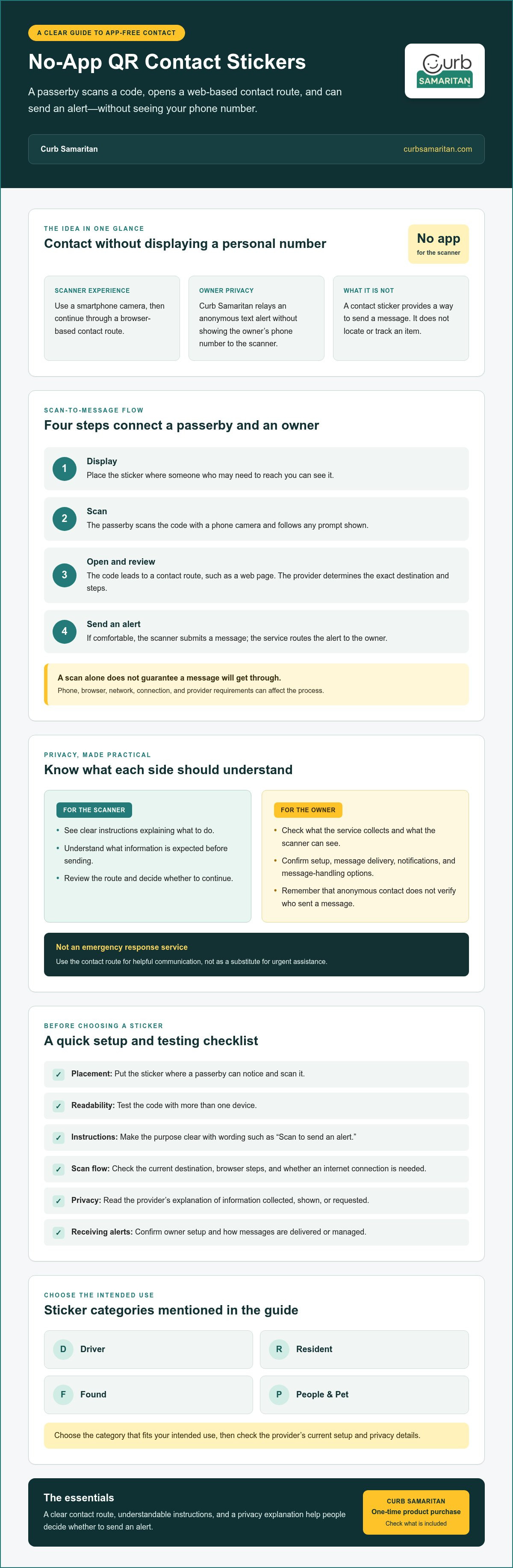
A no app qr code contact sticker is a physical label with a scannable code that opens a contact or messaging route on a phone. Rather than displaying your personal phone number in public, it can direct someone to a service that relays a message. The goal is to make it easier to offer help while sharing less personal information.
A QR code stores information that a compatible device can read. On a contact sticker, it usually points the scanner to a web page or another contact route. The destination and what happens next depend on the provider. For a general overview of the technology, see this explanation of the QR code.
A contact sticker provides a way to send a message; it does not locate or track an item. It isn’t a GPS tracker. It can help connect someone who notices a problem, such as a found item or a vehicle concern, with the owner, but it doesn’t show the item’s location.
What happens when someone scans a contact sticker?
The usual process is simple: someone notices the code, scans it, reviews the contact route, and decides whether to send an alert. Depending on the service, the owner may need to complete setup or take steps to receive messages. A scan alone doesn’t guarantee that a message will get through. The phone, browser, and network can all affect the process.
Providers may show different screens and require different steps. Curb Samaritan’s service lets a passerby send a secure, anonymous text alert without sharing personal information with the owner. Before relying on a sticker, review the provider’s current scan flow and what the scanner sees before sending a message.
What does no-app mean for the person scanning?
“No app” describes the scanner’s experience: they shouldn’t need to download a dedicated application just to use the contact route. They can scan the code with a phone’s built-in camera and continue in a browser. It doesn’t mean that the service behind the code requires no technology or setup.
Phone behavior can vary, so test the sticker with more than one device. Check whether an internet connection is needed to open the page or send a message, and note any browser steps. These requirements depend on the provider, so confirm them before relying on the sticker.
How a No-App QR Contact Sticker Connects a Scanner and an Owner
The sticker is the visible starting point, not the entire communication system. The QR code opens a contact route, while the service behind it determines what the scanner sees and how an alert reaches the owner. With a no app qr code contact sticker, the intended process is straightforward, but the provider’s screens and steps can differ.
In short: notice the code, scan it, review the contact route, then choose whether to send an alert.
- Display: The owner places the sticker where someone who may need to reach them can see it.
- Scan: The passerby points a phone camera at the code and follows the prompt, if one appears.
- Open: The code leads to a contact route, such as a web page. The exact destination depends on the service.
- Send: The scanner reviews the instructions and submits an alert if they’re comfortable doing so.
What the scanner sees and does
A phone may display a camera prompt with a link, then open a destination page in a browser. These are examples, not guaranteed interface details. The provider determines the page and message process, so check its current flow before relying on a particular screen.
Clear wording beside the code helps a passerby understand what to do, such as “Scan to send an alert.” The page should explain what information the scanner is expected to provide before submitting a message. That gives a helpful person a chance to understand the request and decide whether to continue.
How the owner receives a message
On the owner’s side, the service routes the submitted alert to them. Curb Samaritan’s messaging platform supports secure, anonymous text alerts, so the scanner can contact the owner without seeing their personal phone number. Setup steps and how alerts are delivered or managed can vary. Confirm those details with the provider, including any notification settings or message-handling options.
Anonymous contact offers a layer of privacy, but it doesn’t verify who sent a message or guarantee that the sender is who they claim to be. It also isn’t an emergency response service. Use the route for helpful communication, not as a substitute for urgent assistance.
Before choosing a setup, review the service’s current instructions for both sides of the exchange. You can also explore Curb Samaritan QR contact stickers to see how its app-free messaging approach is presented.
No-App QR Stickers vs. Phone Numbers, Apps, and Basic QR Codes
Each contact method involves different trade-offs in convenience, privacy, and setup. A no app qr code contact sticker isn’t private simply because it uses a QR code. The destination, message process, and information each person must provide depend on how the service is built and configured.
| Method | Setup friction | Information exposed | Scanner steps | Dependence on a service |
|---|---|---|---|---|
| Public phone number | Low for the owner | The printed number is visible to anyone who sees it | Call or text the number | No messaging platform is needed, though the phone carrier handles communication |
| App-based contact tool | May require setup, an account, or an app | Depends on the app’s settings and design | May need to install or open the app, then follow its steps | Usually relies on the app and its service |
| Basic QR code | Depends on what destination the code opens | Depends on the linked destination | Scan, then visit the destination | May depend on the linked page or service |
| QR-linked messaging | Owner setup and scanner steps depend on the provider | Can avoid displaying a public number, depending on the service | Scan, review the contact route, and send a message | Relies on the provider to handle the contact route and alert |
These are general differences, not guarantees. A QR code can lead to many types of destinations; the printed pattern alone doesn’t determine privacy or prevent unwanted messages. Codes can also be copied or scanned by people beyond the intended audience, so consider where you place the sticker and what information the destination asks each person to share.
Does a no-app sticker keep a phone number private?
A privacy-focused contact route can let someone send an alert without seeing the owner’s personal number. Curb Samaritan’s messaging platform is designed for secure, anonymous text alerts without sharing personal information with the scanner. Still, limiting public exposure isn’t the same as guaranteeing absolute anonymity. Review the provider’s current privacy explanation, including what details the owner must provide and what the scanner is asked to submit.
How is a contact sticker different from a basic QR code?
A basic QR code opens its assigned destination, which could be a page or another resource. A contact sticker is intended to open a communication route. The key difference is what happens after the scan: where the scanner goes, what information is requested, and how a message is handled. Review those details before relying on any code.
How to Choose, Place, and Test a QR Code Contact Sticker
Start with a clear purpose: who might scan the sticker, what they may need to communicate, and where the code will be seen. A no app qr code contact sticker is most useful when its purpose is easy to understand and the code is readable in its intended location. Use this checklist before settling on a setup:
- Purpose: Decide whether you want to receive a vehicle alert, a message about a home, or contact about a found item, person, or pet.
- Placement: Choose a visible location that makes sense for the situation, while considering who else may see or scan the code.
- Readability: Check that the printed code is clear and easy to access where it will be used.
- Instructions: Make sure nearby wording tells a passerby what scanning is for and what to do next.
- Privacy: Read the provider’s current explanation of what information the owner and scanner may need to share.
Choose a sticker for the situation
Match the label to the intended use. A Driver Sticker can give someone a way to send a helpful vehicle alert. A Resident Sticker is suited to home-related contact, while a Found Sticker gives someone who finds an item a route to contact its owner. People & Pet tags provide a contact option for people or pets. These are contact tools, not tracking devices.
Check readability, privacy, and expectations
Test the printed code with more than one phone, in the intended location and under ordinary lighting and viewing conditions. Confirm that the page opens as expected and the instructions are easy to follow. Before choosing a provider, review its current privacy information and check what details may be collected or shared. Avoid printing personal details on the sticker unless you’re comfortable making them visible.
Set practical expectations, too. A contact sticker can help someone send a message, but it doesn’t replace emergency services or active monitoring. Review the provider’s setup and message-receiving steps so you understand what happens after an alert is sent.
To find a sticker category that fits your situation, explore Curb Samaritan stickers and tags.
How Curb Samaritan Makes QR Contact App-Free
Curb Samaritan uses QR-coded stickers and tags to give a passerby a way to send an anonymous text alert without installing a mobile app or seeing the owner’s personal contact information. The code connects the physical item or location with a messaging platform. It provides a contact option, not a way to locate or monitor someone or something.
This approach can suit people who want to make it easier for a passerby to share a helpful message while limiting public exposure of personal details. As with any contact service, review the current instructions and privacy information so you know what the scanner is asked to do and what information may be involved.
Which Curb Samaritan sticker category fits your use?
Choose based on what you want a passerby to contact you about. The categories serve different situations, rather than offering one identical solution for every need:
- Driver Sticker: A contact route for vehicle-related alerts. The specific message depends on what the passerby notices and chooses to report.
- Resident Sticker: A QR contact option for a resident or home-related use.
- Found Sticker: A way for someone who finds an item to send an alert to its owner.
- People & Pet tags: Contact tools that can help someone reach an owner or responsible person. They don’t provide GPS tracking or professional monitoring.
Consider where the code will be placed and who might see it. A good match makes the purpose easier for a passerby to understand and keeps the sticker’s role clear: it opens a communication route.
What to understand before getting started
A one-time product purchase includes lifetime access to the messaging platform, with no monthly subscription fee for that access. Review the current product details before choosing a sticker so you understand the setup and privacy terms.
Keep expectations practical. Curb Samaritan is not a GPS tracking service, and it doesn’t include professional security monitoring. A message route can support helpful communication, but it can’t guarantee that someone will scan the code or that an alert will lead to a particular outcome.
If this kind of contact option fits your needs, explore Curb Samaritan’s QR contact stickers and tags and compare the categories before deciding which one suits your situation.
Choose a Contact Setup That Feels Right for You
A no app qr code contact sticker can make it easier for someone to send a helpful message without downloading an app. The code opens a contact route, while the service behind it determines what information is requested and how the alert reaches the owner. Review those details before choosing, and test the sticker where you plan to place it.
With Curb Samaritan, a passerby can send an anonymous text alert without sharing personal information with the owner or installing a mobile app. A one-time product purchase includes lifetime access to the messaging platform. Choose among Driver, Resident, Found, and People & Pet options according to the kind of contact you want to enable. These stickers support communication; they aren’t GPS tracking or professional security monitoring.
If this approach fits your needs, explore Curb Samaritan’s app-free QR contact stickers and tags. A clear purpose, thoughtful placement, and a quick test can help people offer a hand while respecting your privacy.
Frequently Asked Questions
Does a no-app QR code contact sticker work with any smartphone?
Not necessarily. Many smartphones can scan QR codes with a built-in camera, but camera behavior, browser support, and the page the code opens can vary. A no app qr code contact sticker avoids requiring a dedicated app, but it can’t remove every device limitation. Test the code with more than one phone and check the provider’s current requirements.
Can someone scan a QR contact sticker without downloading an app?
Yes, if the sticker’s service is designed for app-free scanning. With Curb Samaritan, a passerby can scan the code and send an anonymous text alert without installing a mobile app. The scanner may use a phone camera and continue through a browser, depending on the device and service flow. Check the current instructions to understand what the scanner sees and needs to do.
How does a QR code contact sticker let someone message the owner?
The QR code opens a contact route set up by the provider. The passerby reviews that route and, if they choose, sends an alert. The service then relays the message to the owner. Curb Samaritan’s platform supports anonymous text alerts, but screens and owner notification steps can vary by service. Check the current setup instructions to understand how messages are sent and received.
Does a no-app QR sticker reveal my phone number?
Not necessarily. A privacy-focused messaging service can let someone contact an owner without displaying the owner’s personal phone number. Curb Samaritan’s messaging platform supports anonymous text alerts without sharing personal information with the scanner. Privacy still depends on the service’s design and settings. Review its current privacy information and confirm what details the owner must provide and what the scanner is asked to submit.
What happens if someone scans a QR contact sticker without internet access?
If the contact route needs to load a web page, an internet connection may be needed to open it and send an alert. Without access, the scanner may not be able to complete the message at that time. Requirements depend on the provider and device. Check the service’s instructions for connection needs at both the scan and message stages rather than assuming the code works offline.
Can a QR contact sticker track a car, person, or pet?
No. A QR contact sticker provides a way to send a message; it doesn’t show the location of a car, person, or pet. Curb Samaritan’s Driver Sticker, Resident Sticker, Found Sticker, and People & Pet tags connect scanners and owners through messaging, not GPS tracking. They also don’t provide professional security monitoring. Choose them for contact, not live location updates or emergency response.
How can I test whether a QR code contact sticker works?
Scan the printed code with more than one phone, including a phone different from the one used to set it up. Test it where you plan to place it, under ordinary lighting and viewing conditions. Check that the contact route opens, read the instructions, and confirm through the provider’s setup that the message reaches the intended owner. Review current privacy details before using the sticker.