

No-App QR Code Messaging: How It Works and Protects Your Privacy
Can someone send a helpful message through a QR code without downloading an app or sharing a phone number? With no app QR code messaging, a scan opens a path to contact, while the service behind the code determines what happens next.
It’s natural to wonder where a scan leads and what information it reveals. A QR code generator creates the code, but it isn’t necessarily the messaging service. Some codes open a phone’s messaging app; other systems let someone send an alert without sharing personal contact details. Knowing the difference helps you understand what a scan does before you use a code.
This guide explains the scan-to-message process, the privacy questions to consider, and how QR stickers and tags can make everyday contact easier. Curb Samaritan’s QR-coded products provide a physical entry point to anonymous messaging, helping people share a quick alert about a vehicle, a resident, a person, a pet, or a found item. No special app is needed to send an alert, and each product includes lifetime access to the messaging platform.
Key Takeaways
- With no app qr code messaging, scanning and sending are separate steps. Follow the on-screen prompts before choosing whether to send an alert.
- App-free access doesn’t automatically mean private messaging. Consider whether a service lets people connect without sharing personal contact details.
- Choose a QR code option that suits its purpose, whether it’s for a vehicle, home, person, pet, or found item.
- Place the code where it is easy to notice and scan, and make its purpose clear.
- Check whether ongoing fees apply. Curb Samaritan products include lifetime access to the messaging platform.
What Is No-App QR Code Messaging and Why Use It?
No-app QR code messaging lets someone scan a code and reach a messaging flow without downloading a dedicated app. The scan opens a route to contact, but it doesn’t send a message by itself. The person scanning still needs to follow the prompts and choose to send an alert. That distinction explains how no app qr code messaging works in practice.
No-app QR messaging starts a message from a QR code without requiring the person scanning it to install a dedicated app. This can make it easier to send a quick, useful alert without pausing to find and install an app. The scan opens the next step, but the decision to send remains with the person who scans.
A QR code is an access point, not the entire messaging service. Its pattern holds information that a compatible camera can read; the destination determines what happens next. For background on how a QR code works, see its basic structure and history. Scanning and choosing to send a message remain separate actions.
Does Scanning a QR Code Require an App?
Many smartphones can scan QR codes with a compatible built-in camera, without a separate QR-scanning app. After scanning, the phone may offer to open a browser or another experience, depending on the code’s destination. Review the prompt and destination before continuing. Phone behavior and the exact steps can vary by device and service, so don’t assume every scan looks the same.
How Is QR Messaging Different from a QR Code Generator?
A QR code generator creates the visual code and may let someone choose what information it points to. A messaging service provides the experience that follows, such as a way to send an alert. The code connects the two, but the printed square alone doesn’t explain how messages are handled or what details are shared. Understanding that distinction helps you assess the service as well as the code.
For a passerby, the practical questions are: What does the scan let them do? What information must they provide to send a message? Curb Samaritan’s QR-coded stickers and tags are physical entry points to a messaging platform. A scan lets someone send an alert without a mobile app or sharing personal information, and each purchase includes lifetime access to the platform. For a closer look at this kind of setup, read No-App QR Code Contact Stickers: How They Work and Protect Privacy.
How No-App QR Code Messaging Works from Scan to Reply
The process involves two people and two choices: a passerby scans and decides whether to send an alert, then the person associated with the code can respond through the messaging service. The screens and next steps depend on the service. Follow the prompts shown on the phone and review them before sending anything.
With no-app QR code messaging, someone scans a visible code, follows its destination to a messaging experience, and chooses whether to send an alert.
What Does the Person Scanning the Code Do?
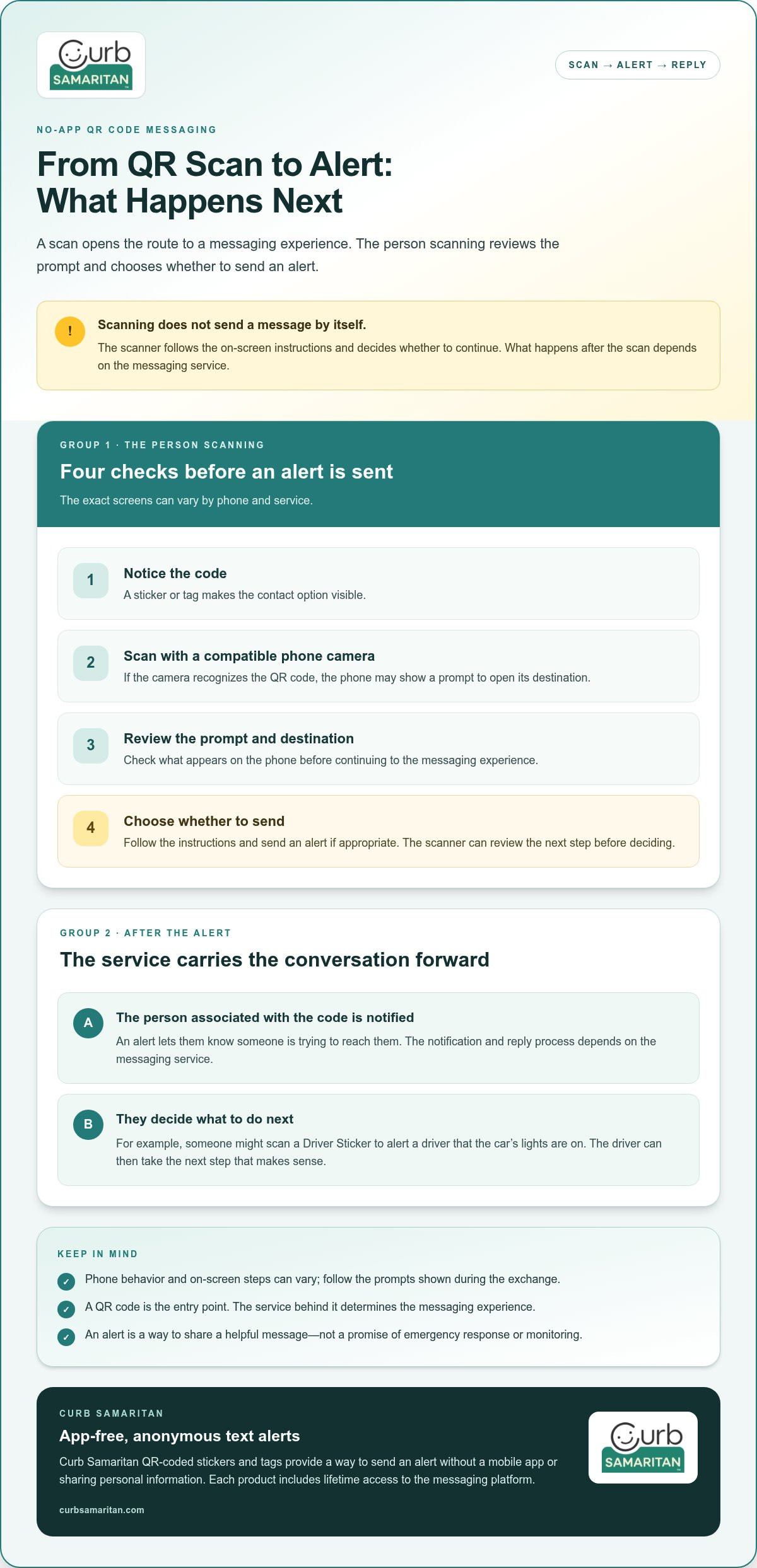
The scanner opens their phone’s camera and points it at the QR code. If the camera recognizes it, the phone may show a prompt to open the code’s destination. The person follows the on-screen instructions to reach the messaging experience. Since phone behavior varies, the steps won’t look exactly the same for everyone.
- Notice the code: A sticker or tag makes the contact option visible.
- Scan it: Use a compatible phone camera to read the code.
- Review the prompt: Check the destination shown on the phone before continuing.
- Choose whether to send: Follow the instructions and send an alert if appropriate.
Scanning doesn’t automatically send a message. The person can review the next step and decide whether to continue. That pause keeps the action in the scanner’s hands.
What Happens After Someone Sends an Alert?
The alert lets the person associated with the sticker or tag know that someone is trying to reach them. The notification and reply process depends on the messaging service, so check the instructions shown during the exchange.
For example, someone might notice that a car’s lights are on. They scan the Driver Sticker, follow the prompts, and send an alert. The driver can then take the next step that makes sense. This is a way to share a helpful message, not a promise of emergency response or monitoring.
With Curb Samaritan’s QR-coded stickers and tags, a scan lets someone send an anonymous text alert without requiring a mobile app or sharing personal information. Each product includes lifetime access to the messaging platform. If an app-free contact point would be useful for a vehicle, home, person, pet, or found item, explore Curb Samaritan QR-coded stickers and tags.
Does No-App QR Messaging Protect Your Privacy?
Using a QR code without downloading an app can make contact easier, but app-free access alone doesn’t guarantee private messaging. With no app qr code messaging, privacy depends on what happens after the scan: where the code leads, what information the sender is asked to provide, and what details are visible to the recipient.
Before relying on anonymous messaging, consider what information the service requests and reveals, and what the service is designed to do. An anonymous alert can help people connect without exchanging personal contact details. But no app qr code messaging isn’t automatically the same as confidential communication, identity verification, or emergency protection.
Can Someone See Your Phone Number When They Scan a QR Code?
That depends on the messaging service and how it’s designed. A QR code is only the entry point; the messaging flow determines what the scanner and recipient may see. Curb Samaritan’s QR-coded products let someone send a text alert without sharing personal information.
For example, a service may allow an alert without showing the sender’s number to the recipient. That’s different from knowing what other information the service requests or how the exchange works. Consider those details when choosing no app qr code messaging.
What Privacy Questions Should You Consider?
Look beyond the printed code. The destination and messaging flow shape the interaction more than the QR image itself. Before using a service for routine contact, consider what each person shares during the exchange and whether the process asks for details that seem unnecessary for the intended alert.
- Does the scanner need to provide a phone number, name, or other personal detail?
- What information is visible to the person associated with the code?
- Does the service explain how messages and related information are handled?
- Does the code lead to the destination you expected before you continue?
These checks are useful whether the code is on a vehicle, a Resident Sticker, or a tag for a person or pet. They help distinguish “no app required” from “no personal information involved.” For a separate look at scanner safety, see Why No-App QR Code Scanners are More Secure. Safe scanning and messaging privacy are related, but the key question here is what information the service reveals or requests.
Where Can No-App QR Code Messaging Be Useful?
No-app QR code messaging can give someone a simple way to share a helpful alert in everyday situations. The message might point out a vehicle issue, reach a resident, or help a finder start contact about a pet or lost item. It supports communication, but it doesn’t track anyone’s location or provide professional monitoring.
- Vehicle: A passerby might alert a driver that a window is open or a door appears unlatched.
- Home or residence: Someone could send a resident a note about a delivery or an item left nearby.
- Person or pet: A finder could use a tag to start contact with the person responsible.
- Lost item: Someone who finds a tagged belonging could message its owner to help arrange its return.
Each situation calls for a simple, relevant alert, not more personal detail than needed. A visible code can make the next step clear: scan it, follow the prompts, and send a message if appropriate. When a sticker or tag explains its purpose, a passerby can more easily understand how to make contact.
When Is a QR Message Helpful for a Vehicle or Home?
A vehicle sticker gives someone a way to share a practical note with its driver without looking for contact details. A Resident Sticker provides a similar path for a message intended for someone at home. For more vehicle-specific context, read Guide to Anonymous Car Stickers for Secure Alerts.
Can QR Tags Help with Pets or Lost Belongings?
If someone finds a pet wearing a tag or a belonging with a label, scanning its code can offer a way to contact the person connected to it. A message might say where the item was found or that the pet is safe with the finder. A tag can help people connect, but it can’t promise recovery or a reunion. For more on pet tags, see Smart Pet ID Tag Lifetime Access: The 2026 Guide to Subscription-Free Security.
Curb Samaritan’s QR-coded stickers and tags offer app-free messaging for vehicles, homes, people, pets, and found items. Each purchase includes lifetime access to the messaging platform. Explore QR-coded stickers and tags to make helpful contact easier.
How to Choose a No-App QR Messaging Option for Everyday Use
A useful option should fit the situation and make the next step easy to understand. Before choosing no app qr code messaging for a vehicle, home, person, pet, or found item, consider what a passerby needs to do and what information the exchange should reveal.
Use this short checklist:
- App-free access: Can someone reach the messaging experience without downloading a dedicated app?
- Personal information: Can they send an alert without sharing personal contact details? Consider what the service asks from both people.
- Intended use: Does the sticker or tag suit the item or place it’s meant to identify?
- Ongoing fees: How is access to the messaging platform handled over time?
What Should You Look for in a Messaging Sticker or Tag?
Look for a clear scan experience and a purpose that matches the sticker’s location or the item it identifies. Place the code where it can be seen and scanned, and make its purpose easy to understand. A passerby is more likely to know what to do when the sticker or tag clearly indicates that scanning starts a contact process.
Privacy deserves a separate look. App-free access doesn’t automatically mean personal details stay private, so consider what information the messaging flow requests or shows. Curb Samaritan’s QR-coded products let someone send an alert without sharing personal information. Each purchase includes lifetime access to the messaging platform.
Which Curb Samaritan Option Fits Your Situation?
Match the option to the person or item that may need a message:
- Driver Sticker: For a passerby who needs to send a vehicle-related alert to its driver.
- Resident Sticker: For a message intended for a resident at home.
- People & Pet tags: For contact related to a person or pet.
- Found Sticker: For someone who finds an item and wants to help its owner get in touch.
Placement matters too. Put the sticker or tag where it can be noticed and scanned in the situation it’s meant for, and keep any instructions direct. A code that’s hard to see or unclear in purpose may be overlooked.
If one of these options fits how you want to make everyday contact easier, explore the available stickers and tags on the Curb Samaritan homepage. Each creates a physical entry point to messaging, with lifetime platform access included.
Make Everyday Contact Easier, One Scan at a Time
No app qr code messaging can give a passerby a straightforward way to start contact, but scanning and sending are separate actions. The person follows the prompts and chooses whether to send an alert. App-free access alone doesn’t guarantee privacy, so consider what details the messaging service requests or reveals.
For a vehicle, home, person, pet, or found item, the right QR-coded sticker or tag can make a helpful next step visible without displaying personal contact details. Curb Samaritan’s messaging platform lets people send alerts without sharing personal information, and each purchase includes lifetime access to the platform.
Explore Curb Samaritan stickers and tags for a practical way to make private contact easier in everyday moments. A clear point of contact can help turn a passerby’s good intentions into a thoughtful message.
Frequently Asked Questions
Does no-app QR code messaging require a special scanner app?
No. Many compatible smartphone cameras can scan QR codes without a separate scanner app. The phone may then show a prompt that leads to a website or messaging experience. The exact steps can vary by device and service. Follow the on-screen prompt and review what opens before choosing whether to continue.
Can someone send a message through a QR code without seeing my phone number?
Some services are designed to let someone send an alert without revealing personal contact details, but the process depends on the service. Curb Samaritan’s QR-coded stickers and tags let people send alerts without sharing personal information. Consider what details the messaging flow requests and what each person can see before using a service.
How does no-app QR messaging work after someone scans the code?
After scanning, the phone directs the person to the destination linked to the code. They follow the on-screen prompts to reach the messaging experience and choose whether to send an alert. Scanning and sending are separate actions. With Curb Samaritan, a scan lets someone send an anonymous text alert without a mobile app. The exact screens and message-handling steps depend on the service.
Is no-app QR code messaging safe to use?
It can be a practical way to start contact, but not needing an app doesn’t automatically make a service private or safe. Check that the code leads to the expected destination before continuing, and consider what information the messaging flow asks for or reveals. Be cautious with codes that appear altered or come from untrusted sources. Privacy depends on the service behind the code, not just the QR image.
Can QR code stickers be used for cars, homes, pets, and lost items?
Yes. Curb Samaritan offers QR-coded options for vehicle alerts, resident contact, people and pets, and found items. For example, someone could use a Driver Sticker to send a vehicle-related alert, or scan a tag on a pet or belonging to start a message to the person connected with it. These products support communication, but they don’t track location or guarantee that an item or pet will be returned.
Do QR messaging stickers require a monthly subscription?
Curb Samaritan products include lifetime access to the messaging platform, with no monthly subscription fee for that access. The platform is included with each product rather than sold as a standalone app. The physical sticker or tag serves as an entry point to messaging.
What happens if someone scans a QR code but does not send a message?
A scan alone doesn’t send an alert. The person may reach the code’s destination, but they still need to follow the prompts and choose to send a message. If they decide not to continue, no message is sent through that flow. What information a scan itself may reveal or record depends on the service behind the code, so don’t assume every QR destination works the same way.