

QR Code for Apartment Door: Private Resident Messaging
What if a QR code for apartment door visitors could open a conversation without opening the door? Not every apartment QR code is part of an entry system, and scanning one does not automatically share your phone number. A resident messaging sticker works differently: a visitor scans it to send an anonymous text alert, without seeing your personal number or downloading an app.
The right option depends on what you need. A messaging sticker can help a delivery person send a note or a neighbor report an issue. A building access system, by contrast, helps manage entry. One supports communication; the other is designed for access control.
This guide explains what happens after someone scans a door code, how messaging differs from building access, and what to check before displaying a sticker in a shared space. Use the practical checks for building guidelines, privacy, and backup contact methods to choose an option that makes it easier to connect while keeping your boundaries clear.
Key Takeaways
- A qr code for apartment door visitors can lead to messaging, a directory, or an access system. Check what the code opens before choosing one.
- Compare options by purpose, visitor steps, access control, and the information each asks people to share.
- Before displaying a code, check its destination, consider privacy, ask property management about placement, and explain its purpose to visitors.
- Curb Samaritan’s Resident Sticker supports anonymous resident messaging. It does not unlock doors or manage building access.
- The Resident Sticker includes lifetime platform access, and visitors do not need a mobile app to scan and send a message.
What does a QR code for an apartment door actually do?
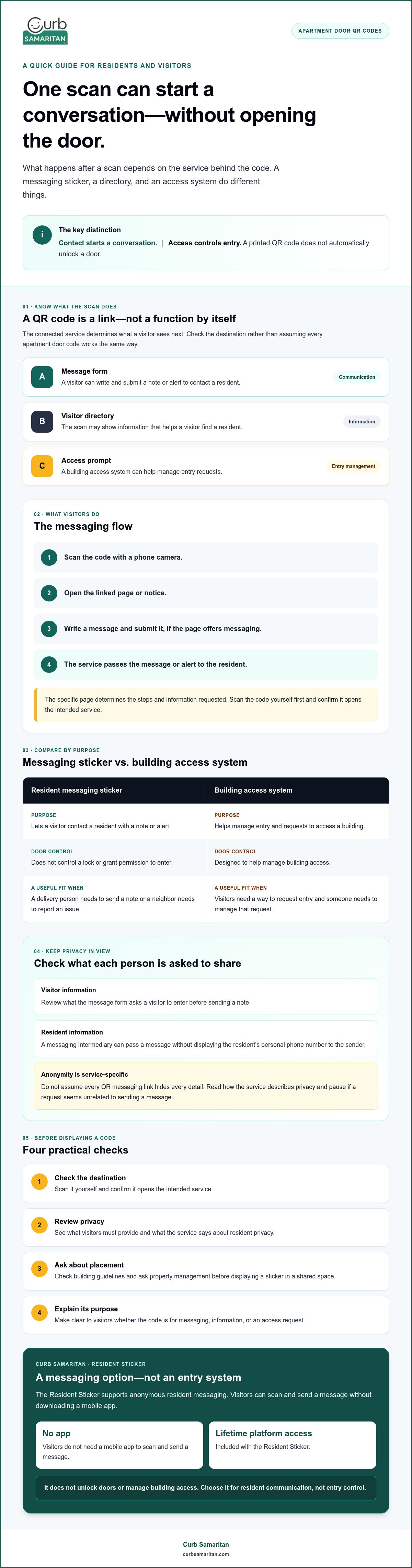
A QR code for an apartment door is a scannable link, not a function by itself. The service connected to it determines what happens next. One code might open a message form for contacting a resident. Another could show a visitor directory or prompt someone to request building access. For a basic explanation of how the technology stores and shares information, see this overview of the QR code.
A printed code does not automatically unlock a door. Access depends on a system set up to manage entry, while a messaging code may only start a conversation or show information. Scanning a code can initiate contact without granting entry.
What happens when a visitor scans an apartment QR code?
A visitor points a phone camera at the code and taps the link or notice that appears. The linked service determines what they see, such as a message form, a resident directory, or an access prompt. The steps and information requested vary, so check the specific code rather than assuming every apartment QR code works the same way.
Before displaying a code, scan it yourself. Confirm that it opens the intended service and that the page explains what a visitor can do. Clear instructions help prevent someone from mistaking a contact sticker for an entry credential.
QR contact sticker or QR entry system: what is the difference?
A contact sticker lets someone reach a resident by sending a note or alert. It does not control a lock or grant permission to enter. An entry system manages requests to access a building, often through a visitor-facing interface and a decision by a resident or property representative.
Contact starts a conversation; access controls entry. A resident might want a visitor to report a delivery issue without sharing a personal phone number. A building might need a system that helps visitors find a resident and request entry. Those are different needs, even when both use QR codes.
Start by deciding what you want the scan to accomplish. If the goal is communication, check what information the messaging service asks visitors to provide. If the goal is entry, find out how access is managed and who can approve it. Understanding what sits behind the code helps you choose an option that fits your door and privacy preferences.
How apartment-door QR messaging works while protecting resident privacy
A QR message link can give visitors a way to send a note without putting a resident’s phone number on the door. The basic process is simple: scan the code, open the linked page, write a message, and submit it. The service then passes the message or alert to the resident.
What the visitor provides and what the resident shares are separate questions. A visitor may need to enter information requested by the message form, while the resident may receive a message without showing their personal number. Check what the service asks each person to provide. Anonymity depends on how that service works, so do not assume every QR messaging link hides every detail.
A QR code is a doorway to a service, not proof of security. Before using a qr code for apartment door messaging, review the page it opens and make sure its purpose is clear. Apartment buildings use QR codes in different ways, including for amenities, as described in this overview of QR codes for apartment amenities. The code itself does not explain what information a service collects or how it handles messages.
Can a visitor send an apartment resident a message without seeing their number?
Yes, if the service acts as a messaging intermediary. It can pass a visitor’s message to the resident without displaying the resident’s personal phone number to the sender. Curb Samaritan describes its Resident Sticker as supporting anonymous messaging without requiring the resident to share personal information. This describes its messaging approach, not a promise of complete anonymity across every service or situation.
Does scanning a resident QR code require an app?
App requirements depend on the service. Some links open in a phone’s browser, while others may ask visitors to use an app. Curb Samaritan says its QR messaging works without a mobile app. Before submitting anything, check what the linked page requests, including personal details or permissions, and pause if a request seems unrelated to sending a message.
Use this quick check before relying on a code:
- Confirm it opens the intended messaging page.
- Review what information a visitor must enter to send a note.
- Understand how the service describes resident privacy and message delivery.
- Make sure the sticker tells visitors what scanning it will do.
If anonymous resident alerts fit your needs, learn more about Curb Samaritan’s Resident Sticker and how its messaging option works.
Apartment QR code options compared: resident sticker, intercom, or access control
Choose an option based on the job you need done: sending a resident a message, helping a visitor contact someone, or managing building entry. A qr code for apartment door visitors can point to any of these, but the code itself does not tell you what the system can do. Compare purpose, visitor steps, access control, and information requested before deciding.
| Option | Purpose | Visitor experience | Access control | Information shared |
|---|---|---|---|---|
| Resident messaging sticker | Send a note or alert to one resident | Scan, open a message page, and send a message | Does not grant entry | Depends on the linked service and its message form |
| Intercom directory | Help visitors find or contact a resident | Scan to view a directory or contact option | May be part of an entry process; capabilities depend on the system | May show resident or directory details, depending on setup |
| Managed entry system | Handle building visitor access | Follow the property’s access request process | Designed to manage entry | Depends on how the property configures the system |
When is a resident QR sticker a better fit than an intercom?
A communication-only option may fit when someone needs to alert you, not enter the building. For example, a visitor may want to send a note without viewing a resident directory or requesting access. Curb Samaritan’s Resident Sticker is an option for anonymous messaging. Keep the building’s existing access arrangements and emergency procedures separate. A contact sticker is not a door lock, intercom replacement, or security monitor.
When does an apartment building need a QR access-control system?
If a building needs a shared process for managing visitor entry, it may need a property-wide system and input from its administrators. Companies such as ButterflyMX, Gate Sentry, and DOOR are examples in the building-entry category, not resident messaging stickers. Before choosing an approach, the building should assess how entry decisions will be made and what visitor information the system uses.
Keep the purpose clear. A message sticker should not imply that scanning it will let someone in. The Federal Trade Commission explains security risks of QR codes, including harmful links placed on or in place of legitimate codes. Check that a displayed code still opens its intended destination, and tell visitors whether it is for messaging or entry.
How to choose and place a QR code for an apartment door
Before putting up a qr code for apartment door visitors, decide what you want the scan to do. A few checks can protect your privacy, prevent misunderstandings, and make the code more useful to the people it is meant for.
Use this checklist before displaying one:
- Purpose: Decide whether visitors should send you a message, view a directory, or follow an access process.
- Destination: Scan the code and confirm that it opens the page you expect.
- Privacy: Review what information visitors must provide and what personal details about you may be shown.
- Building approval: Ask property management about placement guidelines. Do not assume every door or shared area has the same rules.
- Visitor clarity: Add a brief explanation of what scanning the code does, so visitors do not mistake a contact link for an entry credential.
Test the code and its linked experience before relying on it for routine messages. Check that the page loads and the steps make sense from a visitor’s point of view. If the service allows it, send a test message and confirm how the alert reaches you. Keep another way to contact you available in case the code or linked page is not usable.
Where should a resident place an apartment QR sticker?
Choose a spot where the intended visitor can notice and scan the sticker without blocking signs, locks, or shared equipment. A visible location may still be unsuitable if it could confuse visitors or interfere with building fixtures. Ask the property manager before placing anything in a shared area, since expectations can vary between buildings.
What should residents check before choosing a QR messaging service?
Review the full visitor and resident experience, not just the printed code. Does scanning require an app or account? What contact details, if any, must the visitor provide? What does the recipient see, and how does the resident receive an alert? These checks help you understand the privacy trade-offs before a stranger scans the code.
Also check whether continued platform access is included or requires recurring payments. Curb Samaritan’s Resident Sticker includes lifetime platform access without recurring subscription fees, and its QR messaging works without a mobile app. Confirm product details with the provider rather than assuming a sticker is weather-resistant, easy to install, or reliably scannable.
If a private messaging sticker fits your needs, explore Curb Samaritan’s Resident Sticker and review how its messaging works before choosing where to display it.
A private apartment-door alert with Curb Samaritan's Resident Sticker
A resident messaging sticker has a focused purpose: helping a visitor send a note, not managing who can enter the building. If that is the kind of contact you want, Curb Samaritan’s Resident Sticker is a QR-coded option for receiving anonymous messages without sharing your personal information with the passerby. Visitors can scan it and send a text alert without installing a mobile app.
The distinction matters. A private alert can help a visitor reach you about a delivery or another matter at your door. It does not unlock a door, provide GPS tracking, or offer professional security monitoring. Keep your building’s entry system and emergency arrangements in place for those separate needs.
What the Curb Samaritan Resident Sticker is designed to do
The sticker connects a passerby to a messaging service, allowing them to send a text alert to the resident. Its purpose is to support contact without requiring the resident to give the visitor personal information, such as a phone number. The purchase includes lifetime access to the messaging platform without recurring subscription fees. As with any messaging service, do not treat the sticker as a promise of message delivery, a response time, emergency help, or ongoing monitoring.
Before displaying a qr code for apartment door visitors, confirm that messaging is the outcome you want and that the sticker’s purpose will be clear. For more context on privacy-minded home messaging, read this secure home messaging guide.
How to decide whether a resident sticker fits your building
Consider what the visitor needs to do. If they only need a way to send you a private message, a resident sticker may fit. If they need to find someone in a directory, be screened, or request building entry, ask property management about the intercom or managed access options the building supports. A messaging sticker does not replace those systems.
Also consider who might scan the code and what information you are comfortable sharing. Check the linked service’s visitor steps, review what details it requests, and follow your property manager’s guidance about displaying a sticker. This helps provide a clear path to contact without suggesting that the code grants access.
If private resident alerts match what you need, take a look at Curb Samaritan’s Resident Sticker and review its messaging details before deciding whether it fits your door and building.
Choose a door code that fits the way you live
The right qr code for apartment door depends on what you want visitors to do. A messaging code can open a private line of communication; an intercom or managed entry system serves a different purpose. Before displaying a code, check where it leads, what information it requests, and whether your building has placement guidelines.
If your goal is to receive a visitor’s message without sharing your personal phone number, Curb Samaritan’s Resident Sticker is one option to consider. Its QR code supports anonymous messaging, visitors do not need a mobile app, and lifetime platform access is included without recurring subscription fees. It is a communication tool, not a way to unlock doors or manage building access.
Ready to see whether it suits your needs? Explore Curb Samaritan's Resident Sticker. A clear purpose and thoughtful setup can make it easier for visitors to reach out while helping you keep your personal boundaries.
Frequently Asked Questions
What is a QR code for an apartment door?
A qr code for apartment door visitors is a scannable link that opens a page or service. What happens next depends on its destination: it might show a message form, a resident directory, or an access prompt. Check the linked service before displaying the code to confirm what visitors will see and whether it serves your purpose. A QR code alone does not determine what the door or building can do.
Can a QR code on an apartment door unlock the building?
It can be part of an entry system, but a QR code by itself does not unlock a door. Access depends on a system designed to manage building entry and how the property has set it up. A resident messaging sticker has a different role: it lets a visitor send a message or alert. If you need entry control, ask property management about the building’s access system rather than relying on a contact sticker.
Can visitors contact an apartment resident without knowing their phone number?
Yes. A messaging service can let visitors send a message without showing them the resident’s personal phone number. Curb Samaritan’s Resident Sticker supports anonymous messaging without requiring the resident to share personal information with the passerby. The precise privacy experience depends on the service, so review what the visitor must provide and what details may be visible before displaying a code.
Do apartment QR codes require an app?
Not always. App requirements depend on the service behind the code: some open a page in a phone’s browser, while others may require an app or account. Curb Samaritan says its Resident Sticker messaging works without a mobile app. Before using another QR code, scan it and check what the linked page asks visitors to install, share, or allow.
Is a resident QR sticker the same as an apartment intercom?
No. A resident QR sticker is intended to start communication, such as letting a visitor send an alert. An apartment intercom or directory helps visitors contact residents as part of a building’s visitor process, and some systems may connect that process with managed entry. A messaging sticker does not replace an intercom, unlock a door, or control building access. Choose based on whether you need a message or an entry process.
Do residents need permission to put a QR sticker on an apartment door?
Check with your property manager before placing a sticker, especially in a shared area or somewhere subject to building guidelines. Requirements can vary between properties, so do not assume that a sticker is automatically allowed or prohibited. Ask where it may be placed and whether it could obstruct signs, locks, or shared equipment. Confirming first can help avoid confusion and keep the code visible to the visitors it is meant for.
Does a QR code for an apartment door track visitors?
A printed QR code by itself does not track a visitor’s physical location or reveal who scanned it. The service or webpage it opens may handle information according to its own practices, so check its privacy details rather than assuming every code works the same way. Curb Samaritan’s Resident Sticker is for anonymous messaging, not GPS tracking. A QR messaging sticker is also not professional security monitoring or a record of who enters the building.