

QR Code for Mailbox Contact: Reach Homeowners Without Sharing a Phone Number
What if a visitor could reach you without seeing your phone number? A qr code for mailbox contact may seem like a simple answer, but there’s an important catch: USPS rules prohibit attaching items without postage to a mail receptacle. A QR contact point can still help neighbors and visitors send you a message without displaying your personal number, as long as it’s placed somewhere other than the mailbox itself.
It’s reasonable to want a contact method that’s easy to understand and doesn’t put private details on public view. With a Resident Sticker, someone can scan the code and send a secure, anonymous text alert without downloading an app or sharing personal information. The code leads to a messaging option rather than displaying your phone number.
This guide explains what happens after a scan, how to choose a privacy-conscious way to receive messages, and how to make a contact point visible and easy to scan. It also covers why the mailbox itself isn’t the place for a QR code, so you can make a neighborly connection while respecting the rules.
Key Takeaways
- A qr code for mailbox contact can guide a visitor to a way to message you, but it doesn’t manage mail.
- Understand how the scan, contact prompt, and message fit together so visitors know what to do next.
- Compare displaying a phone number with information-only codes and private messaging to weigh the privacy trade-offs.
- Use a clear label and easy-to-scan placement to help people find a contact point without obscuring your address.
- The Resident Sticker gives neighbors and visitors a way to send a message without sharing personal contact details.
What Is a QR Code for Mailbox Contact, and What Can It Do?
A qr code for mailbox contact is a scannable route to a homeowner messaging option. A passerby scans the code with a phone, then follows the prompt to send a message. The code itself doesn’t manage mail, track a person, or reveal where someone is. It connects a visitor with a way to reach a resident.
A contact QR code is a scannable invitation to message a homeowner, not a tracking device. What happens after a scan depends on where the code leads. Some codes show information, such as a website or contact card. Others connect to a messaging experience. A QR code can point to different kinds of content, as the QR code overview explains, but not every code offers anonymous or secure messaging.
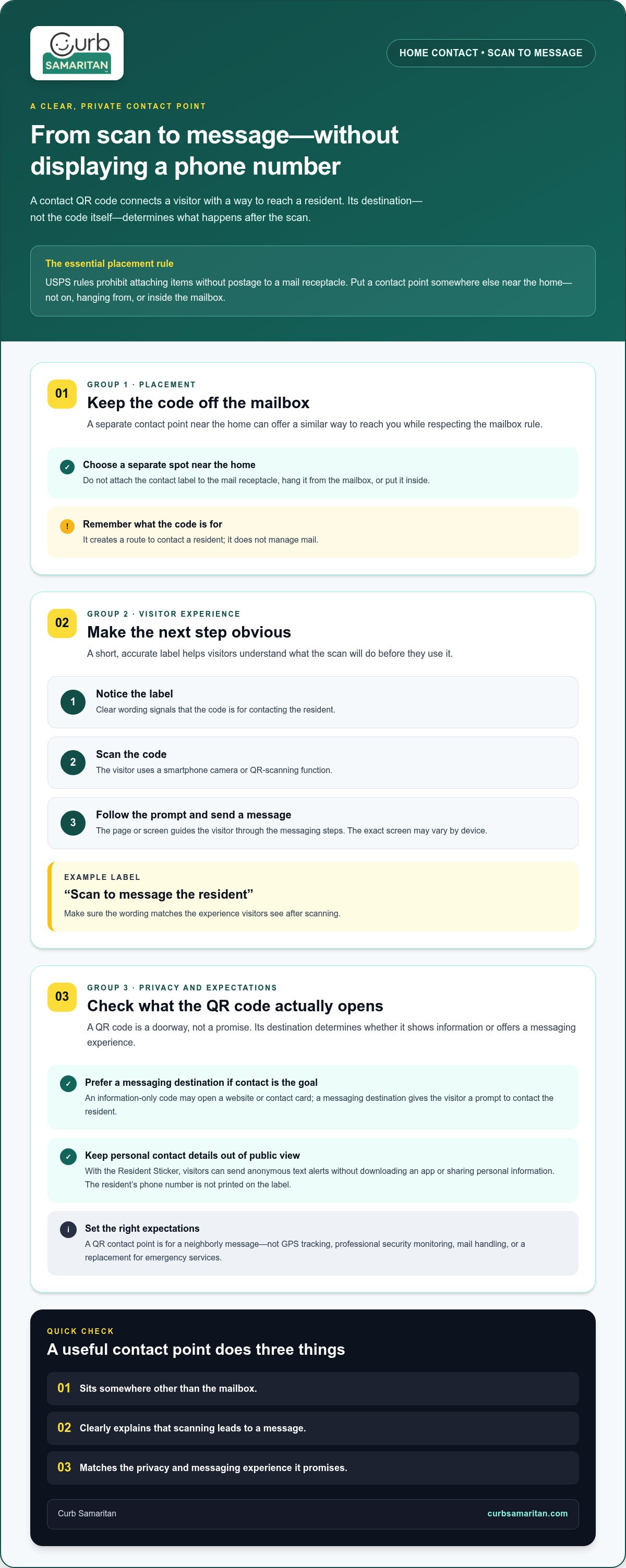
There’s also an important placement distinction: in the United States, USPS rules prohibit attaching items without postage to a mail receptacle. Don’t place a contact sticker directly on, hang it from, or insert it into a mailbox. A separate contact point near the home can serve a similar purpose without putting the code on the mail receptacle.
How Is a Mailbox Contact QR Code Different from a Standard QR Code?
A standard QR code is a doorway, not a promise about what’s on the other side. An information-only code might open a page with household details or instructions. A code connected to a messaging platform gives the visitor a prompt to contact the resident. The difference is the destination and the experience it offers. For example, Curb Samaritan’s Resident Sticker supports anonymous text alerts without requiring an app or personal information sharing.
When Might a Resident Want a Contact Option at the Mailbox?
Think of ordinary moments when a quick note could help. A neighbor might notice that a gate has been left open, see a parcel sitting in an exposed spot, or spot a small issue near the home. A visitor who arrives while the resident is inside or away may also need a simple way to send a message. These are everyday situations, not emergencies, and a QR contact point is optional. It offers a neighborly alternative to posting a phone number where anyone can see it.
Clear wording helps people understand the purpose before they scan. A short label such as “Message the resident” sets an expectation: the code is for person-to-person contact, not mail handling or monitoring. Keep the message calm and direct, and make sure the destination matches that promise. When a visitor understands what the scan will do, reaching out feels straightforward, and the resident can keep personal contact details private.
How Does QR Code Contact at a Mailbox Work?
A QR contact label gives a visitor a simple path from a visible prompt to a message for the resident. The steps are straightforward: notice the label, scan its code with a smartphone, then follow the contact prompt. A person scans the code, follows the on-screen steps, and sends a message that reaches the resident through the messaging platform.
The code doesn’t need to display a phone number for the visitor to use it. With Curb Samaritan, a person can send an anonymous text alert without installing a mobile app or sharing personal information. The resident receives a message through the platform, rather than having a personal number printed for passersby to see.
- Notice the label. Clear wording helps a visitor understand that the code is for contacting the resident.
- Scan the code. The visitor points a smartphone camera or QR-scanning function at the code.
- Follow the prompt. The page or screen that opens guides the visitor to send a message.
What Does the Person Scanning the Code Need to Do?
Most smartphone cameras can read a QR code. The visitor opens the camera or a QR-scanning function, holds the phone so the code is visible, and selects the prompt that appears. The exact screen may vary by device, but the next step should be clear: follow the displayed instructions to write and send a message. The basic process doesn’t depend on a specific phone model.
How Can a Resident Receive a Private Alert?
The message travels through the contact platform, which supports anonymous text alerts. A visitor doesn’t need to provide personal information to contact the resident, and the resident’s phone number isn’t displayed publicly on the label. This separation makes it possible to offer a contact option while keeping personal details out of public view.
Keep the purpose clear. This is a messaging tool, not GPS tracking or professional security monitoring. It doesn’t follow a person’s location or replace emergency services. It gives a neighbor or visitor a way to send a note when a simple heads-up would be useful. The resident can then decide how to respond.
For a smooth experience, make sure the label’s wording matches what happens after scanning. A prompt such as “Scan to message the resident” sets a clear expectation and helps visitors feel confident about the next step. The Resident Sticker home-contact option provides this kind of scan-to-message experience, connecting a passerby with a private way to send an alert.
Mailbox QR Code vs. Phone Number: Which Contact Method Protects Privacy?
The best contact method depends on what you want a passerby to see and how you want a conversation to begin. A phone number is immediately usable, while a QR code can direct someone to information or a messaging service. But the code’s appearance doesn’t tell you whether contact details stay private. The service behind it matters.
Here’s a practical comparison of three common options:
| Contact method | What the passerby sees | How contact begins | Privacy trade-off |
|---|---|---|---|
| Displayed phone number | Your number in plain view | They call or text directly | Convenient, but anyone who sees it can copy or save it |
| Information-only QR code | A code that opens a page or contact details | They scan, then use the information shown | Can avoid printing details on the label, but the destination may reveal them |
| QR code linked to private messaging | A code and a clear contact prompt | They scan and send a message through the connected service | Can keep a personal number off public display; privacy depends on the service |
For a resident who wants to be reachable without publishing a number, QR-based messaging can offer a middle ground. It creates a path for someone to make contact without requiring the resident’s personal number to appear on the label. The key is to distinguish the QR code from the service it opens. A code is only a link or doorway; it doesn’t make every destination anonymous or private.
What Are the Trade-Offs of Printing a Phone Number?
A visible number is familiar and direct. Someone can call or text without scanning anything, which may suit a resident who welcomes that kind of contact. The trade-off is exposure: the number is available to anyone who sees the display. That doesn’t mean it will be misused, but a resident who prefers not to share it publicly may choose a messaging option instead.
Does Every Mailbox QR Code Keep Contact Details Private?
No. A QR code might open a page that displays a phone number or other personal details. Privacy depends on what happens after scanning. Curb Samaritan’s Resident Sticker connects passersby to anonymous text alerts without requiring an app or personal information sharing. It offers a contact route without publicly displaying the resident’s phone number, but it shouldn’t be confused with GPS tracking or professional monitoring.
When considering a qr code for mailbox contact, look past the graphic and ask what the scan invites a visitor to do. Does it show information, reveal contact details, or open a message prompt? A clear explanation of the destination helps visitors know what to expect and helps residents choose a contact method that fits their comfort level.
How to Set Up a Clear, Useful QR Contact Point at Your Mailbox
A useful contact point starts with a clear purpose. Decide what kind of everyday message you want a neighbor or visitor to be able to send, then make the scan instructions easy to understand. One important placement note: in the United States, USPS rules prohibit attaching items without postage to a mail receptacle. Don’t stick, hang, or place a QR label on the mailbox itself. Instead, choose a separate contact point, such as a sign near the home or a suitable spot by the entrance.
Use this simple setup sequence:
- Choose the purpose. Decide whether the code is for general messages to the resident or another specific, non-urgent reason.
- Write a plain label. Tell people what scanning does, such as “Scan to message the resident.”
- Choose a visible location. Put the contact point where an approaching visitor can notice and reach it comfortably, without obscuring the house number or interfering with normal access.
- Test the scan. Use a smartphone to scan the displayed code and follow the prompt. Confirm that it leads to the intended contact experience.
Keep public information to what a visitor needs. A short instruction and a clear path to contact may be enough. Avoid adding private details to the label if your goal is to keep them out of public view.
Where Should a Mailbox Contact Label Go?
Think about where a visitor naturally looks and where they can comfortably hold a phone to scan. Keep the home’s address visible and leave the mailbox’s normal access unobstructed. Since a QR contact label shouldn’t be attached to a US mail receptacle, choose a separate, appropriate display point instead. Consider what the location and label reveal to anyone passing by.
How Can You Make the QR Contact Experience Easy to Use?
Use friendly, direct wording that sets an accurate expectation before someone scans. “Scan to message the resident” is clearer than a QR code with no explanation. Test it with a smartphone and check that the prompt is readable and the message route works as intended. For more on the no-app experience, see No-App QR Code Contact Stickers: How They Work and Protect Privacy.
Testing takes only a moment. Check that the code can be scanned from the spot where a visitor will stand, and confirm that the next screen explains what to do. If the message prompt is confusing, revise the label or contact instructions before relying on the setup. The goal is a small, welcoming signpost, not a puzzle.
A qr code for mailbox contact works best when its placement respects the mailbox, its wording is easy to understand, and its destination matches the promise on the label. Curb Samaritan’s Resident Sticker provides a home-contact option for anonymous text alerts without an app or personal information sharing. Explore the Resident Sticker as a simple way to offer visitors a message route.
A Resident Sticker Makes Mailbox Contact More Private and Neighborly
For residents who want neighbors and visitors to have a simple way to get in touch, the Resident Sticker offers a home-contact option without putting a phone number on public display. A person can scan the code and send an anonymous text alert through Curb Samaritan’s messaging platform. They don’t need a mobile app or to share personal information to contact the resident.
That makes the sticker a practical fit for small, everyday moments: a visitor has a question, or a neighbor wants to pass along a helpful note. It’s a contact route, not a mail service. It doesn’t track anyone’s location or provide professional security monitoring. Its purpose is to make it easier for people to reach one another while keeping personal contact details private.
What Makes a Resident Sticker Different from a Public Phone Number?
A public phone number gives someone a direct way to call or text, but it also puts that number in view. A scan-based contact point offers a different path: the visitor scans the code and uses the messaging prompt, rather than seeing the resident’s number printed on the label. With the Resident Sticker, messages are anonymous and no app is required.
That distinction can help a household choose the contact experience that feels right. If you’d like to think about privacy beyond the front of the home, consider where else a clear, optional message route could help people connect. The same principle applies: explain what the scan is for, and keep the public-facing information focused on that purpose.
What Is a Simple Next Step for Private Mailbox Contact?
Start by deciding what you need the contact point to do. If your goal is to let a neighbor or visitor reach a resident, a home-contact option like the Resident Sticker is designed for that purpose. If your main need is communication about deliveries, choose a delivery-specific communication method instead. These are different needs, so selecting the right kind of contact route helps set clear expectations.
A qr code for mailbox contact should lead to the experience its label promises. Before displaying the code, make sure its wording is easy to understand and the scan takes the visitor to the intended message option. That simple check helps make an unfamiliar code feel more approachable.
- For neighbor or visitor messages: Choose a home-contact option that doesn’t publicly display your phone number.
- For delivery updates: Use a delivery-specific communication method rather than a general resident contact point.
- For clarity: Use a short label that tells people what scanning will let them do.
If a private, neighborly way to receive messages sounds useful, explore Curb Samaritan’s Resident Sticker as a straightforward home-contact option. It gives visitors a way to send a message without requiring an app or sharing personal information, helping everyday communication feel simpler for everyone.
Make Your Next Neighborly Connection Easier
Choosing a qr code for mailbox contact is really about deciding how you want a neighbor or visitor to reach you. A clear, privacy-conscious message route can make it easier to share a helpful note while keeping your personal number out of public view. Choose a contact point that fits your home and the kind of messages you welcome.
Curb Samaritan’s Resident Sticker offers anonymous text alerts without requiring an app or personal information sharing. Each purchase includes lifetime access to the messaging platform, with no recurring subscription fees. It’s a simple way to invite contact while giving visitors a clear next step.
If you’re ready to create a more approachable way for people to reach you, explore Curb Samaritan’s Resident Sticker. A small, thoughtful contact option can make everyday neighborly communication feel more comfortable for everyone.
Frequently Asked Questions
Can I put a QR code on my mailbox?
No. In the United States, USPS rules prohibit placing or attaching items without postage on a mail receptacle. That includes a QR label, even if it’s intended for personal contact rather than advertising. If you want to offer a scan-to-message option, use a separate display point near your home. Keep it distinct from the mailbox, and make sure its placement doesn’t hide your address or interfere with access.
How does a QR code for mailbox contact work?
A visitor scans the code with a smartphone, opens the linked contact experience, and follows its instructions to send a message. The destination might show information, open a contact page, or provide a messaging prompt, depending on the service connected to the code. With Curb Samaritan, a Resident Sticker provides a route for sending an anonymous text alert, giving someone a way to reach a resident without calling a displayed number.
Can someone contact me through a mailbox QR code without seeing my phone number?
Yes, if the QR code leads to a messaging service that doesn’t display your number. Curb Samaritan supports anonymous text alerts without requiring the visitor to share personal information. Before using a QR contact point, check what the scan opens and what the visitor sees there. A code alone doesn’t hide information if its destination displays a phone number or asks the visitor to contact you directly.
Do people need an app to scan a mailbox contact QR code?
Not necessarily. Many smartphones can scan a QR code using the camera, though the exact steps depend on the device. Curb Samaritan’s messaging option doesn’t require a mobile app. A visitor can scan the code and follow the contact prompt. If the camera doesn’t recognize the code, they can look for a QR-scanning function on the phone or use another contact method you’ve made available.
What should a mailbox contact QR code link to?
It should lead to the specific experience promised by its label. For resident contact, that could be a message prompt rather than a page that publicly displays personal details. Test the destination before displaying the code, and check that it’s relevant, understandable, and leads to the page you intend visitors to reach. Avoid linking to content that could confuse someone who simply wants to send the homeowner a brief note.
Is a mailbox QR code a tracking device?
No. A QR code is a way to open linked content, such as a page or messaging prompt. It isn’t a device that tracks someone’s location. Curb Samaritan’s Resident Sticker is for sending messages to a resident, not GPS tracking or professional security monitoring. If your goal is to let someone share a concern or helpful update, a contact code may serve that purpose, but it won’t show where a visitor or homeowner is.
What if someone cannot scan the mailbox QR code?
Make the contact instructions easy to read and consider offering another way for a visitor to get in touch, such as a written note or speaking with the resident when appropriate. Test the code from the visitor’s likely viewing position and check that it isn’t obscured. Remember, in the United States, don’t attach the code or another item to the mailbox itself. Use a separate display point instead.