

Secure Driver Notification Systems: A 2026 Buyer’s Guide
A secure driver notification system can let someone alert you about your car without seeing your phone number. That can be useful when a note under the wiper might be missed, while displaying a personal number on the vehicle could invite unwanted calls or texts.
It’s reasonable to want a simple way to hear about a concern without giving strangers direct access to your contact details. But not every tool called a “driver notification system” works the same way. A QR-coded Driver Sticker, for example, lets someone scan and send an anonymous text alert without requiring an app. It isn’t GPS tracking or professional security monitoring.
This guide explains how to compare privacy, ease of use, messaging, and ongoing access terms. You’ll learn what to check in the scan-to-message process, how to distinguish contact tools from tracking systems, and why clear access terms matter. The aim is practical: stay reachable for useful messages while keeping personal contact details private.
Key Takeaways
- Choose a secure driver notification system by checking what personal details it reveals, how messages are handled, and what access continues after purchase.
- Compare phone-number labels, QR messaging, GPS tracking, and monitored response by matching each option to the kind of help you need.
- Before choosing, review the scan steps and message process, and look for evidence before relying on security claims.
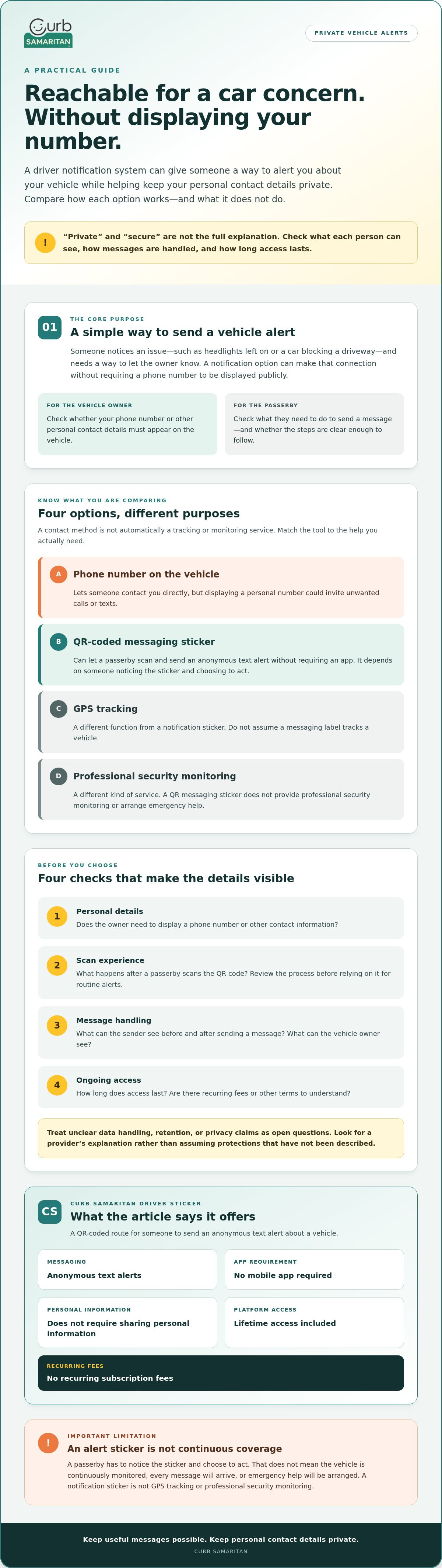
- Curb Samaritan’s Driver Sticker offers anonymous text alerts without an app, with lifetime platform access and no recurring subscription fees.
What Should a Secure Driver Notification System Do?
Someone notices your headlights are on, your car is blocking a driveway, or there may be another issue with the vehicle. A useful notification option gives that person a way to send you a message without requiring you to display your phone number in public. That is the basic purpose of a secure driver notification system: helping people connect about a vehicle while giving its owner more control over how contact happens.
The sender’s experience matters too. If scanning a label or figuring out how to send a message feels confusing, a passerby may give up. A straightforward process should still avoid requiring the owner to publish contact details. Before choosing a product, check what the sender must do, what the owner needs to do, and what information each person can see. Don’t assume that words like “private” or “secure” explain how a provider handles data.
Keep the purpose clear. A QR-based messaging sticker can let a passerby initiate contact, but it isn’t automatically GPS tracking, emergency response, or professional security monitoring. Those tools serve different purposes. Vehicle telematics refers to connected systems that can exchange information with vehicles. A notification sticker, by contrast, may simply give one person a way to send an alert. Check the provider’s description before treating one as a substitute for another.
Which driver situations can a notification system help with?
These systems are intended for brief, practical messages from someone who notices an issue with a parked vehicle. For example, a passerby can scan a QR-coded Driver Sticker and send an anonymous text alert. This depends on someone noticing the sticker and choosing to act. It doesn’t mean the vehicle is continuously monitored, every message will arrive, or emergency help will be arranged.
What does secure communication mean for a driver?
Start with a direct question: must you display your phone number where anyone can see it? Then check exactly what information appears to the scanner and what the vehicle owner can see during messaging. Don’t rely on assumptions about anonymity or data handling; look for a clear explanation from the provider. For more context on QR-based alerts, see this guide to anonymous car stickers.
Curb Samaritan’s Driver Sticker provides access to an anonymous text-alert messaging platform. The service doesn’t require a mobile app or sharing personal information, and each purchase includes lifetime platform access without recurring subscription fees. These are useful details to compare. For specifics about what information is visible to each participant, check the provider’s current explanation.
How to Evaluate Privacy and Ease of Use Before You Buy
A useful comparison goes beyond the word “secure” on a product page. Look for clear answers about what a passerby must do, what the vehicle owner can see, and whether personal details are exposed along the way. For a secure driver notification system, the steps should make sense to both people, and the provider should explain its claims rather than leave you to guess.
Use this checklist before choosing:
- Personal details: Does the owner need to display a phone number or other contact information?
- Scan experience: What happens after a passerby scans the QR code? Try the process yourself before relying on it for routine alerts.
- Message handling: What information can the sender see before and after sending a message, and what can the owner see?
- Ongoing access: How long does access last, and are there recurring fees or other terms to understand?
Separate confirmed features from claims that need evidence. Curb Samaritan’s Driver Sticker provides access to anonymous text alerts without requiring a mobile app or sharing personal information. Those details don’t explain every part of the data flow. Ask the provider what information is visible to each participant, how messages are handled, and whether data is retained. Don’t assume encryption or specific anonymity protections unless the provider explains and supports those claims. The Future of Privacy Forum’s discussion of the privacy implications of vehicle safety systems offers useful context for thinking carefully about data and trust.
Which privacy questions should buyers ask?
Ask whether a phone number or other personal detail must be printed on the vehicle. Then check what a sender sees before submitting a message and what details appear to the owner afterward. Clear answers matter more than broad assurances. If a provider doesn’t explain its data handling or retention practices, treat those as open questions rather than assuming the system protects information in a particular way.
Is a no-app QR flow easy for passersby?
A common QR journey is to open a smartphone camera, scan the code, and follow a link to a message page in a browser. The exact steps vary, so confirm whether the sender needs an account, an app, or personal details. If possible, test the process yourself, including what appears before a message is sent. For another explanation of the scan-to-contact approach, read this no-app QR contact sticker guide.
A QR code starts a contact flow; it doesn’t locate a vehicle. If you’re considering a Driver Sticker, review Curb Samaritan’s Driver Sticker information alongside these privacy and usability checks.
QR Driver Stickers vs. Phone Numbers, Tracking, and Monitoring
These options solve different problems. A sticker that lets someone send a message is not a locator, and neither a phone-number label nor a QR code automatically provides a monitored response. Compare what each option does, what information it may expose, and whether it depends on another person taking action.
| Option | What it’s for | Information it may expose | Does another person need to act? |
|---|---|---|---|
| Public phone-number label | Lets someone contact the driver directly | Your displayed number | Yes. They must notice the label and call or text. |
| QR-based messaging | Offers a scan-to-message route for a vehicle alert | Depends on the service and its message flow; check what each person can see | Yes. Someone must notice, scan, and send a message. |
| GPS tracking | Shows a vehicle’s location through a tracking service | Vehicle location and potentially related data, depending on the service | Not necessarily for location updates, but setup and access depend on the provider. |
| Professional monitoring | May involve a monitoring service that reviews alerts or coordinates a response | Depends on the service, its sensors, and its information-handling practices | Response depends on the service’s process and terms. Verify what it actually provides. |
When is a QR-based driver alert a better fit than a phone number?
A QR sticker can suit drivers who want to offer a way to make contact without printing a personal phone number on the vehicle. Instead of dialing a number, a passerby scans the code and can send a message through the service. This is a different privacy trade-off, not a guarantee that contact will happen: the person must notice the sticker, choose to scan it, and complete the message steps. A scan also doesn’t promise an instant alert or delivery in every case.
How is messaging different from vehicle tracking?
Messaging starts with a person. GPS tracking is a separate capability designed to determine or share a vehicle’s location, usually through a tracking service. Curb Samaritan offers QR-coded messaging stickers, not GPS tracking or professional security monitoring. If you need to find a vehicle’s location or want a monitored response, evaluate providers that specifically offer those services, and check their data practices and response terms.
Research on driver notification and monitoring systems provides context for technologies intended to alert or monitor drivers. That category is broader than a QR contact sticker. Choose based on the job you need done: a person-to-person message, location information, or a separately arranged monitored service.
A Practical Checklist for Choosing a Driver Notification System
Start with the job you need done. A private message about a vehicle, live location information, and a monitored response are different needs, so don’t choose a product based on its label alone. Use this checklist to compare the practical details before you buy.
- Match the tool to your need. For person-to-person vehicle alerts, look for a clear contact method. If you need vehicle location or a monitored response, evaluate services designed specifically for those purposes.
- Check personal-data exposure. Find out whether you must display a phone number or other contact details. Confirm what the sender and vehicle owner can see during the message process.
- Try the scan journey. Scan the QR code and follow the steps as a passerby would. Check whether the process is easy to understand and what information it asks for.
- Review message handling. Confirm how an alert reaches the owner, how replies work, and what the provider says about handling or retaining message information. Don’t treat broad security language as proof of specific protections.
- Read the access terms. Check what comes with the purchase, whether access has recurring fees, and how long the service remains available.
What should you verify about setup and everyday use?
Follow the product’s current instructions for sticker placement rather than assuming one location suits every vehicle. Confirm how the owner receives alerts and whether account setup is required. Then test the QR code and message journey yourself. A quick trial can reveal confusing steps before you depend on the contact method for everyday use.
How can you compare ongoing access and support?
Look beyond initial setup. Check whether access continues without recurring fees, what the purchase includes, and how to update owner details or manage messages. Verify these steps in the provider’s current product information, since setup and account processes can change. Curb Samaritan’s Driver Sticker includes lifetime platform access without recurring subscription fees.
To compare the Driver Sticker’s stated features and access terms, explore Curb Samaritan’s Driver Sticker.
How Curb Samaritan’s Driver Sticker Supports Private Alerts
A useful vehicle alert doesn’t need to start with a phone number printed in plain view. Curb Samaritan’s QR-coded Driver Sticker offers another route: a passerby scans the sticker and can send an anonymous text alert through the messaging platform. It’s designed for person-to-person messages about a vehicle, not for locating or continuously monitoring it.
What the Curb Samaritan Driver Sticker offers
The scan-to-message approach gives someone who notices a concern a way to reach the vehicle owner without requiring the owner to publicly display personal contact details. Using the service doesn’t require a mobile app or sharing personal information. As with any contact tool, an alert depends on someone noticing the sticker, choosing to scan it, and sending a message. It isn’t a promise of instant delivery or a substitute for emergency help.
Each Driver Sticker purchase includes lifetime access to the messaging platform without recurring subscription fees. Consider that access model alongside the privacy and setup details. Before relying on the sticker, review the current instructions and confirm how alerts reach you and what information is visible to the sender and owner. Don’t assume details about data handling that the provider hasn’t clearly explained.
Is this the right fit for your vehicle-alert needs?
A Driver Sticker may suit you if your goal is a private way for another person to send a vehicle-related message. It’s not GPS tracking, and Curb Samaritan doesn’t provide professional security monitoring. If you need to see a vehicle’s location or want a monitored response, compare services built for those needs and check their terms separately.
Choose according to the kind of connection you want. A QR sticker creates a contact route, while location tracking and monitoring serve different purposes. If anonymous text alerts fit your needs, review the product’s stated features and verify any remaining setup questions before deciding.
See how Curb Samaritan helps drivers stay connected.
Choose a More Private Way to Stay Connected
The right secure driver notification system depends on what you need: a private way to receive a message, vehicle location tracking, or a monitored response. These are different services. Before choosing, check what contact details are exposed, how a passerby sends a message, what information each person can see, and how ongoing access works.
For drivers seeking person-to-person vehicle alerts, Curb Samaritan’s QR-coded Driver Sticker lets a passerby send an anonymous text alert through its messaging platform. The service doesn’t require a mobile app or sharing personal information, and the purchase includes lifetime platform access without recurring subscription fees. Review the current setup steps and privacy details so you know what to expect.
If this kind of private contact route fits your needs, explore Curb Samaritan’s Driver Sticker and check its stated features. A clear, thoughtful choice can help useful messages reach you while keeping personal contact details private.
Frequently Asked Questions
What is a secure driver notification system?
A secure driver notification system gives someone a way to send a message about a vehicle without requiring the owner to publicly display a personal phone number. Options can include a QR-coded sticker that starts a messaging process when scanned. Check what each person can see and how messages are handled. These systems are not automatically GPS tracking, emergency response, or professional security monitoring.
How does a QR code driver notification sticker work?
A passerby scans the sticker’s QR code with a smartphone and follows the steps to send a message through the associated service. With Curb Samaritan’s Driver Sticker, the passerby can send an anonymous text alert through its messaging platform. Someone must notice the sticker and choose to scan it, so it isn’t continuous monitoring or a guarantee that an alert will be sent or received.
Can someone contact me about my car without seeing my phone number?
Yes. A QR-based messaging sticker can provide a contact route without requiring you to display your phone number on the vehicle. Curb Samaritan says its Driver Sticker lets a passerby send an anonymous text alert without requiring personal-information sharing. Review the provider’s current explanation of the message flow to understand what information the sender and vehicle owner can see before and after a message is sent.
Do I need an app to use a QR driver notification system?
It depends on the provider, so check the product’s instructions before buying. Curb Samaritan’s service does not require a mobile app. A passerby scans the Driver Sticker and can send an anonymous text alert through the messaging platform. Try the QR experience yourself, if possible, and confirm the sender’s steps rather than assuming every QR-based service works the same way.
Does a driver notification sticker track my car?
No. A QR driver notification sticker is a way for a person to initiate contact, not a vehicle-location tool. Curb Samaritan’s Driver Sticker enables text alerts through its messaging platform; Curb Samaritan does not sell GPS tracking services or professional security monitoring. If you need location information or a monitored response, look for a provider that specifically offers that service and review its terms separately.
What should I check before buying a driver alert sticker?
Check whether you need to display personal contact details, what happens after someone scans the code, how messages reach you, and what information each participant can see. Test the scan-to-message process and review the provider’s data-handling explanations rather than assuming specific protections. Also confirm the access terms, including whether the purchase includes ongoing platform access or recurring fees, and follow the current setup instructions.
Does Curb Samaritan charge a monthly fee for its Driver Sticker?
No. Curb Samaritan says each Driver Sticker purchase includes lifetime access to its messaging platform without recurring subscription fees. The sticker lets a passerby send an anonymous text alert, and the service does not require a mobile app or sharing personal information. Check the current product information for setup steps and details about the messaging process before relying on it for vehicle alerts.