

Secure QR Codes for Kids’ Gear: A Private Way to Reconnect
If someone finds your child’s lost backpack, they may be able to help return it without seeing your family’s phone number. A secure qr code for kids gear gives a finder a way to scan a tag and send your family an alert through a messaging page, without needing an app or seeing personal contact details. That can be useful if you’d rather not put a child’s name or your number on something they carry every day.
This guide explains what QR tags can and can’t do, where to place one, and how to check that it’s easy to use. It also covers the difference between a contact tag and location tracking. Curb Samaritan People & Pet tags offer a private way for a finder to send a secure, anonymous message, without putting visible contact details on your child’s gear.
Key Takeaways
- A secure qr code for kids gear gives a finder a way to alert your family without displaying a phone number on the item.
- Choose belongings where a contact route could be useful, such as a backpack, jacket, or activity gear.
- After placing a tag, scan-test it so you know the contact route works and can explain it simply to your child.
- Curb Samaritan People & Pet tags support secure, anonymous text alerts without an app or sharing personal information.
- A QR tag helps with communication, but it doesn’t show an item’s location or provide monitoring.
Why Put a Secure QR Code on Kids’ Gear?
A school bag left behind, a jacket picked up by mistake, or an activity bag separated from its owner can leave a finder wondering how to reach the family. Printing a name or phone number on the item is one option, but it makes that information visible to anyone who sees it. A secure QR code for kids gear offers another route: a scannable tag that lets a finder contact the family without a phone number displayed on the item.
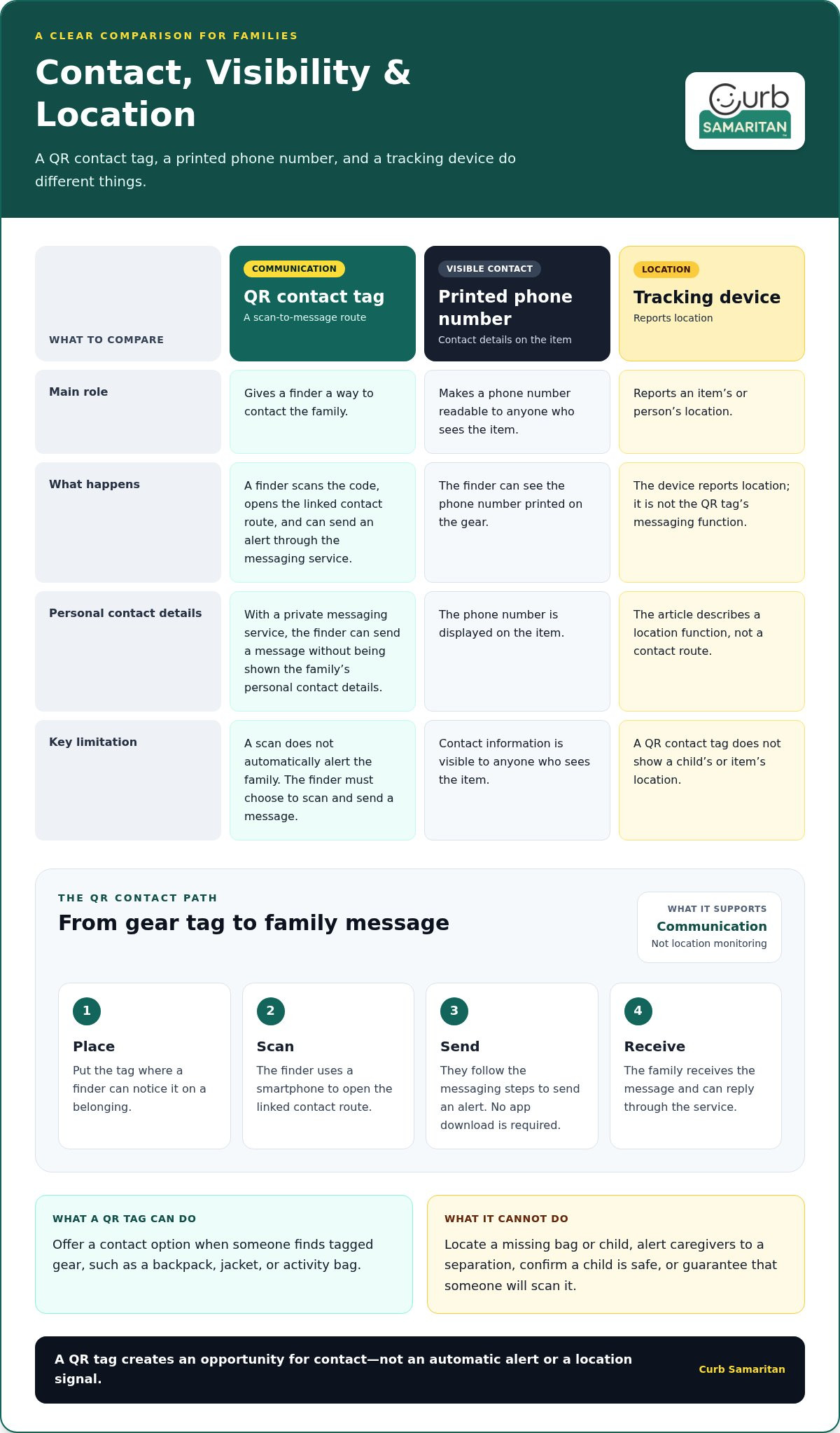
A QR contact tag helps a finder send a message to a family; a tracking device reports an item’s or person’s location. The tag supports communication, not supervision. It can’t show where a child is, confirm that a child is safe, or guarantee that someone will scan it.
A QR code is a scannable pattern that can direct a phone to digital information or a service. On a gear tag, it can open a contact route instead of displaying a phone number. What happens after the scan depends on the linked messaging service and whether the finder chooses to use it.
What can a QR code on a backpack or jacket do?
If someone finds a school bag, jacket, or activity gear, they can scan its code with a smartphone and follow the linked steps to contact the family. With a messaging service designed for private alerts, the finder can send a message without being shown the family’s personal contact details. The tag doesn’t send an alert simply because it’s been scanned, and it can’t make someone respond. It makes a contact option available.
When is a gear tag useful for families?
A contact tag may help when a belonging is left at school, a library, a sports venue, or a community event. It can also give a finder a way to reach caregivers if a child becomes separated in a public place while carrying tagged gear. Its usefulness depends on someone noticing the tag, scanning it, and choosing to send a message.
A tag is meant to make reconnecting easier when someone has an item and wants to help. It doesn’t locate a missing bag or child, alert caregivers to a separation, or replace adult supervision. Treat it as one part of your family’s usual safety plans, alongside agreed meeting points and instructions about which trusted adults a child can approach.
For belongings that move between home, school, and activities, a private contact route can be useful without making personal details plainly visible. Choose an item where a finder is likely to notice the tag, and explain to your child that it helps someone contact family if their gear gets misplaced. The tag’s role is simple: give a helpful person a clear next step while keeping contact details off the item.
How Does a Secure QR Code for Kids’ Gear Work?
A QR tag creates a path between a finder and a family. Attach it to a child’s belongings, and someone who finds the item can scan the code with a smartphone, open its linked contact route, and send an alert through the messaging platform. The family can then receive the message and respond through that route.
After a finder scans the tag, they can use its linked messaging service to send your family a text alert without needing an app or seeing your personal contact details. That’s how a secure qr code for kids gear works: the tag invites someone to make contact, and the messaging service handles the communication instead of a phone number printed on the item.
What happens when someone scans the QR tag?
The scan takes the finder to the tag’s linked contact route on their smartphone. They can follow the available steps to send an alert through the messaging platform. Curb Samaritan’s platform supports secure, anonymous text alerts, and neither the finder nor the family needs to share personal information to make that connection. No app download is required.
What does secure and anonymous messaging mean here?
The messaging service gives a finder a way to contact a family without revealing personal contact details as part of that exchange. “Anonymous” describes the contact route, not a promise that every action or piece of information is invisible in every circumstance. The practical difference is that a finder can send a message without being given the family’s phone number.
The QR code itself is an entry point, not a signal that reports where the tag or child is. It doesn’t alert the family simply because the item has moved, show a live location, or connect someone to emergency services. A scan creates an opportunity for contact. The finder must choose to scan and send a message, and the family must receive and respond to it.
The process is a short chain:
- Place: Put the tag on a belonging where a finder can notice it.
- Scan: The finder uses a smartphone to open the linked contact route.
- Send: They follow the messaging steps to send an alert.
- Receive: The family gets the message and can reply through the service.
Each step depends on someone choosing to act. The tag doesn’t retrieve lost belongings automatically, but it can make the next helpful action clear. Curb Samaritan People & Pet tags use a messaging platform designed for secure, anonymous alerts without an app or personal information sharing.
Does a QR Tag Expose a Child’s Information?
A QR contact tag offers an alternative to printing a family phone number on a backpack or jacket. With a private messaging service, a finder can use the code to send an alert without being shown personal contact details. A QR contact tag can create a more private route to a family, but it can’t remove every privacy risk or guarantee a safe outcome.
Privacy depends on what’s visible on the item and how the linked contact service works. The code is an entry point, not a promise that all information connected with a scan is protected in every circumstance. Keep the tag’s purpose clear and limit the personal details displayed on the gear.
QR messaging versus printing a phone number
A printed phone number is readable by anyone who sees the item. A scan-to-message route can let a finder send an alert without displaying that number. Families may prefer this option when they don’t want contact details visible on a backpack or jacket in a classroom, changing area, or public place.
Keep visible information to a minimum. A tag can invite someone to scan it without displaying a child’s full name or a caregiver’s number. The privacy benefit comes from the linked messaging route, not from the QR pattern itself.
- Printed contact details: Easy to read, but visible to anyone who picks up or passes the item.
- Scan-to-message route: Gives a finder a way to contact family without printing the family’s phone number on the gear.
Neither approach eliminates every concern. A finder still needs to notice and use the tag, and QR codes can be copied or replaced. Use a tag from a service you recognize, and avoid adding extra personal details just to make the item identifiable.
QR contact tags versus GPS trackers
A QR scan doesn’t continuously report where a child or belonging is. It doesn’t show a live map, alert caregivers that an item has moved, or summon help. Instead, it offers a finder-initiated way to contact family if they choose to scan the code and send a message.
The distinction is straightforward: a location-tracking service reports location, while a QR contact tag supports communication. Curb Samaritan’s People & Pet tags use a messaging platform designed for secure, anonymous text alerts without requiring an app or sharing personal information.
Think of a secure qr code for kids gear as one practical contact option, not a substitute for supervision, agreed family plans, or emergency help. Its role is to make it easier for a well-meaning finder to reach a family while keeping personal contact details off the item.
How to Set Up a QR Tag on Kids’ Belongings
A little preparation makes a tag easier to find and use. Choose a belonging your child regularly carries, place the tag where it’s visible during normal use, and test the scan yourself. Then explain its purpose in simple, reassuring words. This lets you catch placement or scanning problems before the item leaves home.
Where should families place a QR tag?
Start with an item your child uses often, such as a school bag, lunch bag, jacket, or activity gear. Consider how the item is carried, hung, or stored. A tag tucked under a flap or covered by a strap may be harder for a finder to notice.
Choose a spot that’s easy to see without getting in the way of ordinary use. Follow the tag’s attachment instructions, and consider whether its material and placement suit the item. If your child switches bags or coats, prioritize the belongings most likely to be with them away from home.
How can parents check the setup?
Once the tag is in place, scan it with a smartphone. Confirm that the linked contact route opens and that you understand how a finder would send an alert. Check whether the code is easy to see and scan from its actual position, not just when the item is laid flat. Test it again if you move the tag.
Make the next step clear to a finder. If the tag’s purpose isn’t obvious, add a short prompt such as “Scan to contact family,” if its format allows. The aim is to guide a helpful person without printing a child’s full name or a caregiver’s phone number on the gear.
- Choose: Pick a regularly used item, such as a bag, jacket, or activity gear.
- Place: Attach the tag where it’s visible and less likely to be obscured during normal use.
- Test: Scan the code and confirm the contact route opens.
- Explain: Tell your child the tag can help a finder contact family if the item gets misplaced.
- Review: Recheck the scan and contact route when the gear or family contact method changes.
Use language that fits your child’s age. For example, you might say, “If someone finds your bag, this code helps them send our family a message.” That explains the tag’s purpose without suggesting it watches over them or replaces your family’s usual safety plans.
A secure qr code for kids gear is most useful when it’s easy to spot, easy to scan, and linked to a contact route your family has tested. Explore Curb Samaritan People & Pet tags for everyday belongings.
A Privacy-First QR Gear Tag from Curb Samaritan
Curb Samaritan People & Pet tags give a finder a way to send a message without seeing personal contact details. The platform supports secure, anonymous text alerts, requires no app, and doesn’t require families to share personal information to make contact. Each purchase includes lifetime access to the messaging platform without recurring subscription fees.
This approach makes contact possible without displaying details on a child’s bag or jacket. A finder can scan the tag and choose to send an alert, and the family can receive a message through the platform. As with any QR contact tag, that exchange depends on someone noticing the tag and choosing to use it.
What makes the Curb Samaritan approach different?
Instead of displaying a family phone number, the tag lets a finder send a secure, anonymous text alert through the messaging platform. No app is needed, and personal contact information doesn’t have to be shared for the finder to alert the family. It’s an option for caregivers who want to make contact possible while keeping details off the item itself.
The tag has clear limits. Curb Samaritan doesn’t offer GPS tracking or professional monitoring. The tag won’t show where a child or belonging is, alert a caregiver when gear moves, or replace supervision and family safety plans. It provides a communication option if someone scans the code and sends a message.
Choose a simple next step for your family
Consider what your child carries regularly and whether a private contact route would be useful if an item were misplaced. A tag may suit gear that travels between home, school, and activities. To get started, choose one familiar item, scan-test the tag, and explain its purpose to your child in clear, age-appropriate language.
For a school bag, ask yourself: Is the tag easy for a finder to notice? Does the scan open the contact route? Does your child understand that it helps someone message family, rather than tracking their location? These checks set realistic expectations and make the tag’s role easier to explain.
A secure qr code for kids gear can be a useful fit when your priority is a private way for a finder to alert your family, rather than location tracking. Explore Curb Samaritan People & Pet tags for a contact option for everyday belongings.
Make a Thoughtful Choice for Everyday Gear
Choosing a contact tag is a chance to decide what information belongs on your child’s belongings and what you’d rather keep private. Start with one item your child carries often. Consider whether a finder could notice the tag, understand its purpose, and use the contact route. A quick scan-test can help you spot problems before the item heads out the door.
A secure qr code for kids gear is one practical way to make family contact easier, not a promise that an item will be found or a child’s location known. Explain the tag’s purpose to your child, and pair it with the everyday plans and conversations your family already relies on.
If you’d like a private contact option for belongings, explore Curb Samaritan’s People & Pet tags. Explore Curb Samaritan tags for everyday gear and choose a small next step that feels right for your family.
Frequently Asked Questions
Is a QR code tag safe to put on a child’s backpack?
A QR tag can provide a contact route without printing a phone number on the backpack, but no tag can guarantee a child’s safety. Keep visible details to a minimum, and tell your child what the tag is for and how a finder might use it. It supports communication only. It doesn’t replace adult supervision, family plans for getting help, or emergency services when they’re needed.
Can someone scan a kids’ gear QR code without downloading an app?
Yes. Curb Samaritan’s messaging platform doesn’t require a mobile app. A finder can use a smartphone to scan the code and open its linked contact route. Before putting the item into everyday use, scan the tag yourself and make sure you understand the steps a finder will see. That check can help you explain the process clearly to your child.
Does a QR code tag show a child’s phone number?
Not necessarily. A printed number is visible on the item, while Curb Samaritan’s QR-linked messaging lets a finder send a secure, anonymous text alert without sharing personal information. QR tags don’t all work the same way, so don’t assume every code hides contact details. Understand what the linked contact route does, and keep extra identifying details off the tag.
Can a QR code tag track a child’s location?
No. Scanning a QR code opens its linked information or contact route; it doesn’t continuously report location. Curb Samaritan doesn’t provide GPS tracking or professional monitoring. If a child leaves a bag in a different room, for example, the tag won’t tell a caregiver where it is. Its purpose is to give a finder a way to contact family, not to locate a child or replace supervision.
What should I write on a child’s gear tag?
Keep visible wording brief and focused on the next step, such as “Scan to contact family.” The linked contact route can handle the message, so there’s no need to print a child’s full name or a caregiver’s phone number just to explain the tag. Avoid adding personal or medical details unless you’ve decided they’re appropriate for that item and purpose.
Can QR tags be used on school bags and activity gear?
Yes. Families can consider school bags, lunch bags, jackets, and other gear a child regularly carries. Choose a spot where the tag is easy to notice and scan during ordinary use, then test it before relying on that placement. If the item is used at school or in an organized activity, review any relevant school or activity guidelines, since rules may differ between settings.
Explore Curb Samaritan People & Pet tags for a private contact option on your child’s everyday gear.