

Secure QR Codes for Personal Items: A Privacy-First Guide
What if a lost item could find its way home without your phone number or address being on display? A label with personal details may seem like the simplest option, but it can reveal more than you intend. A secure qr code for personal items offers another way to connect a finder with an owner while keeping contact details private.
It’s natural to wonder what happens after someone scans a code. A QR code can lead to a page that displays your details, or it can offer a private way to send you an alert. The important question is not just whether your details are printed on the tag, but what the scan reveals and how the conversation works.
In this guide, you’ll learn what privacy protections to look for, how a finder can send an alert without seeing your personal contact information, and how to choose a practical sticker or tag for your belongings. We’ll also cover People & Pet tags and Found Stickers, which let a finder send an anonymous text alert without an app. The goal is to make it easier for someone to help while keeping your details to yourself.
Key Takeaways
- A QR pattern alone doesn’t make contact private. What matters is where the scan leads and how the finder can reach you.
- Choose a secure qr code for personal items that gives finders a clear contact path without displaying your phone number or home address.
- Compare a self-made URL code with a private messaging tag by setup effort, exposed information, finder steps, and ongoing fees.
- Match the label or tag to the item, place it where it can be found, and test the scan before relying on it.
- People & Pet tags and Found Stickers can let a finder send an anonymous text alert without an app.
What Makes a Secure QR Code for Personal Items Different?
A personal-item QR code gives a finder a scannable route to information about an item or a way to contact its owner. The code can help a finder take the next step, but the printed pattern alone doesn’t make the interaction private. Privacy depends on what the code leads to and how the finder can get in touch.
Think of security as three separate questions: Is the code’s destination clear and relevant? What information does it show? Does the contact method protect both people’s details? A code that opens a page listing your phone number may be convenient, but it exposes your contact information. A code that lets a finder send a message without displaying your number creates a more private contact route. Neither setup guarantees an item will be returned, but a clear way to reach you can make it easier for someone to help.
For a basic overview of how QR patterns store or point to information, see What is a QR Code? For personal belongings, the key question is what happens between the scan and the owner-finder conversation.
What happens when someone scans a personal-item QR code?
A phone camera reads the pattern and presents or opens its destination. Depending on how the code was created, that destination might display information, open a webpage, or offer a contact option. The scan itself doesn’t tell you whether personal details will remain private.
Check the contact step. If the destination displays your phone number or email address, the finder can see those details. If it offers a private messaging route, the finder can send an alert without being shown your direct contact information. The printed patterns may look alike, so evaluate the destination and contact method rather than judging by appearance.
Which personal belongings can use QR labels or tags?
Start with portable belongings that are easy to misplace and could benefit from a simple contact route. A bag, key ring, suitcase, or another item you regularly carry may be a useful place to start. Choose a label or tag that suits the item and where it will be attached. A label that is easy to cover, hard to scan, or unsuitable for the surface may not be practical.
Curb Samaritan offers QR-coded People & Pet tags and Found Stickers for personal belongings. A finder can scan one to send a secure, anonymous text alert without needing a mobile app or the owner sharing personal information. It creates a simple bridge between someone who finds an item and the person hoping to hear about it, while keeping direct contact details out of view.
How to Judge QR Code Privacy and Safety Before Using One
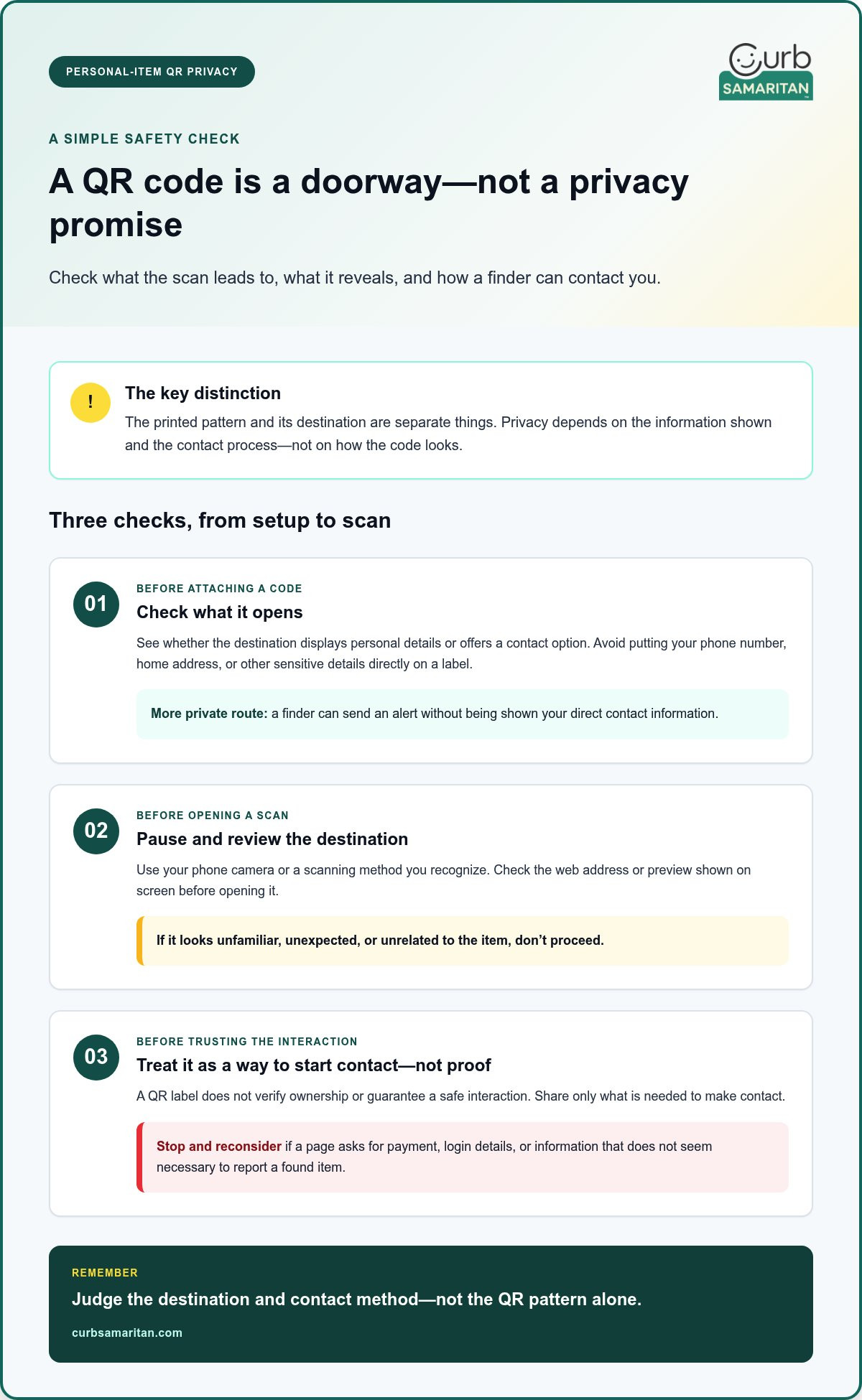
A QR code can make it simple for a finder to reach useful information, but the scan is a doorway, not a privacy promise. Before attaching one to a belonging, consider what a stranger will see and what they’ll be asked to do. Avoid putting your phone number, home address, or other sensitive details directly on a label. Printed details are visible to anyone who can read them, whether or not they scan the code.
Look for a contact route that lets a finder reach you without displaying your direct details. A code that opens a page showing your number works differently from one that lets a finder send an alert through a messaging process. Ask yourself: Can someone contact me without learning where I live or how to reach me outside this process? This keeps the focus on the actual owner-finder exchange, not just the QR pattern.
Does a QR code itself keep personal information private?
No. Privacy depends on the content the code leads to and the communication process offered there. Some codes contain contact details directly; others lead to a page or messaging route. The QR code’s pattern and its destination are separate things to assess: the pattern doesn’t tell you whether the information or contact method is private.
For a secure qr code for personal items, favor an arrangement where a finder can send a message without being shown your phone number or email address. Consider what the destination asks the finder to share, too. Don’t assume a code protects either person simply because the label uses words like “private” or “secure.” Look for a clear explanation of the steps involved, and share only the information needed to make contact.
How can a finder scan a code more thoughtfully?
Use your device’s camera or a scanning method you recognize, then pause before opening the destination. Review the web address or preview shown on screen. If it looks unfamiliar, unexpected, or unrelated to the item, don’t proceed. A familiar scanning method can help you inspect the destination, but it can’t promise that every code or page is safe.
A QR label also isn’t proof that an item belongs to the person named on the page. Treat its message as a way to start a conversation, not as identity verification. If a page asks for payment, login details, or information that doesn’t seem necessary to report a found item, stop and consider another way to handle the situation.
- Before attaching a code: Check what it opens and whether it exposes personal details.
- Before following a scan: Review the displayed destination and avoid unexpected requests.
- Before trusting a claim: Remember that a QR label doesn’t establish ownership or guarantee a safe interaction.
If you want a label designed to connect a finder and owner through an alert rather than display contact details, explore Curb Samaritan’s QR-coded tags and stickers.
QR Code Generator or Private Messaging Tag: Which Fits Your Belongings?
The right choice depends on what you want a finder to do. A self-generated QR code can point to a webpage or other information you choose. A private messaging tag gives someone a way to alert you without displaying your contact details. Both use a scannable code, but their setup and purpose differ.
Self-generated URL code
Setup effort: Create a code linked to your chosen destination, then manage that destination and its contents.
Information exposed: Whatever the linked page displays. Avoid including personal contact details if you don’t want them visible.
Finder steps: Scan the code, review the destination, then use the information or contact option there.
Ongoing fees: These depend on the code setup and destination. A dynamic redirect service may require a subscription to stay active.
Private messaging tag
Setup effort: Use a tag designed to give a finder an owner-alert option.
Information exposed: A finder can send an alert without seeing the owner’s personal contact information.
Finder steps: Scan the tag and follow the steps to send the alert.
Ongoing fees: Curb Samaritan purchases include lifetime access to the messaging platform without recurring subscription fees.
Use the comparison to match the tool to the job. If you want a code to open public information, a URL may be enough. If you want a finder to reach you without seeing your number or address, look for a contact route built around private messaging. A secure qr code for personal items should fit the conversation you want to have, not just look scannable.
When is a self-generated QR code enough?
A self-generated code can work well when its main job is to link to information you’re comfortable making available, such as a public webpage or basic item details. You control the linked content, so keep it focused on that purpose. If you add your phone number or home address, anyone who reaches the page may be able to see it. The code itself doesn’t manage that information for you.
When does a private messaging tag make more sense?
Choose a private messaging tag when a finder needs a clear way to alert you without viewing your personal details. Curb Samaritan tags support secure, anonymous text alerts, and the process doesn’t require a mobile app or the owner to share personal information. Each purchase includes lifetime messaging-platform access without recurring subscription fees, which is useful to consider when comparing ongoing costs.
For belongings where a direct, private alert matters more than linking to general information, consider Curb Samaritan’s QR-coded tags. They’re designed to help a finder reach an owner while keeping personal contact details out of view.
How to Set Up and Use a QR Code for Personal Items
A useful label needs to do more than scan. It should guide a finder toward a clear next step while keeping your personal information private. Use this sequence to prepare a secure qr code for personal items and check how it works in everyday use.
- Choose the item. Start with a portable belonging you’d want a finder to identify, such as a bag, key ring, or piece of luggage. Consider where a label or tag could be seen without getting in the way of using the item.
- Decide what information to share. Choose whether the scan should open information or provide a way to contact you. Avoid adding your home address, phone number, or other details you don’t want a stranger to see.
- Pick a label or tag that suits the purpose. A self-made code may fit a link to public information. If you want a finder to send an owner alert without seeing your details, consider a private messaging tag, such as Curb Samaritan’s People & Pet tags or Found Stickers.
- Choose a sensible placement. Put the code where someone can notice and scan it, but where it won’t obstruct normal use. It should also be easy to spot during a quick look at the item.
- Test the full experience. Scan the code with a phone that isn’t already set up for you. Check the destination, read the instructions as a finder would, and follow the contact steps to confirm they work as expected.
Where should you place a QR tag or sticker?
Choose a visible, accessible spot where the code stays readable during ordinary handling. Avoid a place that’s routinely covered by a hand, strap, or another part of the item. Think about how the belonging is normally carried or opened, then check that the code remains easy to see. After placing it, scan the code while holding or using the item as you usually would.
What should an owner test before relying on the label?
Use a phone that isn’t configured with your own account or settings, so you can see the finder’s view. Make sure the next step is understandable and doesn’t reveal unnecessary personal details. If the label is meant to start a message, complete that process and confirm it behaves as expected. The essential test is simple: scan the code, understand the next step, and make contact without unnecessary exposure. A successful test can show that the route works, but it can’t guarantee an item will be returned.
Choose a contact option that makes this test straightforward. Explore Curb Samaritan tags and stickers for a QR-coded way to help a finder send an alert.
How Curb Samaritan Helps Keep Personal-Item Alerts Private
A label can do more than identify an item. Curb Samaritan’s QR-coded tags and stickers give a finder a route to alert its owner, so the two people can connect without printing personal contact details in plain view. The process is straightforward: a scan opens the messaging route, and the finder can send a secure, anonymous text alert.
This approach is designed for the moment someone finds a belonging and wants to help. The finder doesn’t need to download a mobile app, and the owner doesn’t need to share personal information to use the alert process. It gives both people a direct next step. It doesn’t track an item or guarantee it will be recovered; it gives a finder a way to report what they found.
What does the finder and owner each do?
The finder scans the Curb Samaritan code and follows the messaging route to send an alert. The owner can communicate through that process without publishing personal contact details on the item. Each person has a clear role: the finder starts the conversation, and the owner can respond through the alert exchange.
For a finder, clear instructions matter. Someone who spots a tag should be able to recognize that it offers a way to contact the owner and understand what to do after scanning. For the owner, the benefit is not having to print a phone number or home address where anyone can see it. The QR code serves as a bridge, helping a kind stranger reach out while keeping direct details private.
Curb Samaritan’s secure, anonymous text-alert process doesn’t require a mobile app or the owner to share personal information. The basic steps are simple: scan, send an alert, and communicate. That flow works for everyday belongings and People & Pet tags, where a finder may need a clear way to notify the owner.
What comes with a Curb Samaritan tag or sticker?
The product is a physical QR-coded tag or sticker, paired with access to the messaging platform used for alerts. People & Pet tags and Found Stickers are relevant options for belongings. Choose a form that suits the item and place it where a finder can notice it, so the code is easier to find when someone comes across the belonging.
Think of it as a small invitation to help. A finder can scan and send an alert while the owner’s direct contact information stays off the label. If this privacy-first way to connect suits the belongings you want to label, explore privacy-first QR tags and stickers.
Make Your Next Label a Thoughtful One
Start with one belonging you’d like to make easier to identify if it’s misplaced. Before choosing a label, picture the finder’s experience: What will they see, and will they understand what to do next? That perspective can help you choose a secure qr code for personal items that fits your privacy preferences and is straightforward to use.
You don’t need to label everything at once. Pick an item you carry often, decide what kind of contact route feels right, and test the setup carefully. A small step can make it easier for a helpful person to reach out while letting you stay in control of what you share.
Ready to give a finder a private way to send an alert? Explore Curb Samaritan’s privacy-first QR tags and stickers.
Frequently Asked Questions
Is a QR code on a personal item secure?
Not by itself. A secure qr code for personal items depends on what the scan opens and how a finder can contact you. Review the destination from a finder’s point of view before using the code. For example, a tag on a child’s backpack shouldn’t lead to a page that displays a home address or other details a stranger doesn’t need to send an alert.
Can someone find my phone number by scanning a QR tag?
Possibly, depending on the destination. A code might open a page that displays your phone number, or it might offer a way to send a message without showing it. Check the actual scan flow before attaching a tag. If you’re labeling an item used in public, such as a suitcase, choose a contact route that lets a finder reach you without publishing your number on the label or linked page.
Do QR code tags for personal items need an app?
Not always. The steps depend on the service behind the code: a destination might open in a phone’s browser, while another route may work differently. Curb Samaritan’s messaging process doesn’t require a mobile app. Consider the finder’s situation, too. Someone who finds a bag or set of keys should be able to understand the contact instructions and use the phone they already have.
What should a secure QR code tag link to?
It should lead to a relevant, easy-to-understand next step, such as a way to contact the owner about a found belonging. Review the page as a stranger would. Check whether it reveals a name, phone number, address, or other details beyond what’s needed to get in touch. A familiar-looking label doesn’t mean every destination offers the same privacy.
Can I use a QR code to help return lost belongings?
Yes. Depending on its setup, a code can give a finder information or a way to alert an owner. It can’t ensure that someone finds or returns the item, but it can make it easier for a helpful person to take action. For example, a tag on a travel bag can give a finder a contact route without requiring a handwritten phone number on the outside.
Do QR code tags require a monthly subscription?
It depends on the tag and the service connected to it. Some dynamic QR code services charge ongoing fees to keep a redirect active, so understand how access works before choosing one. Curb Samaritan purchases include lifetime access to its messaging platform without recurring subscription fees. That arrangement applies to Curb Samaritan, not automatically to other QR codes, generators, or linked services.
How do I test a QR code before putting it on my belongings?
Scan it with a phone that isn’t already signed in or set up for the owner, then follow the steps a finder would see. Check that the destination makes sense, the contact option works, and the page doesn’t reveal information you meant to keep private. After attaching the label, check that it remains visible and readable when the item is handled as usual.