

Secure Resident Contact Sticker: A Private Way to Connect at Home
What if a visitor could tell you about a package, leak, or open garage without seeing your phone number? A secure resident contact sticker offers a clear contact route without putting personal details on display or leaving visitors with a notice that gives them no way to reach you. They scan its QR code and use the messaging platform to send you an anonymous text alert, without downloading a dedicated app.
It’s understandable to be cautious about sharing your number at home, especially on a label anyone can see. The process is straightforward: place the Resident Sticker where visitors can find it, so they have a private way to send a message about a home-related matter. Your personal contact information isn’t shared through the service.
This article explains how the sticker works, how QR messaging compares with displaying your number, and what visitors can expect when they scan the code. You’ll also learn how to place the sticker so its purpose is clear and decide whether it suits the way you want to stay reachable.
Key Takeaways
- A secure resident contact sticker gives visitors a contact route without putting your phone number on display.
- Compare phone-number labels, general signs, intercoms, and QR messaging based on the kind of contact you want and the details you’re comfortable displaying.
- Place a resident sticker where it’s visible and clearly connected to your home, with a brief note explaining its purpose.
- Curb Samaritan’s Resident Sticker uses QR messaging without a dedicated app and includes lifetime access to the messaging platform.
Why a Secure Resident Contact Sticker Can Protect Everyday Privacy
A delivery is left at the wrong entrance, or a visitor has a quick question but no obvious way to reach the person who lives there. You may want to be contactable without turning your phone number into a detail anyone at the door can copy. That balance is part of the concept of privacy: sharing what’s useful while keeping personal details to yourself.
A secure resident contact sticker is a QR-enabled sign that gives visitors a way to send a resident a message without displaying the resident’s phone number. It creates an option for communication. It doesn’t monitor a home, guarantee a reply, or replace emergency services, a doorbell, or an intercom.
What problem does a resident contact sticker solve?
A standard contact label makes it easy to reach you, but it also makes your number visible. A general notice can keep that detail private, yet leave a visitor unsure how to get a message to the right person. A QR-enabled resident sticker bridges the gap: it invites contact while keeping your personal number off the label.
Imagine a neighbor notices a parcel sitting in a shared entryway, or a visitor needs to pass along a brief home-related message. A clear contact route gives them a way to reach out. You decide what to do with the message, but the sticker can’t ensure that someone will contact you or that you’ll respond in time. It’s a communication tool, not a monitoring service or a substitute for urgent help.
How is private messaging different from a contact label?
A phone-number label displays the contact detail itself. Anyone who can read it can see and record the number. With QR-based resident messaging, the visitor scans the code to start a message instead of reading your number from the sticker. Curb Samaritan’s Resident Sticker uses a messaging platform that supports secure, anonymous text alerts without requiring a mobile app or sharing your personal contact information.
That distinction is practical, not magical. A QR code doesn’t make every part of an interaction invisible, and scanning one doesn’t mean all information about everyone involved is hidden. The privacy benefit is more specific: your phone number isn’t printed on the sticker. Visitors still need to notice the code and choose to scan it, so a short explanation nearby can make its purpose clearer.
You don’t have to choose between posting your number and offering no contact route at all. A resident sticker gives visitors another way to reach out while leaving your personal number off display. Visitors get a clear next step, and you can invite messages without placing your contact details in public view.
How a Secure Resident Contact Sticker Connects a Visitor and Resident
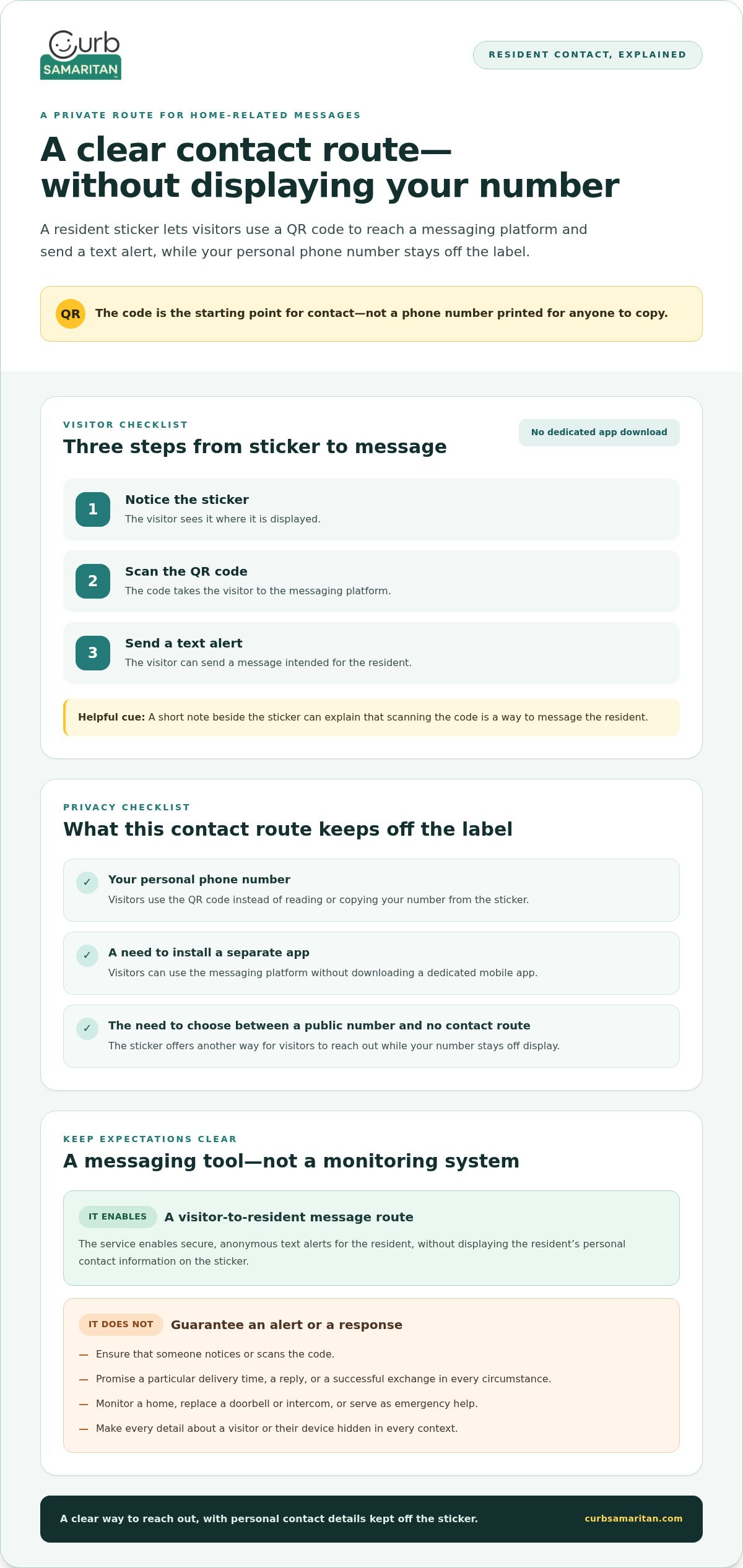
From the visitor’s perspective, the process is simple: spot the sticker, scan its QR code, and use the messaging platform to send a text alert to the resident. There’s no dedicated mobile app to download. The secure resident contact sticker gives visitors a contact route without requiring you to print personal information on a label.
The basic process is:
- Notice the sticker. A visitor sees it where it’s displayed.
- Scan the QR code. The code is the entry point to the messaging platform.
- Send a text alert. The visitor can send a message intended for the resident.
The sticker doesn’t require visitors to install a separate app, and they don’t need to copy a phone number from the label. Keep any accompanying instructions simple so visitors understand what the code is for and what they can do next.
What does the person scanning the QR code do?
The visitor uses the QR code to reach the messaging platform, then sends a text alert to the resident. The code is the starting point for contact, not a sign-in instruction or a promise that the resident is immediately available. A short note beside the sticker can explain that scanning it is a way to send a message to the resident.
For instance, someone who needs to pass along a home-related update can use the sticker’s contact route rather than looking for a number on the label. No dedicated app download is required. The sticker makes the next step clear, though it can’t ensure that someone scans it or sends a message.
What does the resident receive from the interaction?
The messaging platform enables secure, anonymous text alerts for the resident. A visitor can send a message without the resident’s personal contact information being displayed on the sticker. “Anonymous” describes the alerting service, not a guarantee that every detail about a visitor or their device is hidden in every context.
The sticker enables communication; it doesn’t watch over the property or provide live monitoring. It also doesn’t promise a particular delivery time, a reply, or a successful exchange in every circumstance. Treat an alert as a message to consider and respond to as appropriate, not as a monitored safety signal.
This contact route gives visitors a way to reach out while letting residents keep a personal number off display. To see how it works for home-related contact, explore Curb Samaritan’s Resident Sticker.
Resident Contact Sticker vs. Phone Numbers, Signs, and Intercoms
Each doorstep contact method serves a different purpose. A phone-number label shares a direct contact detail. A general sign provides information or instructions. An intercom supports a live, two-way conversation. QR resident messaging offers another route: a visitor can send a text alert without your phone number being printed where others can see it.
To choose, consider what you want a visitor to be able to do, how the interaction should begin, and whether you’re comfortable displaying personal details.
| Approach | What it communicates | How contact begins | Are personal details displayed? |
|---|---|---|---|
| Phone-number label | A direct contact number | The visitor calls or texts the displayed number | Yes, the number is visible |
| General sign | A notice or instruction | The visitor follows the printed direction, if one is provided | Not necessarily |
| Intercom | A way to speak with someone at the home | The visitor starts a live, two-way conversation | No number needs to be printed on the sign |
| QR resident messaging | An invitation to send a resident a message | The visitor scans the code and sends a text alert | The resident’s number is not displayed on the sticker |
When is displaying a phone number less appealing?
A visible number can be convenient if you want visitors to call or text you directly. But it’s also readable by anyone who sees the label. If you’d rather not post your personal number at your entrance, a secure resident contact sticker offers a message route without making the number part of the public notice. It’s a matter of preference, not a judgment about phone labels.
When is a QR contact route a useful alternative?
A QR route may suit residents who want to invite a text about a home-related matter but prefer not to display their number. It differs from an intercom: a visitor sends a message instead of starting an immediate spoken exchange. A general sign can still share instructions, and an intercom can still support live conversations. The right choice depends on the kind of contact you want to make possible.
These options can work alongside one another. A QR resident sticker doesn’t replace an intercom, doorbell, or other home system; it adds a separate way for someone to reach out. For example, a household might use an intercom for visitors at the entrance and a QR message route for non-urgent updates. Choose based on the interaction you want: direct contact, a simple notice, a live conversation, or a private path for sending a message.
How to Place and Use a Resident Contact Sticker Thoughtfully
A resident contact sticker works best when visitors can spot it, understand who it’s for, and tell what to do with it. Think about the path someone takes to your home: where would they naturally look for resident information? An entrance area may work, but the right spot depends on the layout and whether the sticker clearly relates to your residence.
In a shared building, follow existing posting arrangements and avoid placing a notice where it could be mistaken for building-wide instructions. The aim is a clear, considerate invitation to contact you, not a sign that appears to speak for everyone who lives there.
Where could a resident contact sticker be noticed?
Consider a place near an entry point where visitors already look for directions or resident details. A spot near your own entrance, for example, may make the sticker’s purpose clearer than a location farther from your home. Choose a relevant, visible location that won’t be confused with shared notices or other signs.
What should the accompanying message communicate?
Keep the wording friendly and direct. A short line such as “Scan to message the resident” tells visitors what the QR code is for. Avoid language that suggests emergency response, security monitoring, or an immediate conversation. If you may not reply right away, set a realistic expectation with wording such as “Messages are welcome; I’ll respond when I’m available.”
Before putting up a secure resident contact sticker, use this quick checklist:
- Visibility: Can a visitor notice it while approaching the relevant entrance?
- Connection: Is it clear which resident or home the sticker refers to?
- Purpose: Does a brief note explain that the QR code is for sending a resident a message?
- Shared space: Does the placement respect the building’s existing posting arrangements?
- Expectations: Does the wording avoid implying instant replies or emergency help?
View the placement from a visitor’s perspective. If the sticker is easy to miss, its purpose is unclear, or it appears to apply to the whole building, choose a more relevant spot or adjust the note. Keep the explanation short so visitors can understand the invitation at a glance.
Thoughtful placement makes the intended contact route easier to recognize, but it can’t guarantee that every visitor will scan the code or that every message will receive a response. If you want visitors to have a private way to send a message to a resident, explore the Resident Sticker.
Curb Samaritan’s Resident Sticker: Private Contact Without an App
If you want visitors to contact you without displaying your phone number, Curb Samaritan’s Resident Sticker is designed for that purpose. Its QR code gives visitors a route to send a message about a resident, offering an alternative to a public notice that displays personal contact details.
The sticker is intended for everyday resident-related communication. It doesn’t replace an intercom or provide monitoring, and it can’t promise that a visitor will send a message or that you’ll respond. Instead, it gives visitors a clear way to reach out while keeping your personal information off the sticker.
What does the Curb Samaritan Resident Sticker offer?
A visitor scans the sticker’s QR code to access the messaging platform and send a text alert to the resident. The platform supports secure, anonymous text alerts, and the visitor doesn’t need to download a dedicated mobile app. The service works without sharing the resident’s personal contact information.
This setup suits residents who want to invite messages but prefer not to post a phone number at their entrance. For example, a visitor with a home-related update can use the QR route rather than copying contact details from a label. Clear placement and a friendly explanation help visitors understand what the code is for.
“Anonymous” describes the messaging service; it isn’t a promise that every detail of every interaction is hidden in all contexts. The practical privacy distinction is that the resident’s personal contact information isn’t displayed on the sticker. You can invite communication without putting a number on public view.
How does lifetime access fit the resident use case?
A purchase includes lifetime access to the messaging platform, with no recurring subscription fees. That means messaging access is included with the sticker purchase rather than requiring an ongoing subscription payment. It’s a straightforward way to keep the contact option available as part of your home communication setup.
Before choosing a contact method, consider what you want visitors to be able to do. A printed number invites direct calls or texts to that number. An intercom supports a live conversation. The Resident Sticker offers a QR-based route for sending a text alert without a dedicated mobile app or publicly displaying your personal contact information. Each option serves a different purpose, and the sticker can complement other ways of communicating at home.
If this privacy-conscious approach fits how you’d like to receive resident-related messages, explore the Resident Sticker.
Choose a More Considerate Way to Stay Reachable
Think about the messages you’d welcome at home and the details you’d rather keep private. That decision can guide where you place a contact sticker, what its accompanying note says, and how visitors understand the invitation. A secure resident contact sticker can be one part of a thoughtful approach to home communication, alongside the systems you already use.
Picture the experience from a visitor’s point of view. Can they tell who the sticker is for? Is the next step clear? Does the wording set a realistic expectation about hearing back? Attention to these details can make reaching out simple and respectful without asking you to share more than you’re comfortable displaying.
If you want a private way for visitors to send resident-related messages, take a closer look at the Resident Sticker. Explore Curb Samaritan’s Resident Sticker.
Frequently Asked Questions
Can a resident contact sticker replace a doorbell or intercom?
No. A resident contact sticker adds a message option, but it doesn’t provide a live conversation. If a visitor needs to speak with someone at the door right away, a doorbell or intercom may be more suitable. A delivery question that can be answered later, for example, is different from a visitor waiting for an immediate response in person. Keep existing home communication tools for the interactions they’re designed to handle.
Does someone need to download an app to use a Curb Samaritan Resident Sticker?
No dedicated mobile app is required to use the Curb Samaritan Resident Sticker’s messaging platform. Visitors can send a resident a message without installing an app just for that purpose. Keep any note beside the sticker focused on its purpose rather than promising that every scan will work.
Does a resident contact sticker show my phone number to visitors?
No. The sticker provides a contact route without printing your phone number on the label. Curb Samaritan’s platform supports secure, anonymous text alerts without sharing personal information. That’s different from a printed contact label, where the number itself is visible. If your main concern is keeping your number off a public-facing notice, a secure resident contact sticker offers another way to invite a message.
Can a renter use a resident contact sticker at home?
A renter can use a resident sticker to invite messages without displaying a personal number. For example, it may be relevant near an entrance clearly associated with their home. In a shared lobby or other common area, follow the property’s usual arrangements for notices and make sure the sticker doesn’t appear to speak for all residents. Make clear which resident visitors can contact.
Is a resident QR sticker a security monitoring service?
No. It gives someone a way to send a text alert to a resident; it isn’t professional security monitoring or GPS tracking, and it can’t guarantee a response. Think of it as an option for everyday messages, not a way to watch over a home or request emergency help. If a situation needs urgent attention, use an appropriate emergency contact method rather than relying on a resident sticker.
What should I consider before displaying a resident contact sticker?
Choose a spot visitors are likely to notice and where the connection to your home is clear. Decide what kinds of messages you want to invite, then add a brief note such as “Scan to message the resident.” Avoid wording that suggests emergency response or instant replies. If the entrance is shared, follow the space’s usual posting arrangements so visitors know whom the sticker is intended for.