

Which Pingtag alternative should you test first? Compare asset fit, privacy, and total cost
The best alternative is the one that fits your asset and the action you need. When comparing pingtag alternatives, first decide whether someone nearby should be able to contact you about a home, vehicle, or pet, or whether you need a different tool, such as location tracking. Then compare how each option works, what information it shares, and what it costs to use.
A long feature list can be tempting, but a simpler option may suit you better. Look for a practical way to connect the right person with the right information, without paying for unused features or sharing more personal details than you want to. This guide compares options by asset, setting, privacy, pricing, and likely value to help you choose a sensible first test.
Key Takeaways
- Choose a tag or tool that matches the asset and where it will be used, rather than starting with the longest feature list.
- Compare what personal information each option shares and how its privacy and data-retention practices fit your needs.
- Use the competitor comparison to identify which alternative best suits your main use case and which one merits a first test.
- Estimate total cost by considering both upfront spending and any ongoing costs, then weigh them against the value you expect.
- Separate Pingtag’s stated features from your own requirements so you can make a clearer, more practical comparison.
1. Choosing tags based on asset type, environment, and budget
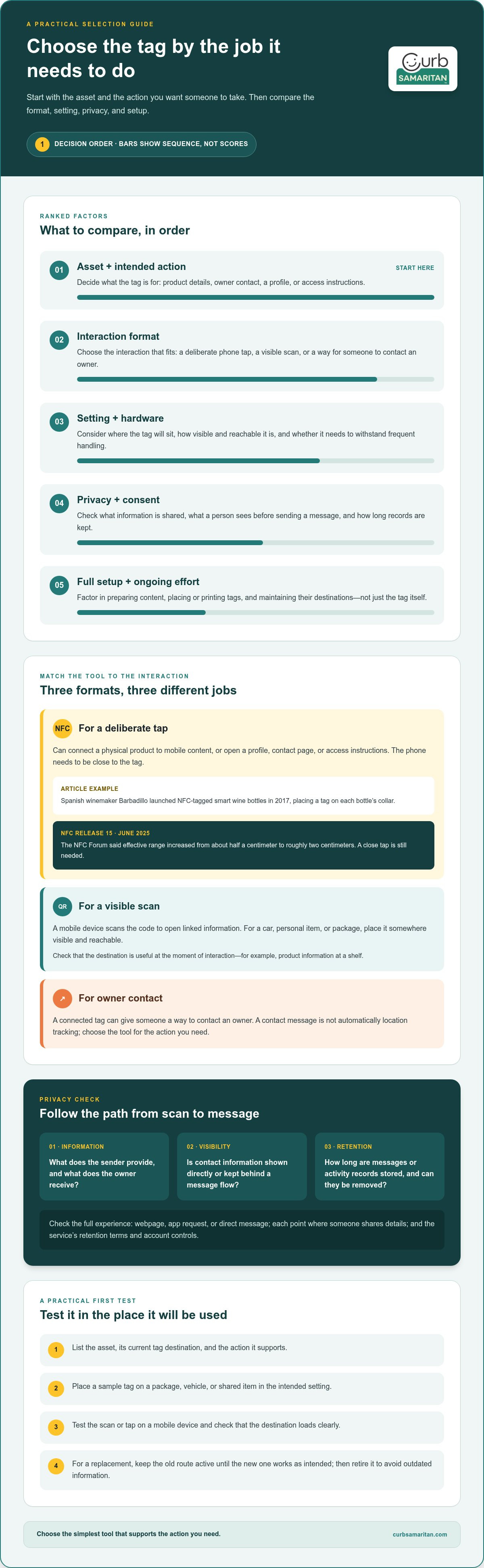
Start with the asset and the action you want someone to take. A bottle label might share product details, while a car tag might help a passerby contact its owner. These are different jobs, so compare the interaction, the setting, and the hardware needed before choosing among pingtag alternatives.
For smart packaging, NFC can connect a physical product with mobile content. Spanish winemaker Barbadillo launched NFC-tagged smart wine bottles in 2017, placing a tag on each bottle’s collar. A shopper could tap a compatible phone to reach digital content. For a mobile promotion, consider whether the tag’s destination is useful at the moment of interaction, such as product information at a shelf.
Contactless NFC tags also suit business cards and tap-to-access instructions. A card can direct someone to a profile or contact page, while a tag at a venue can open access details. NFC Release 15, which the NFC Forum debuted in June 2025, increased effective range from about half a centimeter to roughly two centimeters. That still means the phone needs to be close to the tag.
A QR code offers another route: scan it with a mobile device to open linked information. For a car, personal item, or package, place it somewhere visible and reachable. Consider the conditions, too. A label on a wine bottle, a card in a wallet, and a tag on a frequently handled item each have different visibility and wear requirements.
For small businesses or individuals comparing Pingtag alternatives, start with the simplest tool that supports the action you need. Choose NFC for a deliberate tap, a QR code for a visible scan, or a connected tag that lets someone contact an owner. Match the format to the asset before comparing platforms or extra features.
To migrate from Pingtag, list each asset, its current tag destination, and the action it supports. Create or assign replacement tags, test each scan or tap on a mobile device, and update printed materials. Keep the old route active until each replacement works as intended, then retire it to avoid sending people to outdated information.
Compare the full setup, not just the tag. Account for the time needed to prepare content, place or print tags, and maintain their destinations. One item may need only a label; a business promotion may need consistent tags across packaging, cards, and access points. Reviewing each asset helps keep the decision practical.
2. Privacy, consent, and data retention
A tag can make contact easier, but the path from scan to message matters. Compare what a person sees before acting, what identifying details they must provide, and what information the service keeps. A QR code that opens a contact form, for example, raises different privacy questions from one that opens a public profile.
Follow the interaction from the first tap or scan. Does it open a webpage, request an app, or invite a direct message? Note each point where someone shares a name, phone number, email address, or location. If an alternative asks for more details than your use case needs, consider whether those details enable a useful feature.
Consent should be clear in the experience, not hidden in fine print. Someone scanning a tag on a found backpack should understand what happens after sending a message. A business placing tags on shared equipment should explain their purpose to users. Clear wording helps people decide whether to participate.
For each option, review these privacy questions before setup:
- Information: What details does the sender provide, and what does the owner receive?
- Visibility: Does the tag reveal contact information directly, or keep it behind a message flow?
- Retention: How long are messages or activity records stored, and can the account holder remove them?
Compare data retention separately. A service may keep a message available long enough for someone to respond, while an analytics dashboard may retain activity records for another purpose. Read the service’s retention terms and account controls. Choose a setup with a clear data lifecycle, including deletion and account closure.
Also distinguish communication from monitoring. A tag that lets someone send a message is not automatically a location tracker. A label on a parked car, for example, may let a passerby contact its owner, while a tracking device serves a different purpose. Choose for the action you need, not the word “smart” in a product description.
For a small team, have one person review the tag destination and message flow before publishing. Use a test tag and a separate device to see what a visitor encounters. Remove unnecessary fields, use a managed contact route instead of personal details where available, and record who can access incoming messages.
Privacy needs can change as a use case grows. One personal item may need only a simple contact route; a business campaign may involve several tags, staff members, and platforms. Compare consent language, access controls, and retention practices together. This gives you a practical basis for choosing an option that connects people without collecting more data than the task requires.
3. Listed competitors
Similar features depend on the task, not the label. For a tap-to-open profile, compare NFC tag services; for scan-to-contact use, compare QR-based tag platforms. Then check whether each works with mobile tools you already use, such as a website, contact form, or inventory record.
Which Pingtag alternatives offer similar features and integrations? Look for options that support the same tag type, destination, and contact flow you rely on. A small shop linking a product tag to a product page needs different integrations from a household using a tag to receive messages about a misplaced item.
Test one example in the setting where you plan to use it. Place a sample tag on a package, vehicle, or shared item, then scan or tap it with a mobile device. Note whether the destination loads clearly, the profile is easy to understand, and the recipient can take the intended action.
What are the pros and cons of popular Pingtag competitors? Native mobile support may simplify setup, while a web-based option may work across more devices. Broader integrations can connect tag activity to existing workflows, but extra settings may take more effort to configure. Weigh these trade-offs against your actual use case.
- Fit: Does the tag work for the asset, such as a package or personal item?
- Setup: Can you create and update the destination without rebuilding each tag?
- Connection: Does it work with the mobile platforms and tools you already rely on?
- Management: Can you organize tags by location, team, or inventory group?
For use in the United States, compare checkout and account options that suit your buyers. Check whether the service supports preferred payment methods, displays charges in a familiar format, and lets the account owner manage billing in the intended environment. Payment options can affect adoption, especially when several people share purchasing duties.
Create a short test plan before choosing. Use the same sample destination, device, and task for each option. For example, ask a colleague to scan a tag and send a message, then note every step. This reveals friction that a feature list can hide.
Separate useful features from sales language. A competitor may call its platform flexible, but your test should show whether it supports the profile, integrations, and inventory workflow you need. Keep a candidate only if it performs the core task simply and fits your existing setup.
Native mobile support may make a service quicker to configure, while web-based options may work more easily across devices. Broader integrations can fit existing workflows, but they may also make setup more involved.
4. Pricing, total cost of ownership, and ROI
A low purchase price does not always mean a lower total cost. Compare the tag, setup work, destination management, and recurring charges over the same period. A business using QR labels on product packaging, for example, should account for printing and updating linked pages, not just the labels.
List the costs attached to your specific use. A tag for one personal item may need little ongoing attention. A promotion across several products may involve design, staff time, replacement labels, and a platform account. Separate one-time setup from costs that continue while the tags are active.
Map the tag’s journey: a device scans or taps it, opens a destination, and prompts an action. Each extra step can create friction. If a customer must install an app before viewing a product page, consider whether that fits the interaction. Depending on the service and use case, a simple browser destination may make the process easier.
Use this checklist to build a fair comparison:
- Setup: Include time spent creating the profile, page, or message destination.
- Operation: Account for ongoing platform charges, if applicable, and the work of keeping content current.
- Physical materials: Consider printing, placement, and replacing a damaged or outdated tag.
- People: Include staff time for responding to messages or managing consumer questions.
Estimate value by connecting the tag’s purpose to an observable result. For a product label, that might be visits to the linked page or completed inquiries. For a contact tag on shared equipment, it might be faster reports when an item is found. Choose evidence, such as page analytics or a message log, before deployment.
A practical return-on-investment comparison weighs those results against total costs. Use the same time period and cost categories for each option. If an alternative reduces manual work but takes more setup, record both effects rather than counting only the purchase. This keeps the decision tied to your actual workflow.
Test the full experience with a sample tag before a larger rollout. Scan it with a mobile device, follow the destination, and note any confusing steps. A clear label helps people know what to do; a broken link or unclear prompt can waste the effort invested in the tag.
5. What is Pingtag and what features does it offer?
Pingtag is the reference point for this comparison, but start by defining the task. A tag-based service connects a physical item to a digital action. Someone might scan a label to reach contact details, a product page, or a message form. Compare the actual user journey, not just the product name.
Map the features you need before comparing Pingtag with another option. Start with the tag, then follow its destination on a phone. A QR code opens through a scan, while an NFC tag requires a close tap. The right format depends on where the tag is placed and what a visitor should do next.
For each platform, review these parts of the experience:
- Tag and destination: Identify whether the physical tag opens a page, profile, or messaging flow.
- Visitor steps: Count the actions from scan or tap to the intended result.
- Owner controls: See how the tag owner updates its destination or contact details.
- Privacy path: Trace which details the sender and recipient can see.
- Use environment: Test the tag on its intended object, such as a package or personal belonging.
A feature map makes comparisons more useful. Imagine a lost item with a tag that leads to a contact form. The important benefit is the route from finder to owner, not a long list of unrelated tools. For a product label, the priority might instead be a mobile page with helpful product details. Assess Pingtag and each alternative against the same example.
Separate core functions from optional extras. If you want someone to contact you about a misplaced belonging, inventory reports or campaign analytics may not help. If you manage tagged products, grouping destinations and updating content may matter more. This distinction helps avoid features that add work without supporting the task.
Review an option hands-on before switching. Create a sample tag, scan or tap it with a phone, and follow every screen. Note whether the destination is clear, the action works, and the owner can maintain the information. Repeat the test for an item in each setting where you expect to use it.
Use Pingtag as a baseline, then compare alternatives against your task, setup, and privacy priorities. For a physical tag meant to help people connect around shared items, explore QR sticker options as one possible approach.
Location-based promotions offer another comparison point when deciding what a tag platform needs to do. American Eagle reportedly tripled sales by combining geofencing with beacons to offer shoppers rewards. These examples involve location tools, not simply a link from a physical label, so treat them as separate capabilities rather than assuming every tag service includes them.
For a practical review, decide whether you need a direct contact route or a location-triggered offer, then check whether the platform supports that journey. A feature list is useful only when its controls, destination, and visitor steps match the intended use. These campaign examples do not establish that Pingtag offers geofencing or beacon functions.
Curb Samaritan: Driver Sticker
Curb Samaritan offers a Driver Sticker for anyone who wants a passerby to send an alert about their vehicle. Someone scans the QR code and texts the owner without an app or sharing personal information. It suits a parked car that needs a direct contact route, rather than a vehicle-location tool.
Choose a product to suit the item: a Resident Sticker for a home, a Found Sticker for found property, or People & Pet tags for people and pets. Each provides a practical way for someone nearby to reach an owner when help or a return is needed.
To see whether this approach fits your situation, visit curbsamaritan.com.
Choose the next step that fits your situation
Your first test does not need to cover every future use. Pick one real item and picture the moment someone needs to reach you about it. What should they see, and what simple action should they take? A clear answer gives you a practical starting point for evaluating the options.
If you’re comparing pingtag alternatives for everyday contact about a vehicle, home, or found item, Curb Samaritan offers a Driver Sticker, Resident Sticker, and Found Sticker. Each lets someone nearby send an alert through a QR code, without an app or sharing personal information. Choose the category that matches the situation you want to address.
Bring your use case and questions together, then decide whether this kind of connection suits your needs. Contact Curb Samaritan to discuss your needs. A thoughtful first test can help you choose with confidence and make it easier for people to help one another.
Frequently Asked Questions
Which Alternative Should You Test First?
Test the option designed for the problem you most want to solve. For a car, try a tag that lets someone send the owner an alert; for product packaging, try one that opens relevant product information. This makes the comparison useful from the start. Among pingtag alternatives, prioritize a tool that does the main task without unnecessary steps for its users.
What criteria should I use to choose a Pingtag alternative?
Compare the visitor’s experience, owner controls, privacy approach, and complete cost. Consider what happens when details change: can you update the destination without replacing every tag? A small business may need one destination to stay current across product labels, while a personal tag may need a simple route to its owner. Choose the option that fits that responsibility.
Which Pingtag alternatives offer similar features and integrations?
Look for alternatives that support the tag type, destination, and contact flow you need. Check whether they work with tools you already use, such as a website, contact form, or inventory record.
Which Pingtag alternatives support the United States and local payment methods?
Compare checkout and account options. Check whether the service supports preferred payment methods, displays charges in a familiar format, and lets the account owner manage billing in the intended environment.