

How to Create a Neighborhood Communication Plan That Works
A storm update lands in one group chat, a request for a ride goes to email, and half the block misses both. Learning how to create a neighborhood communication plan starts with a simple idea: neighbors need to know where to look, who will share updates, and what to do next.
If you’ve ever wondered whether an important message reached everyone, you’re not alone. Residents use different channels, have different access and privacy needs, and may not know who’s responsible for replies. A clear plan makes everyday updates easier to find and urgent messages easier to act on, without asking anyone to share more personal information than they’re comfortable with.
This guide explains how to match channels to different needs, set expectations for sharing and responding, and include neighbors who prefer offline options. It also covers how a visible QR code can provide a private way to send a message without an app, as one optional part of a broader communication plan.
Key Takeaways
- Start with the everyday updates and urgent situations neighbors need to communicate about, then keep the plan simple enough to use.
- Learn how to create a neighborhood communication plan by matching each channel to the message, audience, and response time.
- Assign clear roles for sharing and updating messages, and set realistic expectations for replies.
- Make the plan easier to use with plain language, readable materials, and options for residents who aren’t online.
- Check whether messages are reaching people and prompting follow-up, then adjust the plan as community needs change.
How to Create a Neighborhood Communication Plan: Start With Shared Needs
An update only helps if neighbors can find it, understand it, and know whether they need to act. When messages are scattered across conversations and apps, residents may miss a request for help or mistake a routine notice for an urgent alert. The first step in how to create a neighborhood communication plan is to learn what people need to communicate, not to choose a tool first.
A neighborhood communication plan is a shared guide to what gets communicated, who needs to hear it, and how messages are sent and answered. Keep it lightweight. It should make coordination easier, not add layers of approval or turn neighborly help into a bureaucracy. For groups focused on community awareness, the background and purpose of Neighborhood Watch can offer useful context, while the communication approach should reflect residents’ own needs.
Start with a short listening and planning sequence:
- Listen. Ask residents what information they need and what has been hard to keep track of.
- Define purposes. Decide whether the plan covers local notices, shared resources, requests for help, or urgent alerts.
- Identify audiences. Consider who needs each type of message, including residents who don’t live in the same household or use the same communication tools.
- Record barriers. Note access, language, readability, privacy, and technology needs that could make a message difficult to receive or respond to.
Then sort messages by urgency. Routine updates might include a community gathering or a change to a shared resource. A request for help may need a direct response from willing neighbors. A time-sensitive alert calls for faster sharing and a clear explanation of what action would help. An emergency is different: the plan should direct people to appropriate emergency services, not suggest that a neighborhood message guarantees safety or an immediate response.
What should a neighborhood communication plan accomplish?
Ask residents which messages they want, how often they want to receive them, and who they trust to share them. Use the answers to set boundaries: what belongs in a routine update, what needs prompt attention, and what should go through another channel. Be clear about response times. A communication tool can help people connect, but it can’t ensure that someone sees a message or is available to help.
Who should help shape the plan?
Invite renters, homeowners, long-term residents, and newer neighbors to contribute. Include people who don’t regularly use social media or smartphone apps, since their needs can reveal gaps in a digital-only approach. Offer more than one way to share feedback, such as a conversation or an anonymous option. That gives residents room to express preferences without feeling pressured to identify themselves or disclose personal details.
Choose Neighborhood Communication Channels for Different Messages
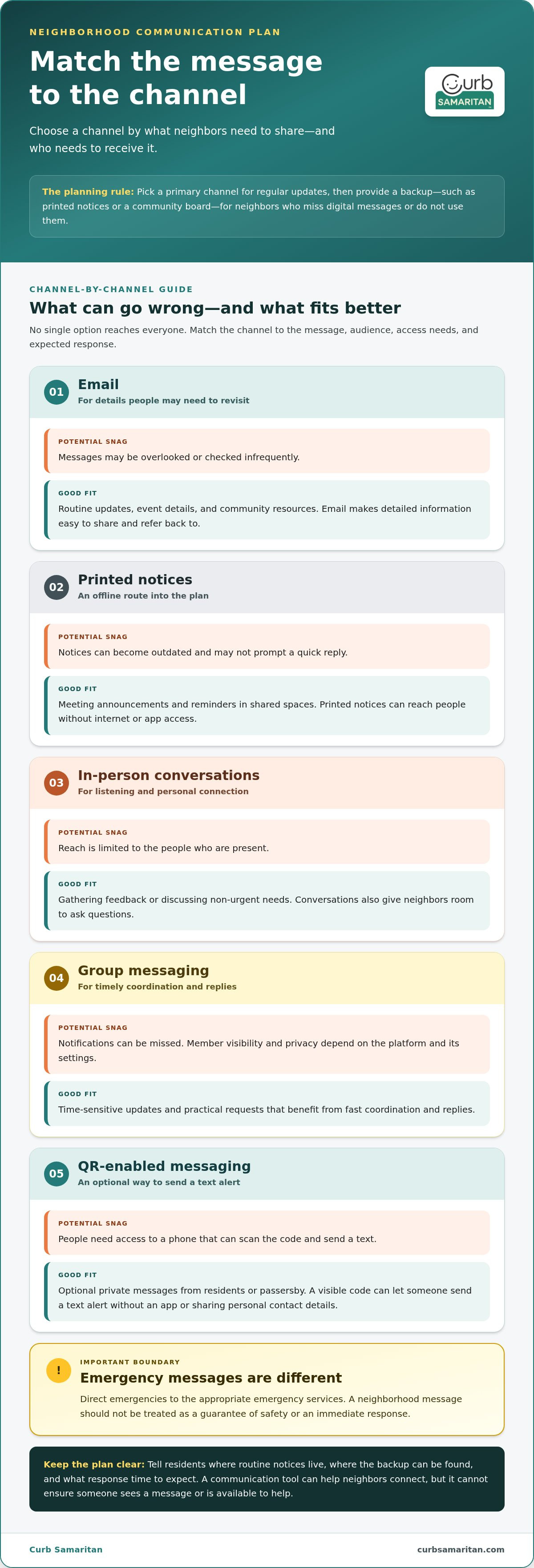
A good channel fits both the message and the people who need to receive it. Email may suit a detailed community notice, while a quick group message can help neighbors coordinate a timely request. No single option reaches everyone, though. Choose a primary channel for regular updates and a backup, such as printed notices or a community board, for residents who miss digital messages or don’t use them.
Compare likely options by reach, speed, access, privacy, and the response you can reasonably expect:
| Channel | Strengths | Limitations | Good fit |
|---|---|---|---|
| Easy to share detailed information; creates a message residents can refer back to. | May be overlooked or checked infrequently. | Routine updates, event details, and community resources. | |
| Printed notices | Reach people without internet or app access. | Can become outdated and may not prompt a quick reply. | Meeting announcements and reminders in shared spaces. |
| In-person conversations | Allow questions and personal connection. | Reach is limited to those present. | Gathering feedback or discussing non-urgent needs. |
| Group messaging | Supports fast coordination and replies. | Notifications can be missed; member visibility and privacy depend on the platform and settings. | Time-sensitive updates and practical requests. |
| QR-enabled messaging | A visible code can provide a simple way to send a text alert without an app or sharing personal contact details. | People need access to a phone that can scan the code and send a text. | Optional private messages from residents or passersby. |
How do you match the channel to the message?
Choose a stable, easy-to-find place for routine notices and shared resources, then use a more immediate option for time-sensitive coordination. Tell residents where to find the backup and what response time to expect. For emergency guidance, Ready.gov’s Make a Plan offers planning ideas to adapt. Don’t rely on a neighbor group to reach emergency services; direct emergencies to the appropriate services.
How can neighbors communicate without sharing personal contact details?
Set clear membership and moderation rules for group chats, and don’t assume a private group hides information from the platform. QR-coded stickers offer another option: people can scan one to send a text alert without an app or sharing personal information. Learn more in this guide to anonymous messaging for neighbors. QR Code Posters or the Neighborhood Connect Sticker Bundle can make this messaging option visible as one part of a broader plan. Explore QR-coded stickers and tags to add that option.
Set Clear Roles, Privacy Boundaries, and Response Expectations
Choosing channels is only part of how to create a neighborhood communication plan. Residents also need to know who shares updates, how quickly someone might reply, and what information should stay private. Clear ground rules make messages more dependable without placing too much responsibility on one neighbor.
For routine updates, agree on a simple path from draft to delivery. For example, one volunteer can prepare a notice, another can review it for clarity and accuracy, and the channel owner can share it and update pinned or printed copies when details change. Not every message needs multiple approvals. Set a review step for information that could affect other residents, and name who can correct or remove an inaccurate post.
What roles does a small neighborhood communication team need?
Keep responsibilities manageable. Name an update owner, a backup contact, and someone to gather questions or feedback. Write down where drafts and current notices live, how the backup takes over, and who updates the information if the primary volunteer is away. A simple handoff keeps messages from depending on one person’s availability. Rotate tasks if that makes participation easier to sustain.
Set response expectations by message type. A routine question may not get an answer right away, while a time-sensitive request should say when a response would be useful. Make it clear that volunteers have other responsibilities and may not see or answer every message immediately. A neighborhood communication channel helps neighbors share information, but it is not an emergency response service. For an emergency, residents should contact the appropriate emergency services.
How should the plan protect privacy and trust?
Collect only what the group needs to communicate, and explain who can see the information and how it will be used. A request for help may need a way to reply, but it rarely needs someone’s full personal history. Ask for consent before sharing a resident’s name, photo, contact details, or other identifying information. Give people a private way to raise concerns if they don’t want to post publicly.
Agree on a few respectful posting rules. Share information that can be checked, distinguish confirmed details from questions, and avoid repeating rumors. Don’t post sensitive emergencies or another person’s private circumstances in a group chat. If a mistake slips through, correct it where the original message appeared and make the update easy to recognize. A calm, visible correction builds more trust than quietly deleting a confusing post.
Keep the rules short enough that people will use them. A clear owner, a backup, a realistic reply window, and shared privacy boundaries help neighbors understand what the channel can do and where its limits are.
Create, Share, and Test the Neighborhood Communication Plan
Once neighbors have agreed on messages, channels, and roles, bring the decisions together in a one-page guide. A short plan is easier to share, revisit, and use than a long set of rules. Keep the wording direct, use large, readable text, and provide translated versions where useful. Share it digitally and through offline options, such as printed copies or a community noticeboard, so residents can refer to it in the way that works for them.
What should a simple communication plan include?
Make the page practical, not exhaustive. Include the intended audience, message types, primary and backup channels, the person responsible for each update, and the date the plan will be reviewed. Add how residents can offer feedback, flag a correction, or opt out of a channel where appropriate. State clearly that the plan doesn’t handle emergencies and that residents should contact the appropriate emergency services.
A sample routine message can show how the plan works:
From: Neighborhood updates volunteer
Purpose: Share the date of the next community clean-up.
Action: Reply by Friday if you’d like to join or need details.
Follow-up: Send questions and corrections to the volunteer using the reply route listed in the plan.
This simple format identifies the sender, explains why the message was sent, gives neighbors a clear next step, and tells them where to follow up. Adjust the wording to suit your community and the channel.
How do you test whether the plan works?
Try the process with a routine announcement before relying on it for time-sensitive coordination. Ask residents who use different channels, including printed notices, to take part. Find out whether they received the message, understood it, and knew how to respond. Sending a message doesn’t prove that it reached everyone.
Note what the test reveals: missed messages, confusing instructions, delayed replies, or barriers such as small print or language differences. Invite participants to suggest changes, then revise the plan and share the updated version. Treat the first draft as a starting point, not a finished product. A visible QR code can be one optional way to invite a private message. Explore QR-coded neighborhood messaging options as you decide what fits your plan.
Keep the Neighborhood Communication Plan Useful as the Community Changes
A communication plan should change as the community does. New residents may arrive, volunteers may take on different roles, or a familiar channel may no longer reach people as well as it once did. A simple review routine helps keep instructions accurate and makes it easier for neighbors to stay connected.
How often should a neighborhood communication plan be reviewed?
Choose a recurring review point that volunteers can realistically maintain, such as an existing community meeting. Also revisit the plan after a communication breakdown, useful resident feedback, or a meaningful change in needs. Update names, channels, and instructions when responsibilities or tools change. A brief check can cover the essentials: are the listed contacts current, can residents still access the channels, and do people know how to take part?
Look beyond whether a message was sent. Track whether it reached the intended audience, whether the instructions were clear, whether residents participated, and whether promised follow-up happened. These signs can reveal different problems. Low reach may point to a missing backup channel; confusion may call for simpler wording; unanswered questions may mean the follow-up route or role needs to be clearer.
Make the current plan easy for newcomers to find. Include it in a welcome note, keep a copy in a shared community space, or link to it from the main update channel. Use plain language to explain how to receive notices, ask a question, or share feedback. New neighbors shouldn’t need to know the right person already to learn how the group communicates.
How can a physical QR option fit into the plan?
A visible QR code can provide another way for a resident or passerby to send a message. It works best as one optional contact route within a broader mix of communication methods, not as a replacement for routine updates, printed notices, or conversations. Curb Samaritan’s QR-coded stickers and tags let people send text alerts without an app or sharing personal information. Read more about secure messaging stickers for home privacy to consider how this kind of contact option may fit your community’s preferences.
To make this option more visible, explore the Neighborhood Connect Sticker Bundle. It can add a messaging channel while remaining one part of the wider plan.
The best guide is one neighbors can find, understand, and trust. Regular reviews help keep it that way, so the effort behind how to create a neighborhood communication plan continues to serve the people who rely on it.
Make Neighborly Communication Easier to Sustain
A strong neighborhood communication plan doesn’t need to be complicated. Start with residents’ shared needs, match channels to messages, and make responsibilities and privacy boundaries clear. Then test the plan, listen to feedback, and update it as the community changes. That’s how to create a neighborhood communication plan people can understand and use.
QR-based messaging can add an optional contact route alongside regular updates and offline methods. Neighbors can send text alerts without a mobile app or sharing personal information, and each purchase includes lifetime access to the messaging platform without recurring subscription fees.
If a visible, privacy-conscious way to help neighbors connect would complement your approach, explore a simple way to help neighbors connect. Add a QR-coded option to your broader communication plan and share it with your community. Clear communication makes it easier for neighbors to show up for one another.
Frequently Asked Questions
How do you start a neighborhood communication plan?
Start by asking residents what information they need, which channels they already use, and what makes updates hard to receive. Group the answers into routine notices, requests for help, and time-sensitive messages. The first steps in how to create a neighborhood communication plan are to choose a few suitable channels, assign volunteers to share and maintain updates, and test the approach with a simple announcement before relying on it for urgent coordination.
What should a neighborhood communication plan include?
Include the plan’s purpose, intended audience, message types, primary and backup channels, volunteer roles, privacy expectations, and a way to give feedback or correct information. State what response times residents can reasonably expect and what the plan can’t handle, including emergencies. Keep the document concise and accessible. A one-page guide with clear instructions is easier for neighbors to find, understand, and keep current than a lengthy policy.
Which communication channels work best for a neighborhood?
No single channel works best for every resident or message. Email or a community page can hold routine updates, while group messaging can help neighbors coordinate quickly. Printed notices and in-person conversations offer alternatives for people who don’t use online channels regularly. QR-enabled options can provide another way to send a message. Choose based on reach, accessibility, privacy, urgency, and resident preferences, then name a backup channel for important updates.
How can neighbors communicate without sharing phone numbers?
Neighbors can use moderated community channels, email-based contact options, or messaging services designed to keep personal contact details private. QR-coded stickers can also let someone scan and send a text alert without installing an app or sharing personal information. Before choosing a method, explain what information it shares and who can see messages. Set clear privacy boundaries, and let residents choose an option that feels comfortable to them.
How do you make a neighborhood communication plan inclusive?
Ask residents about language, accessibility, internet, device, and schedule needs before deciding how to share updates. Use plain language, offer readable printed notices or other offline options, and translate key information where useful. Invite feedback from residents who may be less likely to join online groups. Check over time whether different people receive and understand messages. If some neighbors regularly miss updates, adjust the channels or format rather than assuming they aren’t interested.
What is the difference between a neighborhood communication plan and an emergency plan?
A neighborhood communication plan explains how residents share updates, coordinate everyday support, and direct messages to the right people. An emergency plan focuses on preparation and actions during an emergency, including contacting appropriate emergency services. A neighborhood channel may help neighbors pass along information, but it isn’t professional monitoring and can’t ensure a response. For an emergency, don’t rely on a group message instead of contacting emergency services.
How often should a neighborhood communication plan be updated?
Review the plan on a schedule your volunteer group can maintain, and sooner if residents, channels, roles, or community needs change. Revisit it after a communication breakdown or useful resident feedback. Ask whether messages reached people, made sense, and led to clear follow-up. Then update what needs attention, such as an outdated contact or channel instruction. Small, regular changes can keep the plan useful without requiring a complete rewrite.