

Smart Luggage Tags With No Monthly Fee: What to Look For in 2026
What if the best luggage tag for you doesn’t show your bag on a map? Smart luggage tags no monthly fee can mean very different things: some help you locate a bag through a Bluetooth network, while QR or NFC tags give the person who finds it a way to contact you. These approaches solve different problems, even when neither comes with a recurring charge.
It’s easy to see “smart” and expect GPS tracking. Bluetooth trackers can show where a bag was last detected, while QR and NFC tags help a finder reach you. That distinction matters when you choose a tag, as does deciding how much personal information to share.
This guide compares QR, NFC, Bluetooth, and GPS options, explains their privacy trade-offs, and helps you choose a practical way to improve the chances of a lost bag finding its way home. For a contact option, Curb Samaritan’s Found Sticker uses a QR code that a passerby can scan without an app to send you a secure, anonymous text alert. The purchase includes lifetime access to the messaging platform, with no recurring subscription fee.
Key Takeaways
- “No monthly fee” describes the billing model, not whether a tag can show a bag’s location or guarantee its return.
- Compare QR and NFC contact methods with Bluetooth and GPS location tools to choose the kind of help you need.
- Before attaching a tag, check what a finder can see and share only details needed to arrange a safe return.
- When comparing smart luggage tags no monthly fee, consider how long access continues and how easily a finder can reach you.
- Curb Samaritan’s Found Sticker lets a luggage finder send a secure, anonymous text alert after scanning its QR code.
What Does a Smart Luggage Tag With No Monthly Fee Actually Do?
A smart luggage tag with no monthly fee gives someone who finds your bag a way to contact you without a recurring platform charge. The contact method may use a QR code, an NFC tap, or details printed on the tag. “Smart” describes how the tag helps connect finder and owner. It doesn’t automatically mean the tag tracks the bag’s location.
That distinction can prevent a mismatch in expectations. A contact tag helps someone start a conversation about returning your luggage. A location tracker uses Bluetooth or GPS-related technology to help you find where a bag is, with capabilities that depend on the device and service. A contact tag won’t show you the bag’s live location, and no tag can guarantee that a finder will notice or use it.
How does a no-subscription luggage tag help recover a bag?
The process is simple: a finder notices the identifier, scans its QR code or taps an NFC tag, then follows the contact steps. A QR code holds information that a phone can read. Learn more about QR code technology. Depending on the service, the finder may be directed to a page or messaging option to reach the owner.
The tag opens a path to communication, but it doesn’t collect or carry the luggage back by itself. Its usefulness depends on practical details: whether it’s visible, whether the finder can read it, and whether the contact steps are easy to follow. A clear, low-effort route makes it simpler for someone to help.
What does no monthly fee mean for the traveler?
“No monthly fee” describes the billing arrangement, not the tag’s full capabilities. A one-time purchase means paying once for the item; a recurring platform charge means paying regularly to keep some service or access active. When comparing smart luggage tags no monthly fee, look beyond the checkout. Check whether contact access continues after purchase and what that access includes.
Curb Samaritan’s Found Sticker is a QR-based contact option for luggage. A passerby can scan it without an app and send a secure, anonymous text alert, so you can connect without exposing your personal contact details. The purchase includes lifetime access to the messaging platform, with no recurring subscription fees.
This is a contact service, not GPS tracking, live location reporting, or professional monitoring. Identify what a tag is designed to do, then choose the recovery method that fits your needs.
QR, NFC, Bluetooth, and GPS: Which Smart Luggage Tag Technology Fits?
The right technology depends on what you want to happen when a bag goes missing. Some tags help a finder contact you. Others help you see where a bag was detected. These are different jobs, so compare the recovery action, not just the word “smart.”
| Technology | What happens | Best understood as |
|---|---|---|
| QR | A finder scans the code to open information or a contact page. | A route from finder to owner |
| NFC | A finder taps the tag with a compatible phone to open its contact flow. | A close-range contact route |
| Bluetooth | A tracker uses nearby devices or a finding network to report where the bag was detected. | A location tool, not a message to the finder |
| GPS | A tracking device uses location technology to provide location information through its service. | A location tool, with features and costs that depend on the service |
How do QR and NFC luggage tags connect a finder with an owner?
A QR code is scanned with a phone camera and can direct the finder to a contact page or messaging experience. NFC works differently: the finder brings a compatible phone close to the tag and taps to open its contact flow. QR requires a scan; NFC requires a tap. The exact experience depends on the tag and phone, so a clear prompt can help the finder know what to do.
Both approaches are contact methods, not live locators. They’re useful when your priority is giving a helpful person a straightforward way to reach you.
Are Bluetooth or GPS trackers the same as smart luggage tags?
Not quite. Bluetooth trackers can help an owner see where a bag was last detected through a nearby-device network. GPS devices are designed to provide location information through their tracking service. Neither automatically gives a stranger who finds the bag a way to message you. A QR or NFC contact tag, in turn, isn’t a live locator.
Ask yourself what you need most: a contact route, location information, or both. Some travelers use a tracker for location updates and a separate QR tag to help a finder reach them. If a simple contact path fits your needs, explore Curb Samaritan’s QR-coded Found Sticker. A passerby can scan it and send a secure, anonymous text alert without an app.
How to Compare Smart Luggage Tags With No Monthly Fee
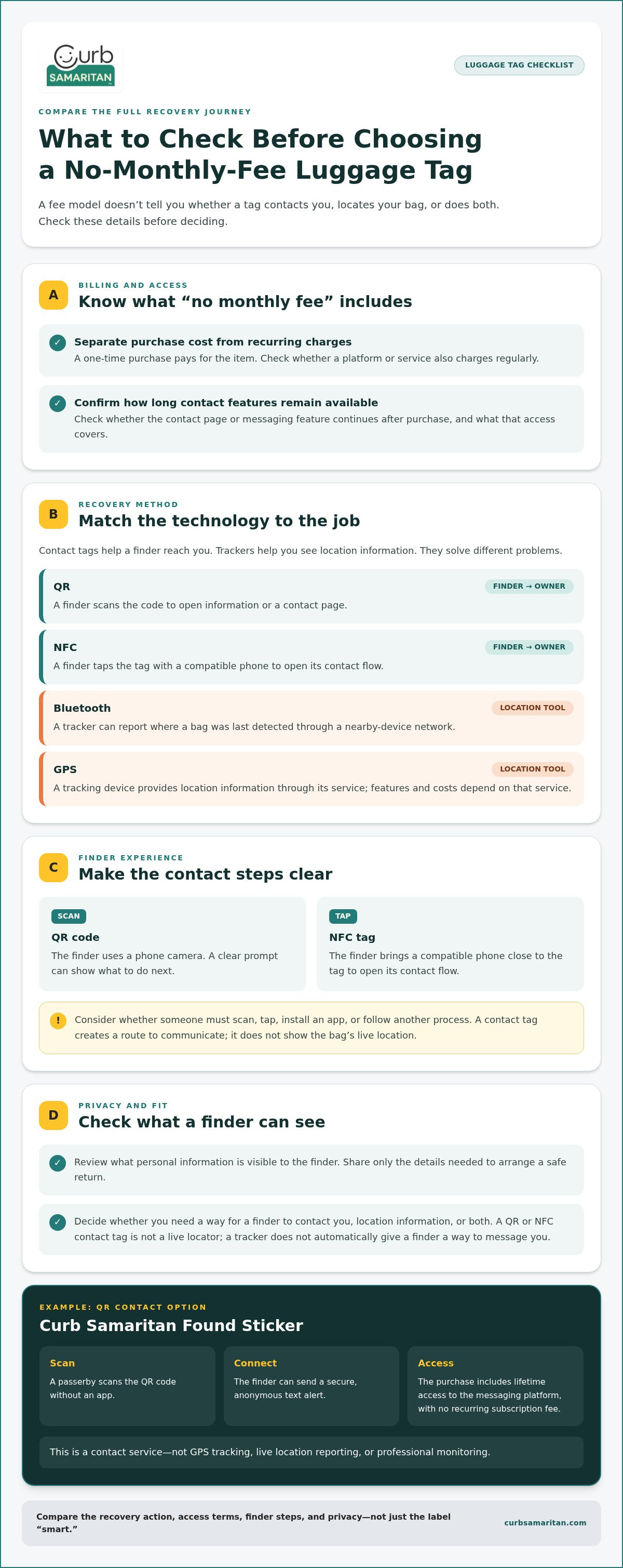
A tag’s value depends on more than whether it avoids a recurring charge. Consider the whole recovery journey: what you pay, how long contact features remain available, what a finder has to do, and what personal information they’ll see. Evaluate the contact steps and fee terms before choosing a tag.
Use this checklist to compare options:
- Recurring fees: Separate the initial purchase from any ongoing platform or service charge. A product can have an upfront cost even when there’s no monthly fee.
- Continued access: Find out whether the contact page or messaging feature remains usable after purchase and what that access covers.
- Finder steps: Consider whether someone needs to scan, tap, install an app, or follow another process. Fewer, clearer steps can make it easier to offer help.
- Privacy: Check what appears after a scan or tap. Does the tag display your phone number, or can the finder contact you without seeing direct personal details?
- Setup: Make sure you can add or review the information needed to arrange a return without sharing details you don’t need to expose.
Which fee and access details should you compare?
“No monthly fee” means there isn’t a recurring monthly charge. It doesn’t mean the tag has no purchase cost or that every possible service is included. Look for a clear distinction between the one-time purchase and any ongoing charge. Then check what continued access means in practice: can a finder still reach the contact experience, and which features remain available? Curb Samaritan purchases include lifetime access to its messaging platform without recurring subscription fees.
How can a luggage tag protect your contact privacy?
A printed phone number is simple, but it makes that number visible to anyone who sees the tag. A digital contact flow offers another route. Curb Samaritan’s QR-coded tags let a passerby send a secure, anonymous text alert without an app or direct access to your personal contact information. Review the scan experience before you travel so you know what information is shown to the finder.
For a closer look at how QR contact flows can work without an app, read the no-app QR code contact sticker guide. Share enough for someone to arrange a return while keeping unnecessary personal details private.
How to Choose and Set Up a Subscription-Free Luggage Identifier
A useful identifier should be easy for a finder to notice and easy for you to use with confidence. Before traveling, choose your contact method, decide what information a finder needs, attach the identifier where it can be seen, and test the contact flow using the tag’s instructions. A little preparation makes it simpler for someone to help if your bag is misplaced.
Use this setup sequence:
- Choose the contact method. Pick a QR code, NFC tag, or another approach based on how you want a finder to reach you. Check what the finder will need to do.
- Prepare the details. Provide a clear way to send you an alert and only the information needed to arrange a response.
- Attach the identifier. Place it where it’s visible and secure, without covering baggage labels or other essential information.
- Test it before travel. Follow the supplied instructions to try the scan or tap flow. Confirm that it leads to the expected contact experience.
What information should you make available to a finder?
Keep the goal simple: let someone alert you and share enough context to coordinate a return. Avoid putting sensitive details or unnecessary personal information in public view. A private messaging route can reduce the need to print your phone number directly on the bag. Curb Samaritan’s QR-coded tags let a passerby send a secure, anonymous text alert without an app or direct disclosure of your personal contact information.
Before using a tag, review what its scan or tap experience shows. Share what helps someone reach you, not details that don’t help reunite you with your luggage.
Where should you place and test a luggage identifier?
Choose a spot that’s easy to see during ordinary baggage handling and secure enough to stay attached. Keep the identifier separate from essential baggage labels so it doesn’t obscure them. Test the full scan or tap process before packing, following the instructions provided with your tag. If the code doesn’t open the expected contact flow, resolve that before you travel. Keep a separate backup contact method, such as relevant contact details inside the bag.
For more guidance on preparing a QR label, see this lost-and-found QR code label guide. If you want a luggage contact option built around a scannable code, explore the Curb Samaritan Found Sticker. It includes lifetime access to the messaging platform without recurring subscription fees, making it an option among smart luggage tags no monthly fee.
A QR-Based, No-Monthly-Fee Contact Option for Lost Luggage
A luggage identifier can help a person who finds a bag reach its owner without tracking the bag. Curb Samaritan’s Found Sticker offers that kind of QR-based lost-and-found contact path. A passerby scans the code and can send a secure, anonymous text alert, giving you a way to hear about a found bag without printing your phone number on its outside.
The purchase includes lifetime access to the messaging platform without recurring subscription fees. The Found Sticker is an option for travelers comparing smart luggage tags no monthly fee who want an ongoing way to receive contact alerts, rather than a service that reports a bag’s location.
How does Curb Samaritan support private contact about a found bag?
The finder scans the QR code with a smartphone and follows the contact flow to send an alert. They don’t need a mobile app, and the messaging experience lets you receive the alert without sharing personal contact information. This gives someone a way to offer help while keeping your direct details private.
A tag’s value depends on someone noticing it and choosing to scan it, so place it where it can be seen. For ideas beyond luggage, explore this lost-and-found QR code label guide.
When is a QR contact tag the right fit for luggage?
A QR contact tag may suit you if your main goal is to give a finder a clear way to reach you, rather than view live location updates. It isn’t GPS tracking and doesn’t provide professional monitoring. If you need location information, that’s a different function from a contact alert, and the two approaches shouldn’t be confused.
For a trip, consider whether a simple scan-and-message route meets your needs and whether you’re comfortable with the information shared through its contact flow. The Found Sticker’s messaging access continues for the lifetime of the platform without a recurring subscription fee, so you can focus on the contact option instead of a monthly platform charge.
If this privacy-conscious contact path fits your luggage needs, explore Curb Samaritan’s QR-coded tags and stickers.
Choose a Tag That Makes Reconnecting Simple
The right luggage identifier depends on what you need it to do. QR and NFC options give a finder a contact route, while Bluetooth and GPS tools focus on location information. A contact tag isn’t a live locator, so decide whether you need a way to hear from the person who finds your bag, location updates, or both.
Before choosing among smart luggage tags no monthly fee, look past the billing label. Check whether contact access continues, what a finder sees, and how easy it is to send you an alert. Then test the tag before travel and share only details that help arrange a return.
Curb Samaritan’s Found Sticker offers a QR-based contact option. A finder can scan it without an app and send a secure, anonymous text alert. A one-time product purchase includes lifetime messaging-platform access, with no recurring subscription fees.
Explore Curb Samaritan’s QR-coded tags and stickers for a privacy-conscious way to help someone reach you. A clear contact path can make it easier for a kind stranger to help your bag find its way home.
Frequently Asked Questions
Are smart luggage tags with no monthly fee worth it?
Smart luggage tags no monthly fee can be worth it if their contact or tracking features suit your needs and the fee terms are clear. A QR contact tag can give a finder a way to reach you, while a Bluetooth tracker can help you check where a bag was detected. Compare what access continues after purchase, what information is shared, and how the tag works. No option guarantees a lost bag will be returned.
Can a QR luggage tag track my bag’s location?
No. A QR luggage tag provides a way for someone who finds your bag to contact you; it doesn’t report the bag’s location. A finder has to notice and scan the code, then follow the contact steps. If you want location information, look at a tracking device designed for that purpose. You can use a contact tag alongside a tracker, but they perform different jobs in a lost-bag situation.
How does a QR code luggage tag help someone return a lost bag?
A finder scans the code with a phone and follows the contact flow it opens. Depending on the tag, that might lead to a contact page or a way to send you an alert. Curb Samaritan’s Found Sticker lets a passerby scan its QR code and send a secure, anonymous text alert without an app. The tag helps start communication, but the finder still needs to notice and use it.
Do smart luggage tags require an app or an internet connection?
It depends on the tag and service. A QR code contact tag may open a web-based contact flow without requiring the finder to install an app. The phone generally needs a connection to the relevant service for that online flow or alert to work. Curb Samaritan’s QR-coded tags don’t require a mobile app for a passerby to scan and send an alert. Follow the tag’s instructions and test it before traveling.
What information should I put on a luggage tag to protect my privacy?
Share only what a finder needs to alert you and help arrange a return. Avoid displaying sensitive information or unnecessary personal details on the outside of your bag. A phone number can be convenient, but it is visible to anyone who sees the tag. A private messaging route, such as a QR code that lets a finder send an alert, can help you avoid printing your direct contact details publicly.
Can someone contact me through a luggage tag without seeing my phone number?
Yes, some QR-based contact services let a finder message the owner without displaying the owner’s phone number. Curb Samaritan’s messaging platform supports secure, anonymous text alerts, so a passerby can scan a tag’s code and send an alert without an app or seeing your personal contact information. Review the contact experience and the details it reveals before relying on a tag, then test the scan flow before your trip.
What is the difference between a QR luggage tag and a Bluetooth tracker?
A QR luggage tag gives a finder a way to contact you after scanning its code. A Bluetooth tracker is designed to help the owner locate a bag through a nearby-device finding network, showing where it was detected rather than sending a message from the finder. One supports contact; the other supports location updates. If you want both functions, consider using separate tools and understand what each one can and can’t do.